13
GB
Getting Started
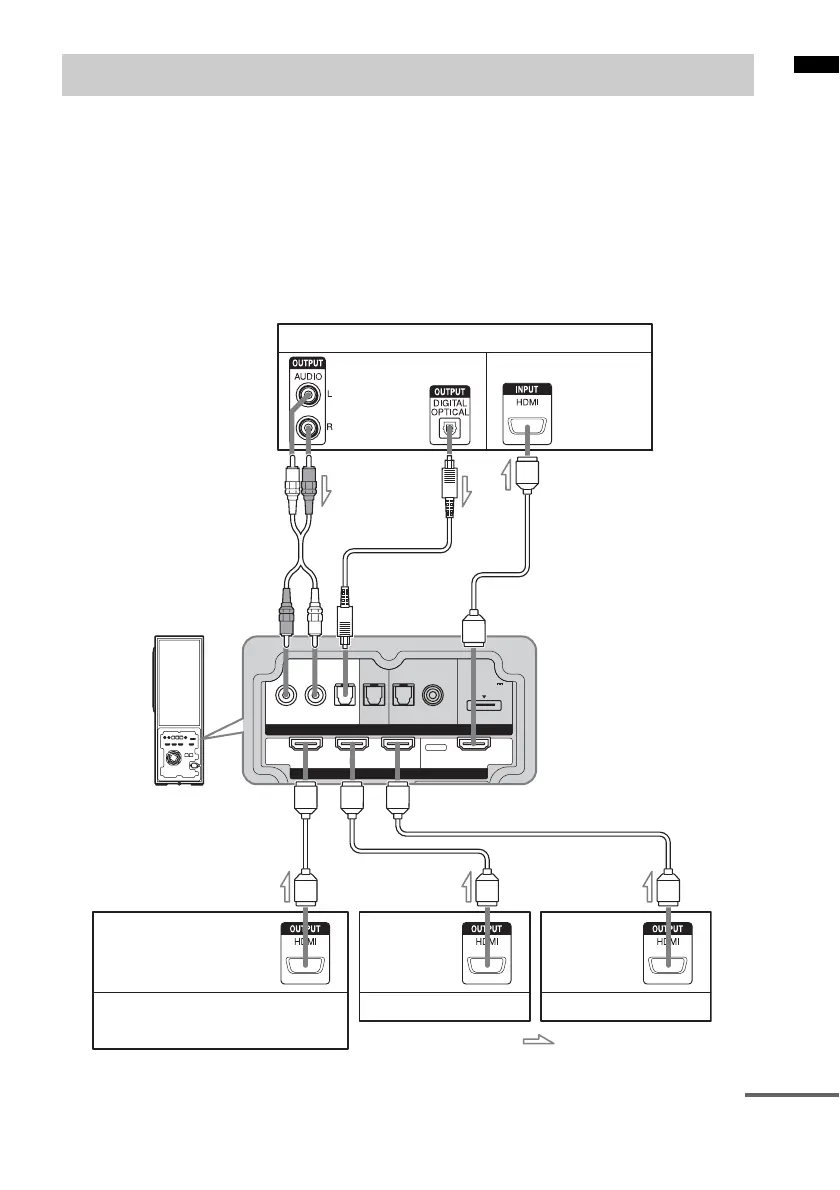
We recommend that you connect components to the system using an HDMI cable.
With HDMI, you can easily enjoy both high quality sound and high quality images.
However, it is necessary to connect the audio output of the TV to the audio input of the system
using an optical cable or an audio cord in order to listen to the TV’s sound from the system.
For details on the Control for HDMI function, refer to ““BRAVIA” Sync Features” (page 25).
Connect the AC power cord (mains lead) after you have finished connecting all components to the
system.
Connecting components with HDMI jacks
INPUTINPUT
HDMI
RL
OPT OPT OPT
COAX
DC 5V
0.7A MAX
DVD SAT DMPORTTV
BD IN DVD IN SAT IN TV OUT
TV monitor, projector, etc.
A HDMI cable (not supplied)
B Optical cable (supplied)
C Audio cord (not supplied)
Audio/video signal
Blu-ray Disc player (recorder),
“PlayStation 3”
Audio/video
signal
Satellite tuner
Audio/video
signal
CBA
Audio/video
signal
DVD player (recorder)
Audio signal
or
: Signal flow
AAA
continued



 To Next Page