15
GB
Getting Started
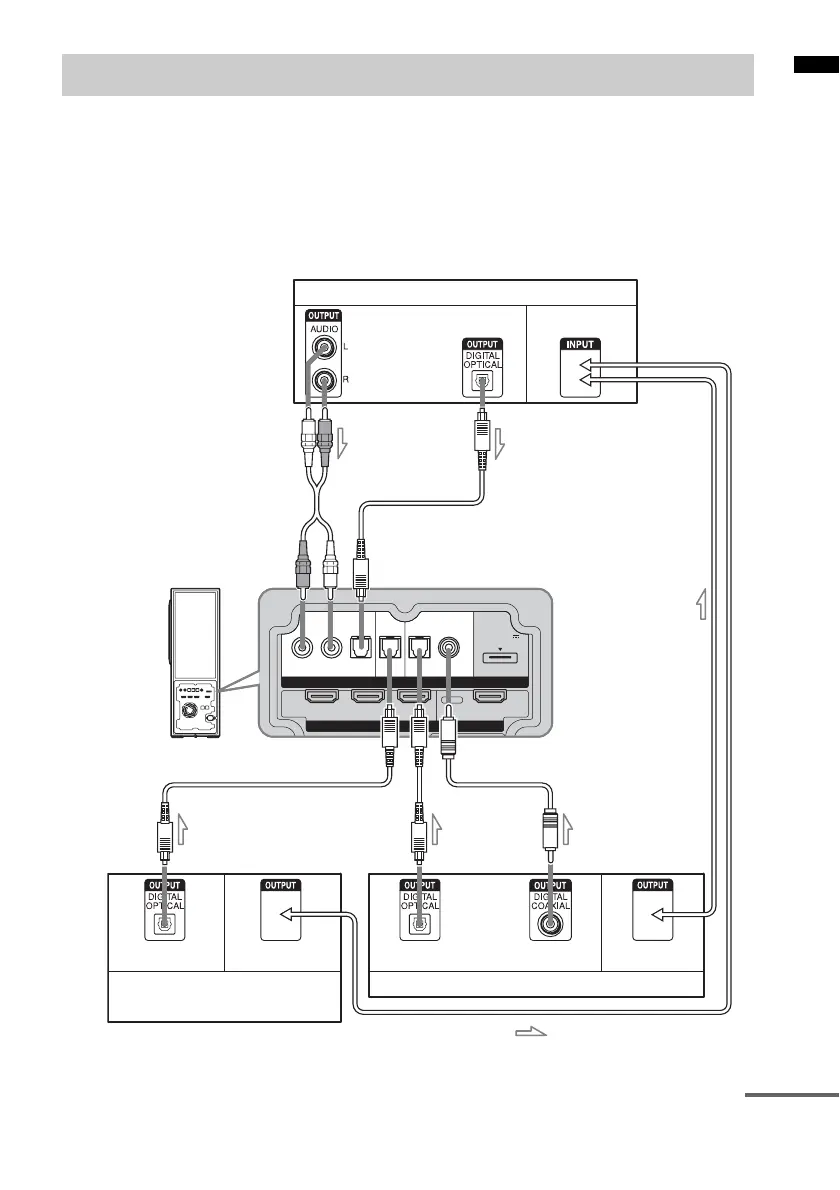
When you connect a DVD player (recorder), satellite tuner, “PlayStation 2”, etc., that has no HDMI
jacks, connect to the system using the INPUT OPT or INPUT COAX jack.
If the satellite tuner does not have an OPTICAL OUT jack, connect the system using the INPUT COAX
jack. In this case, it is not necessary to connect all the cables. Connect the audio cords according to the
jacks of your components.
Connect the AC power cord (mains lead) last.
* “PlayStation 2” is a trademark of Sony Computer Entertainment Inc.
Connecting components without HDMI jacks
INPUTINPUT
HDMI
RL
OPT OPT OPT
COAX
DC 5V
0.7A MAX
DVD SAT DMPORTTV
BD IN DVD IN SAT IN TV OUT
DVD player (recorder),
“PlayStation 2”, etc.
TV monitor, projector, etc.
A
A Optical cable (not supplied)
B Optical cable (supplied)
C Audio cord (not supplied)
D Coaxial digital cord
(not supplied)
or
Video signal
: Signal flow
Video signal
A
D
Audio signal
Satellite tuner
Video signal
CB
or
Audio signal
Audio signal Video signal
continued



 To Next Page