20
GB
Remote control
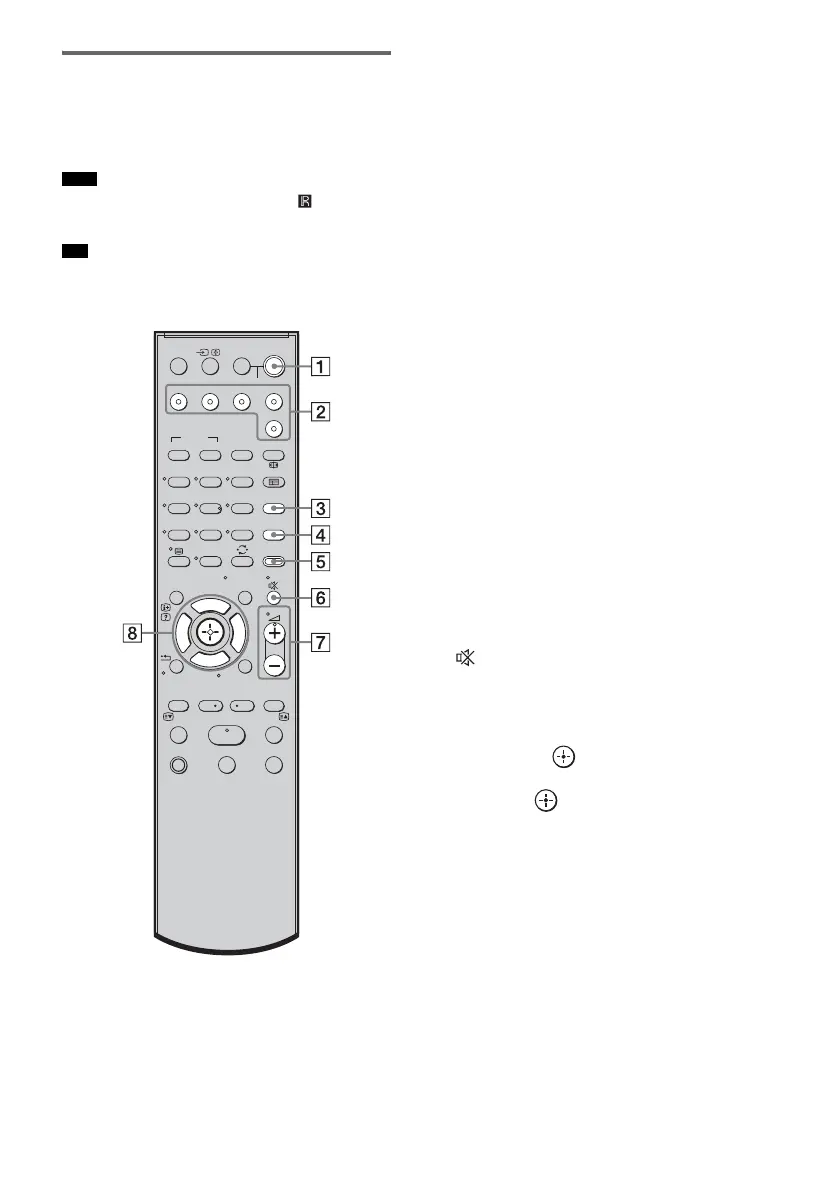
Here describes the buttons for amplifier
operation only. See page 30 for the buttons for
operation of the connected components.
• Point the remote at the remote sensor in the front
panel display.
• The 5, H, and
2 + buttons have a tactile dot. Use
it as a guide during operation.
A ?/1 (on/standby)
Press to turn the system on or off.
To save the power in standby mode
Press ?/1 while the system turns on.
To enter power saving mode, make sure that
the system is in the following status.
– “CTRL: HDMI” is set to “CTRL OFF”
(page 25).
To cancel standby mode, press
?/1 once.
B Input buttons
Press one of the buttons to select the
component you want to use.
The buttons are factory assigned to control
Sony components. You can change the
factory settings of the input buttons to suit
the components in your system. For details,
refer to “Changing the input button
assignments of the remote” (page 33).
C SOUND FIELD
Press to select the sound field (page 24).
D LEVEL MODE
Press to adjust the level of the active
subwoofer (page 34).
E AMP MENU
Press to display the menu of the system
(page 35).
F (MUTING)
Press to turn off the sound.
G 2 +/–
Press to adjust the volume.
H C, X, x, c or
Press C, X, x or c to select the settings.
Then press to enter the selection.
Note
Tip
123
46
78
0
ENTER
9
THEATRE
TV
?/1
AV
?/1
TV BD DVD SAT
TOP MENU MENU
BD/DVD
RETURN/EXIT
TV
F1 F2
AMP MENU
CLEAR
DISPLAY
SOUND
FIELD
LEVEL
MODE
A/B
DIGITALANALOG
DMPORT
?/1
PROG - PROG +
F
Gg
f
.
HmM
Xx
<
<
>
5
SYSTEM STANDBY
MENU/HOME
TOOLS/
OPTIONS



 To Next Page