EasyManua.ls Logo

Sony ICF-2001D - Control Descriptions; Power, Timer, and Light Controls; Band, AM Mode, and Tuning Controls; Memory, Scan, and Indicator Controls

Sony ICF-2001D
78 pages
Print Icon
To Next Page IconTo Next Page
To Previous Page IconTo Previous Page
Loading...
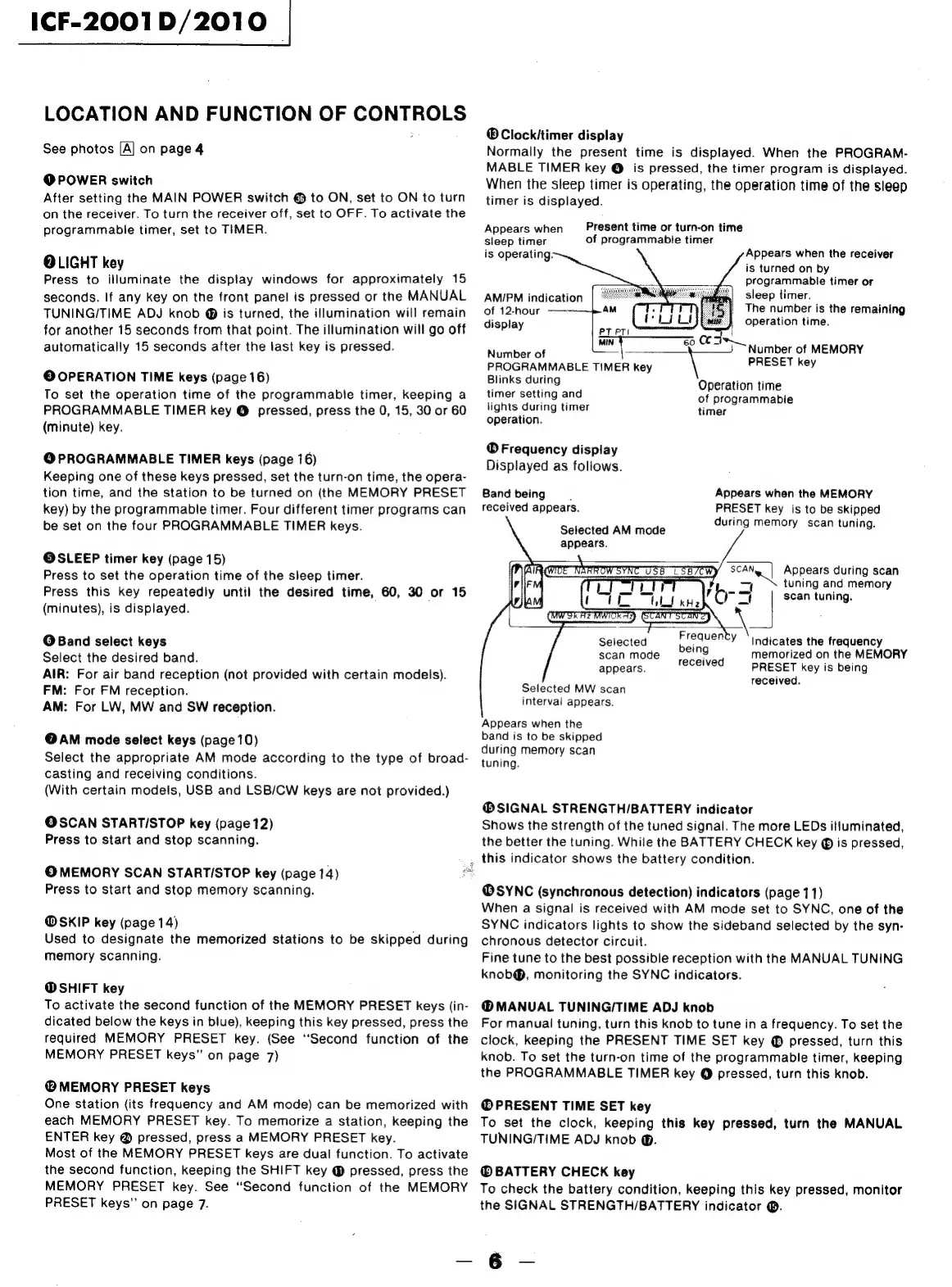
ICF-2001D/2010
LOCATION
AND
FUNCTION
OF
CONTROLS
See
photos
[A]
on
page
4
@
POWER
switch
After
setting
the
MAIN
POWER
switch
@
to
ON,
set
to
ON
to
turn
on
the
receiver.
To
turn
the
receiver
off,
set
to
OFF.
To
activate
the
programmable
timer,
set
to
TIMER.
OLIGHT
key
Press
to
illuminate
the
display
windows
for
approximately
15
seconds.
If
any
key
on
the
front
panel
is
pressed
or
the
MANUAL
TUNING/TIME
ADJ
knob
@
is
turned,
the
illumination
will
remain
for
another
15
seconds
from
that
point.
The
illumination
will
go
off
automatically
15
seconds
after
the
last
key
is
pressed.
©
OPERATION
TIME
keys
(page
16)
To
set
the
operation
time
of
the
programmable
timer,
keeping
a
PROGRAMMABLE
TIMER
key
@
pressed,
press
the
0,
15,
30
or
60
(minute)
key.
@
PROGRAMMABLE
TIMER
keys
(page
16)
Keeping
one
of
these
keys
pressed,
set
the
turn-on
time,
the
opera-
tion
time,
and
the
station
to
be
turned
on
(the
MEMORY
PRESET
key)
by
the
programmable
timer.
Four
different
timer
programs
can
be
set
on
the
four
PROGRAMMABLE
TIMER
keys.
@SLEEP
timer
key
(page
15)
Press
to
set
the
operation
time
of
the
sleep
timer.
Press
this
key
repeatedly
until
the
desired
time,
60,
30
or
15
(minutes),
is
displayed.
@
Band
select
keys
Select
the
desired
band.
AIR:
For
air
band
reception
(not
provided
with
certain
models).
FM:
For
FM
reception.
AM:
For
LW,
MW
and
SW
reception.
@AM
mode
select
keys
(page
10)
Select
the
appropriate
AM
mode
according
to
the
type
of
broad-
casting
and
receiving
conditions.
(With
certain
models,
USB
and
LSB/CW
keys
are
not
provided.)
OSCAN
STARTISTOP
key
(page
12)
Press
to
start
and
stop
scanning.
Press
to
start
and
stop
memory
scanning.
@
SKIP
key
(page
14)
Used
to
designate
the
memorized
stations
to
be
skipped
during
memory
scanning.
@
SHIFT
key
To
activate
the
second
function
of
the
MEMORY
PRESET
keys
(in-
dicated
below
the
keys
in
blue),
keeping
this
key
pressed,
press
the
required
MEMORY
PRESET
key.
(See
‘Second
function
of
the
MEMORY
PRESET
keys”
on
page
7)
@
MEMORY
PRESET
keys
One
station
(its
frequency
and
AM
mode)
can
be
memorized
with
each
MEMORY
PRESET
key.
To
memorize
a
station,
keeping
the
ENTER
key
@
pressed,
press
a
MEMORY
PRESET
key.
Most
of
the
MEMORY
PRESET
keys
are
dual
function.
To
activate
the
second
function,
keeping
the
SHIFT
key
@
pressed,
press
the
MEMORY
PRESET
key.
See
“Second
function
of
the
MEMORY
PRESET
keys”
on
page
7.
®Clockitimer
display
Normally
the
present
time
is
displayed.
When
the
PROGRAM-
MABLE
TIMER
key
@
is
pressed,
the
timer
program
is
displayed.
When
the
sleep
timer
is
operating,
the
operation
time
of
the
sleep
timer
is
displayed.
Present
time
or
turn-on
time
of
programmable
timer
Appears
when
sleep
timer
is
operating:
Appears
when
the
receiver
is
turned
on
by
programmable
timer
or
sleep
timer.
AMIPM
indication
of
12-hour
——-—
AM
The
number
is
the
remaining
i
ci
operation
time.
Gleplay
PT
PTI
bse
Nimberor
zy
6
St
=}
Number
of
MEMORY
PROGRAMMABLE
TIMER
key
PRESET
key
Blinks
during
Operation
time
of
programmable
timer
timer
setting
and
lights
during
timer
operation.
®
Frequency
display
Displayed
as
follows.
Appears
when
the
MEMORY
PRESET
key
is
to
be
skipped
during
memory
scan
tuning.
Band
being
.
received
appears.
Selected
AM
mode
appears.
SCAN
Appears
during
scan
wl
tuning
and
memory
or
S|
scan
tuning.
Selected
pee?
Y
‘Indicates
the
frequency
scanmode
2e'n9
memorized
on
the
MEMORY
appears.
received
PRESET
key
is
being
received.
Selected
MW
scan
interval
appears.
Appears
when
the
band
is
to
be
skipped
during
memory
scan
tuning.
®SIGNAL
STRENGTH/BATTERY
indicator
Shows
the
strength
of
the
tuned
signal.
The
more
LEDs
illuminated,
the
better
the
tuning.
While
the
BATTERY
CHECK
key
is
pressed,
;
,
this
indicator
shows
the
battery
condition.
©
MEMORY
SCAN
STARTISTOP
key
(page
14)
@®SYNC
(synchronous
detection)
indicators
(page
11)
When
a
signal
is
received
with
AM
mode
set
to
SYNC,
one
of
the
SYNC
indicators
lights
to
show
the
sideband
selected
by
the
syn-
chronous
detector
circuit.
Fine
tune
to
the
best
possible
reception
with
the
MANUAL
TUNING
knob@®,
monitoring
the
SYNC
indicators.
@®MANUAL
TUNING/TIME
ADJ
knob
For
manual
tuning,
turn
this
knob
to
tune
in
a
frequency.
To
set
the
clock,
keeping
the
PRESENT
TIME
SET
key
®
pressed,
turn
this
knob.
To
set
the
turn-on
time
of
the
programmable
timer,
keeping
the
PROGRAMMABLE
TIMER
key
@
pressed,
turn
this
knob.
@
PRESENT
TIME
SET
key
To
set
the
clock,
keeping
this
key
pressed,
turn
the
MANUAL
TUNING/TIME
ADJ
knob
@.
BATTERY
CHECK
key
To
check
the
battery
condition,
keeping
this
key
pressed,
monitor
the
SIGNAL
STRENGTH/BATTERY
indicator
®.
6

Related product manuals