EasyManua.ls Logo

Sony ICF-2001D - Clock and Direct Tuning Operations; Clock Setting Procedures; Direct Tuning Operation

Sony ICF-2001D
78 pages
Print Icon
To Next Page IconTo Next Page
To Previous Page IconTo Previous Page
Loading...
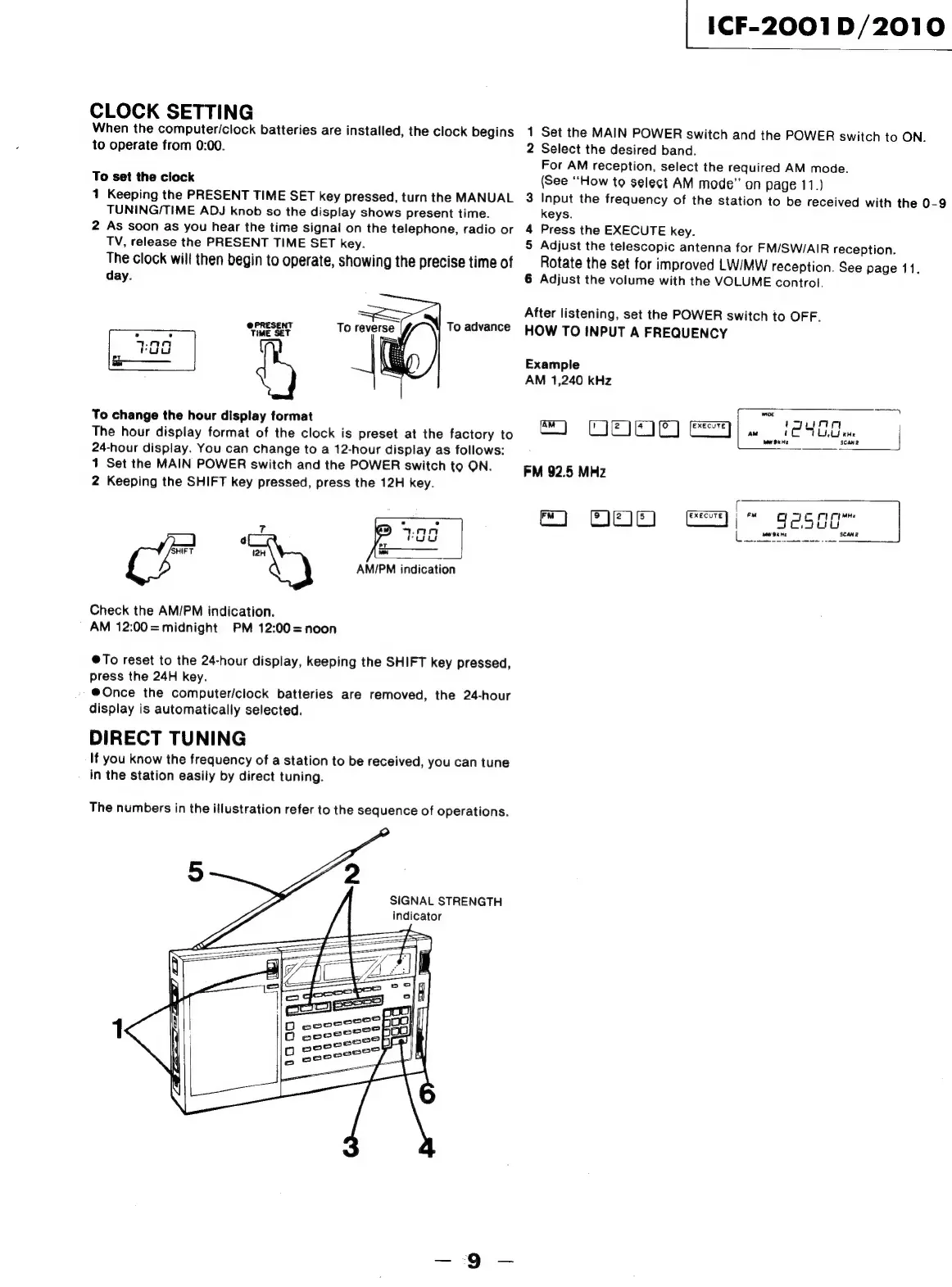
CLOCK
SETTING
When
the
computer/clock
batteries
are
installed,
the
clock
begins
to
operate
from
0:00.
To
set
the
ciock
1
Keeping
the
PRESENT
TIME
SET
key
pressed,
turn
the
MANUAL
TUNING/TIME
ADJ
knob
so
the
display
shows
present
time.
2
As
soon
as
you
hear
the
time
signal
on
the
telephone,
radio
or
TV,
release
the
PRESENT
TIME
SET
key.
The
clock
will
then
begin
to
operate,
showing
the
precise
time
of
day.
To
reverse
@PRESENT
To
advance
;
:
TIME
SET
0a
ray)
-——
To
change
the
hour
display
format
The
hour
display
format
of
the
clock
is
preset
at
the
factory
to
24-hour
display.
You
can
change
to
a
12-hour
display
as
follows:
1
Set
the
MAIN
POWER
switch
and
the
POWER
switch
to
ON.
2
Keeping
the
SHIFT
key
pressed,
press
the
12H
key.
.
ry
7
IAN
uu
Pr
a
AM/PM
indication
SHIFT
(2H
Check
the
AM/PM
indication.
AM
12:00=
midnight
PM
12:00=noon
@To
reset
to
the
24-hour
display,
keeping
the
SHIFT
key
pressed,
press
the
24H
key.
@Once
the
computer/clock
batteries
are
removed,
the
24-hour
display
is
automatically
selected.
DIRECT
TUNING
If
you
know
the
frequency
of
a
station
to
be
received,
you
can
tune
in
the
station
easily
by
direct
tuning.
The
numbers
in
the
illustration
refer
to
the
sequence
of
operations.
SIGNAL
STRENGTH
indicator
aae
2oeo
eooe
D
cece
|
1CF-2001
D/2010
1
Set
the
MAIN
POWER
switch
and
the
POWER
switch
to
ON.
2
Select
the
desired
band.
For
AM
reception,
select
the
required
AM
mode.
(See
‘“‘How
to
select
AM
mode”
on
page
11.)
3
Input
the
frequency
of
the
station
to
be
received
with
the
0-9
keys.
4
Press
the
EXECUTE
key.
5
Adjust
the
telescopic
antenna
for
FM/SW/AIR
reception.
Rotate
the
set
for
improved
LW/MW
reception.
See
page
11,
6
Adjust
the
volume
with
the
VOLUME
control.
After
listening,
set
the
POWER
switch
to
OFF.
HOW
TO
INPUT
A
FREQUENCY
Example
AM
1,240
kHz
|
oe
,
wi
AM
=]
ONO
FM
92.5
MHz
[
ay
MH
800
e)~
gesoo~

Related product manuals