EasyManua.ls Logo

Sony icf 2010 - Page 7

Sony icf 2010
20 pages
Print Icon
To Next Page IconTo Next Page
To Previous Page IconTo Previous Page
Loading...
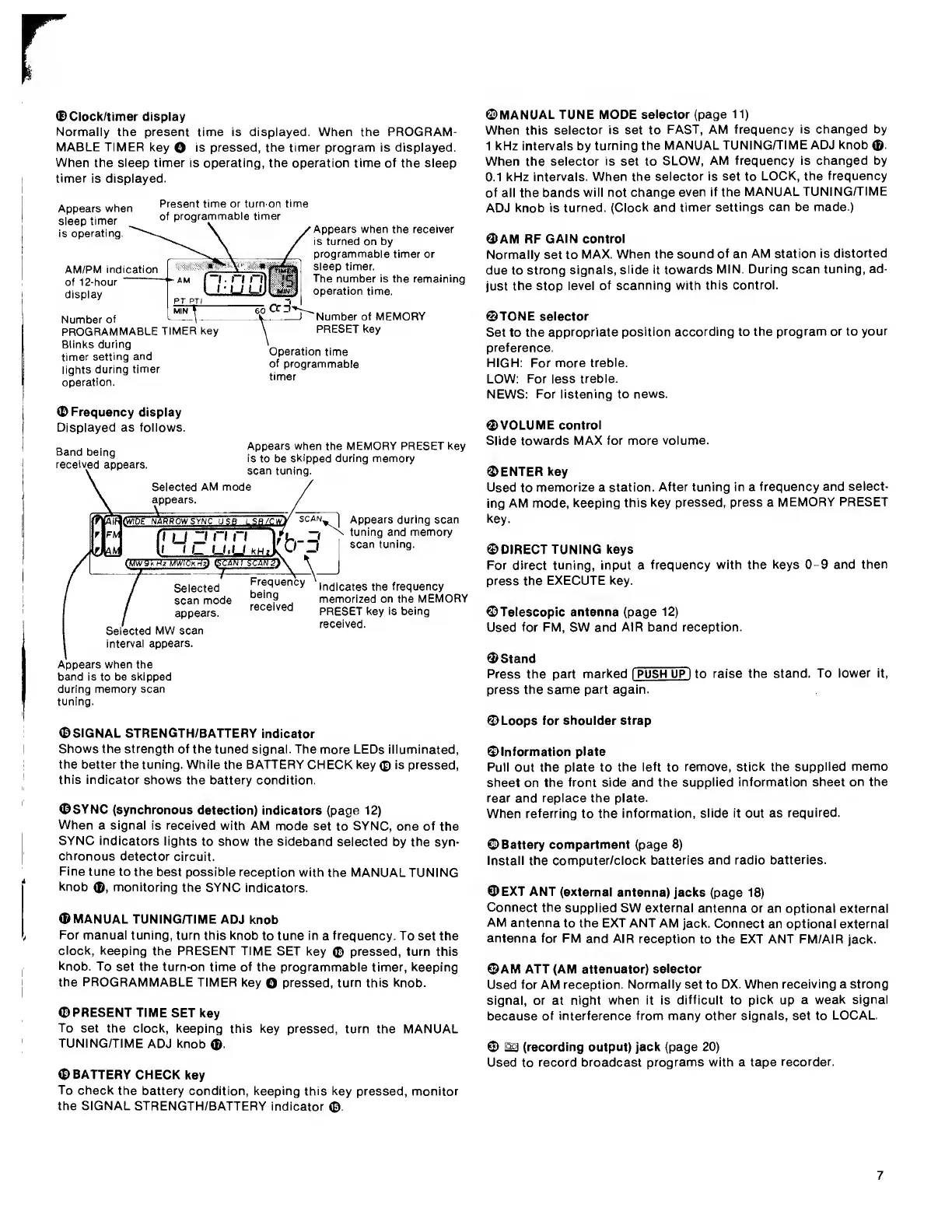
0Clock/timer
display
Normally
the
present
time
is
displayed.
When
the
PROGRAM¬
MABLE
TIMER
key
O
is
pressed,
the
timer
program
is
displayed.
When
the
sleep
timer
is
operating,
the
operation
time
of
the
sleep
timer
is
displayed.
Appears
when
sleep
timer
is
operating
Present
time
or
turn-on
time
of
programmabie
timer
AM/PM
indication
of
12-hour
dispiay
Number
of
PROGRAMMABLE
TiMER
key
Blinks
during
timer
setting
and
iights
during
timer
operation.
Appears
when
the
receiver
is
turned
on
by
programmabie
timer
or
sieep
timer.
The
number
is
the
remaining
operation
time.
Number
of
MEMORY
PRESET
key
Operation
time
of
programmabie
timer
<D
Frequency
display
Displayed
as
follows.
Band
being
received
appears.
^
OVIDE
NAWROWSVWCUSBL
SB^w!
Appears
when
the
MEMORY
PRESET
key
is
to
be
skipped
during
memory
scan
tuning.
Seiected
AM
mode
appears.
Tjjzi
n
n
I
I
I—
u>u
iili
lEUH
I
SgAN'a
Seiected
scan
mode
appears.
Seiected
MW
scan
intervai
appears.
Frequency
being
received
Appears
during
scan
tuning
and
memory
scan
tuning.
Indicates
the
frequency
memorized
on
the
MEMORY
PRESET
key
is
being
received.
Appears
when
the
band
is
to
be
skipped
during
memory
scan
tuning.
0MANUAL
TUNE
MODE
selector
(page
11)
When
this
selector
is
set
to
FAST,
AM
frequency
is
changed
by
1
kHz
intervals
by
turning
the
MANUAL
TUNING/TIME
ADJ
knob
0.
When
the
selector
is
set
to
SLOW,
AM
frequency
is
changed
by
0.1
kHz
intervals.
When
the
selector
is
set
to
LOCK,
the
frequency
of
all
the
bands
will
not
change
even
if
the
MANUAL
TUNING/TIME
ADJ
knob
is
turned.
(Clock
and
timer
settings
can
be
made.)
3>AM
RF
GAIN
control
Normally
set
to
MAX.
When
the
sound
of
an
AM
station
is
distorted
due
to
strong
signals,
slide
it
towards
MIN.
During
scan
tuning,
ad¬
just
the
stop
level
of
scanning
with
this
control.
0TONE
selector
Set
to
the
appropriate
position
according
to
the
program
or
to
your
preference.
HIGH;
For
more
treble.
LOW;
For
less
treble.
NEWS;
For
listening
to
news.
0VOLUME
control
Slide
towards
MAX
for
more
volume.
CENTER
key
Used
to
memorize
a
station.
After
tuning
in
a
frequency
and
select¬
ing
AM
mode,
keeping
this
key
pressed,
press
a
MEMORY
PRESET
key.
0DIRECT
TUNING
keys
For
direct
tuning,
input
a
frequency
with
the
keys
0-9
and
then
press
the
EXECUTE
key.
©Telescopic
antenna
(page
12)
Used
for
FM,
SW
and
AIR
band
reception.
©Stand
Press
the
part
marked
I
PUSH
UP
I
to
raise
the
stand.
To
lower
it,
press
the
same
part
again.
©SIGNAL
STRENGTH/BATTERY
indicator
Shows
the
strength
of
the
tuned
signal.
The
more
LEDs
illuminated,
the
better
the
tuning.
While
the
BATTERY
CHECK
key
©
is
pressed,
this
indicator
shows
the
battery
condition.
0SYNC
(synchronous
detection)
indicators
(page
12)
When
a
signal
is
received
with
AM
mode
set
to
SYNC,
one
of
the
SYNC
indicators
lights
to
show
the
sideband
selected
by
the
syn¬
chronous
detector
circuit.
Fine
tune
to
the
best
possible
reception
with
the
MANUAL
TUNING
knob
0,
monitoring
the
SYNC
indicators.
0MANUAL
TUNING/TIME
ADJ
knob
For
manual
tuning,
turn
this
knob
to
tune
in
a
frequency.
To
set
the
clock,
keeping
the
PRESENT
TIME
SET
key
©
pressed,
turn
this
knob.
To
set
the
turn-on
time
of
the
programmable
timer,
keeping
the
PROGRAMMABLE
TIMER
key
O
pressed,
turn
this
knob.
©PRESENT
TIME
SET
key
To
set
the
clock,
keeping
this
key
pressed,
turn
the
MANUAL
TUNING/TIME
ADJ
knob
0.
©BATTERY
CHECK
key
To
check
the
battery
condition,
keeping
this
key
pressed,
monitor
the
SIGNAL
STRENGTH/BATTERY
indicator
®.
©Loops
for
shoulder
strap
©Information
plate
Pull
out
the
plate
to
the
left
to
remove,
stick
the
supplied
memo
sheet
on
the
front
side
and
the
supplied
information
sheet
on
the
rear
and
replace
the
plate.
When
referring
to
the
information,
slide
it
out
as
required.
©Battery
compartment
(page
8)
Install
the
computer/clock
batteries
and
radio
batteries.
©EXT
ANT
(external
antenna)
jacks
(page
18)
Connect
the
supplied
SW
external
antenna
or
an
optional
external
AM
antenna
to
the
EXT
ANT
AM
jack.
Connect
an
optional
external
antenna
for
FM
and
AIR
reception
to
the
EXT
ANT
FM/AIR
jack.
©AM
ATT
(AM
attenuator)
selector
Used
for
AM
reception.
Normally
set
to
DX.
When
receiving
a
strong
signal,
or
at
night
when
it
is
difficult
to
pick
up
a
weak
signal
because
of
interference
from
many
other
signals,
set
to
LOCAL.
©
S
(recording
output)
jack
(page
20)
Used
to
record
broadcast
programs
with
a
tape
recorder.
7

Other manuals for Sony icf 2010

Related product manuals