EasyManua.ls Logo

Sony ICF-7700 - PRECISION TIME ADJUSTMENT

Sony ICF-7700
24 pages
Print Icon
To Next Page IconTo Next Page
To Previous Page IconTo Previous Page
Loading...
RADIO
OPERATION
THE
FREQUENCY
RANGE
AND
THE
TUNING
INTERVAL
OF
EACH
BROADCAST
BAND
Tuning
interval
0.05
MHz
3
kHz
5
kHz
Broadcast
band
Frequency
range
FM
76-108
MHz
LW
150-285
kHz
MW
530-1,700
kHz
SW1
90
meter
band
3,050-3,565
kHz
SW2
75
meter
band
3,700-4,215
kHz
SW3
60
meter
band
4,650-5,165
kHz
SW4
49
meter
band
5,800
-
6,315
kHz
SW5
41
meter
band
6,950
-
7,465
kHz
SW6
31
meter
band
9,375-10,010
kHz
SW7
25
meter
band
11,525-12,160
kHz
SW8
21
meter
band
13,375-14,010
kHz
SW9
19
meter
band
14,975-15,610
kHz
SW10
16
meter
band
17,475-18,110
kHz
SW11
13
meter
band
21,325-21,960
kHz
SW12
11
meter
band
25,475-26.100
kHz
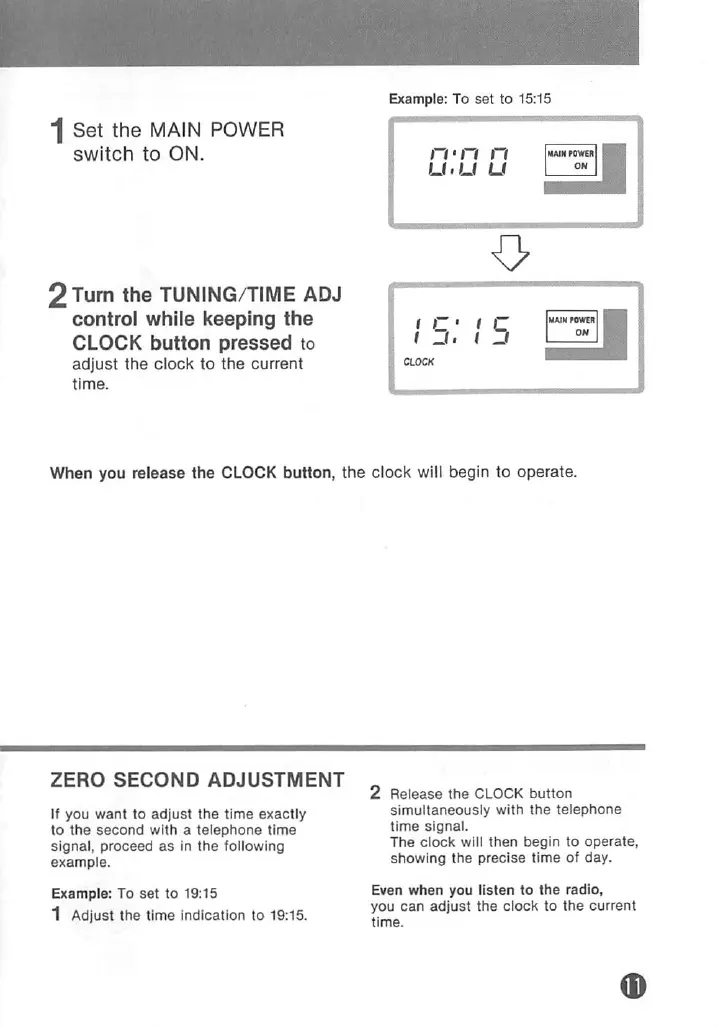
1
Set
the
MAIN
POWER
switch
to
ON.
2Turn
the
TUNING/TIME
ADJ
control
while
keeping
the
CLOCK
button
pressed
to
adjust
the
clock
to
the
current
time.
Example:
To
set
to
15:15
rrn
n
U.U
U
2!L
O
15:
15
When
you
release
the
CLOCK
button,
the
clock
will
begin
to
operate.
Note:
When
the
MW
OH
STEP
selector
Is
set
to
9
kHz,
the
frequency
range
is
531-1,602
kHz
and
the
tuning
inten/al
is
3
kHz.
FOR
SW
RECEPTION
Tune
in
the
desired
station
by
turning
the
TUNING/TIME
ADJ
control.
Since
the
SW
meter
band
Is
switched
by
pressing
the
mb
SELECT
button
(o
or
■=>),
keep
the
button
pressed
for
rapid
selecting.
To
check
the
time
whiie
listening
to
the
radio
Press
the
CLOCK
button:
The
current
time
appears.
Press
the
ALARM
button:
The
alarm
time
appears.
ZERO
SECOND
ADJUSTMENT
If
you
want
to
adjust
the
time
exactly
to
the
second
with
a
telephone
time
signal,
proceed
as
In
the
following
example.
Example:
To
set
to
19:15
1
Adjust
the
time
indication
to
19:15.
2
Release
the
CLOCK
button
simultaneously
with
the
telephone
time
signal.
The
clock
will
then
begin
to
operate,
showing
the
precise
time
of
day.
Even
when
you
listen
to
the
radio,
you can
adjust
the
clock
to
the
current
time.

Related product manuals