EasyManua.ls Logo

Sony ICF-7700 - RADIO OPERATION AND RECEPTION; TUNING AND RECEIVING STATIONS

Sony ICF-7700
24 pages
Print Icon
To Next Page IconTo Next Page
To Previous Page IconTo Previous Page
Loading...
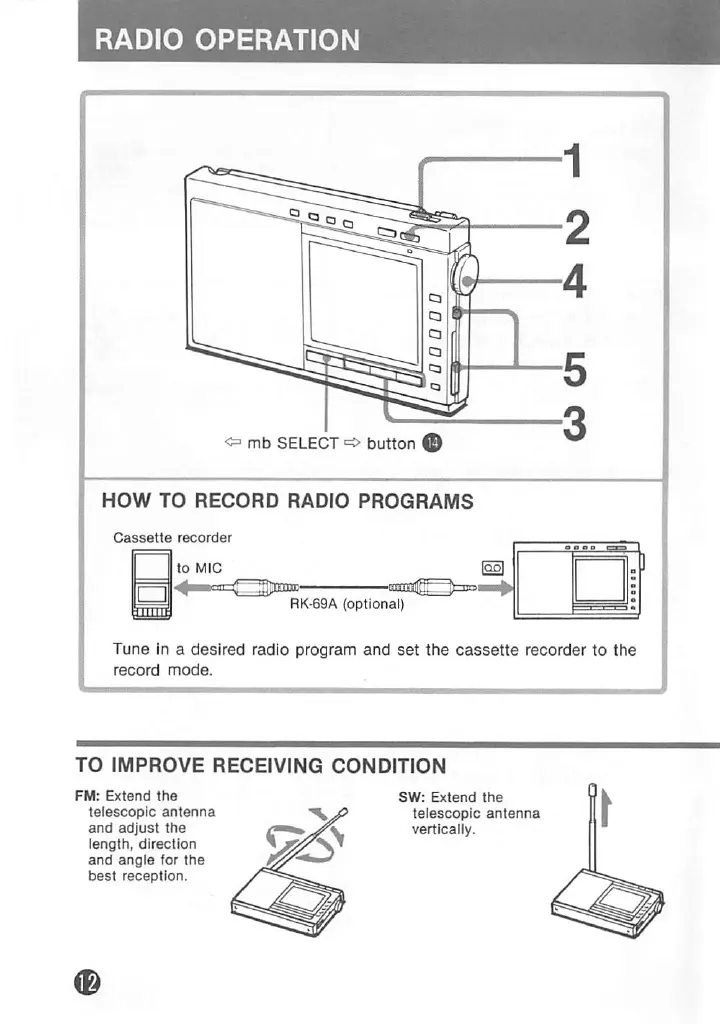
RADIO
OPERATION
I
<=
mb
SELECT
button
^
HOW
TO
RECORD
RADIO
PROGRAMS
Cassette
recorder
RK-69A
(optional)
Tune
in
a
desired
radio
program
and
set
the
cassette
recorder
to
the
record
mode.
•1
Set
the
MAIN
POWER
switch
to
ON.
2
Press
the
ON/OFF
button.
Example:
To
listen
to
SW
26,100
kHz
f
C
r
C
f
ji>
t
J
I
c
n
i
j
u
luwmrEit
U
kHz
0"
3
Press
the
desired
band
button.
4
Adjust
the
TUNING/TIME
ADJ
control
to
tune
In
a
desired
station.
5
Adjust
the
volume
and
the
tone.
To
tum
off
the
radio,
press
the
ON/OFF
button.
DC
inn
|««'««»|
CD
t
u
U
kHz
|2
|3
|4|sis|7
8
9|
l0|
ll
t2|MI
n
TO
IMPROVE
RECEIVING
CONDITION
FM:
Extend
the
telescopic
antenna
and
adjust
the
length,
direction
and
angle
for
the
best
reception.
SW:
Extend
the
telescopic
antenna
vertically.
MW/LW:
Since
the
reception
Is
affected
by
the
direction
of
the
radio,
rotate
the
unit
horizontally
for
optimum
reception.
Use
the
AN-1
external
antenna
(optional)
if
receiving
condition
Is
unsatisfactory
even
when
the
antennas
are
adjusted.
Note:
In
vehicles
or
in
buildings,
radio
reception
may
be
difficult
or
noisy.
Try
listening
near
a
window.

Related product manuals