EasyManua.ls Logo

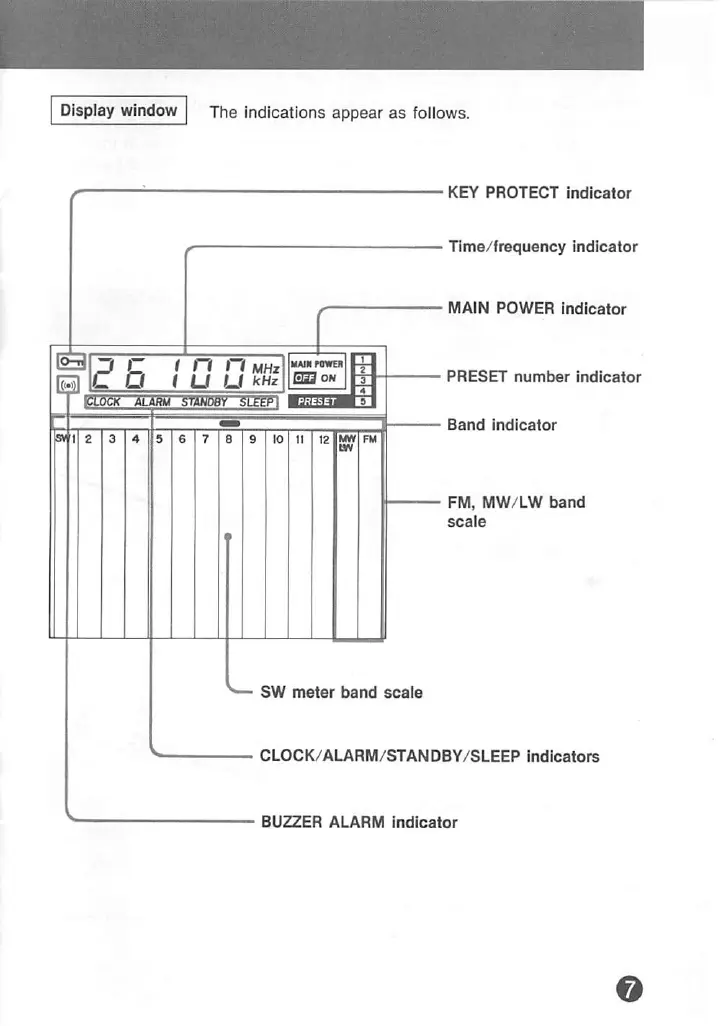
Sony ICF-7700 - DISPLAY WINDOW INDICATIONS

Sony ICF-7700
24 pages
Print Icon
To Next Page IconTo Next Page
To Previous Page IconTo Previous Page
Loading...
HOW
TO
SET
THE
ALARM
Display
window
The
Indications
appear
as
follows.
■1
Set
the
MAIN
POWER
switch
to
ON.
2
Set
the
alarm
time
by
turning
the
TUNING/TIME
ADJ
control
while
keeping
the
ALARM
button
pressed.
3
Press
the
STANDBY
button.
Example:
To
set
the
alarm
to
6:30
^
o:
I
5
b:3S
f1
luupown
\p
C
i
n
IC
O i
u u
'tHz
laa^"
'
|1
2 3
4
Is
6 7
I
8 9
j
10
11
121^
FU
KEY
PROTECT
indicator
Time/frequency
indicator
MAIN
POWER
indicator
PRESET
number
indicator
Band
indicator
FM,
MW/LW
band
scale
4
Set
the
ALARM
selector
to
RADIO
or
BUZZER.
3
n'
I
C
nAmnwn
C
u.
I
3
""
I
SW
meter
band
scale
CLOCK/AURM/STANDBY/SLEEP
Indicators
BUZZER
ALARM
indicator
The
volume
of
the
alarm
sound
The
volume
of
the
radio
sound
can
be
adjusted.
(However,
it
is
audible
even
if
the
volume
is
set
to
MIN.)
The
volume
of
the
buzzer
sound
is
always
the
same.
To
check
the
preset
time.
Press
the
ALARM
button.
To
Change
the
alarm
time
Set
the
desired
alarm
time,
the
alarm
time
previously
set
is
erased.

Related product manuals