EasyManua.ls Logo

Sony ICF-C2W - Setting the Alarm Time; Sleep Timer Operation

Sony ICF-C2W
8 pages
Print Icon
To Next Page IconTo Next Page
To Previous Page IconTo Previous Page
Loading...
ICF-C2W/C25W
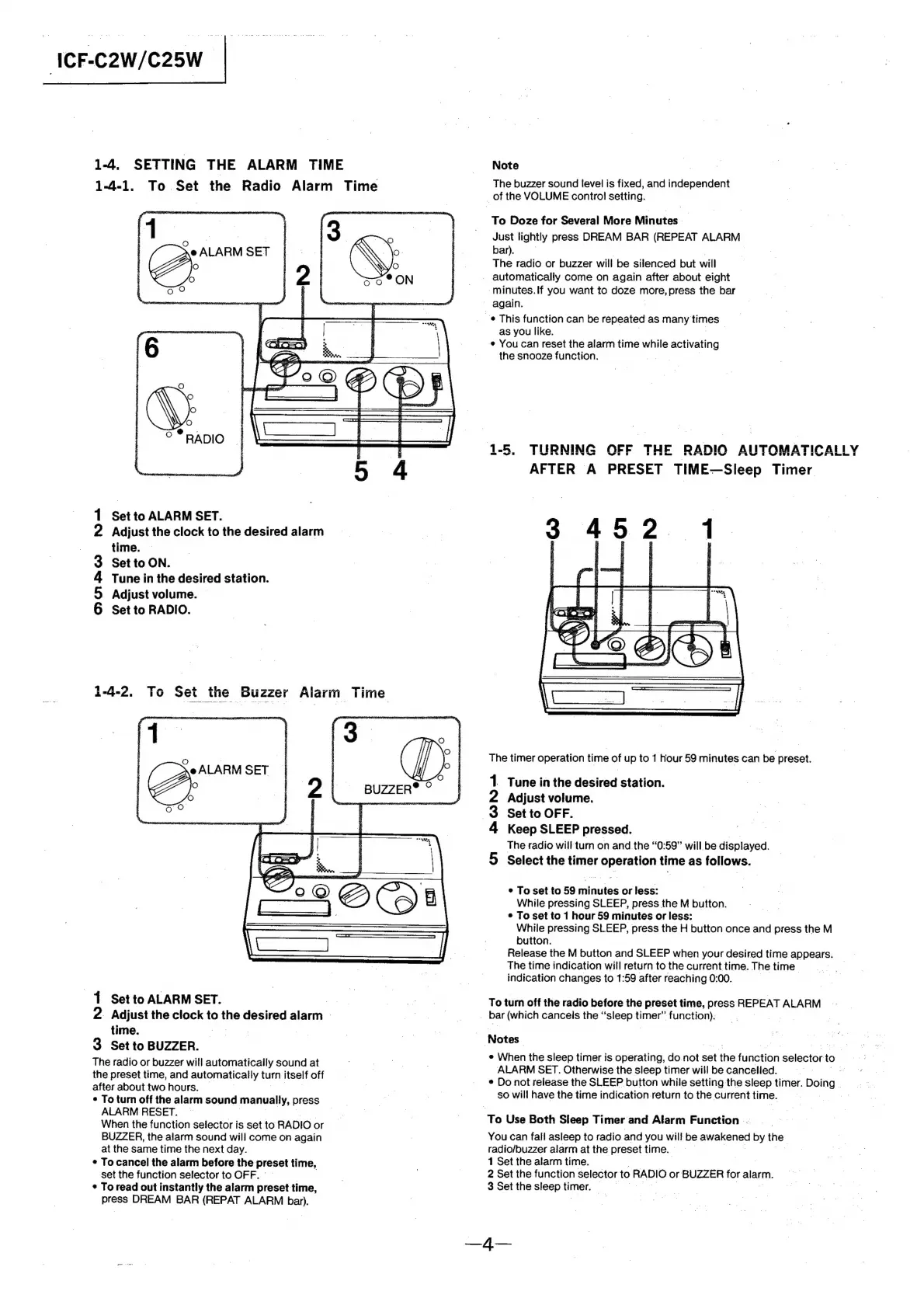
1-4.
SETTING
THE
ALARM
TIME
Note
1-4-1.
To
Set
the
Radio
Alarm
Time
The
buzzer
sound
level
is
fixed,
and
nasesauent
Set
to
ALARM
SET.
Adjust
the
clock
to
the
desired
alarm
time.
Set
to
ON.
Tune
in
the
desired
station.
Adjust
volume.
Set
to
RADIO.
OoRra
MO
1-4-2.
To
Set
the
Buzzer
Alarm
T
Se
ALARM
SET
>
Set
to
ALARM
SET.
2.
Adjust
the
clock
to
the
desired
alarm
time.
3
Set
to
BUZZER.
The
radio
or
buzzer
will
automatically
sound
at
the
preset
time,
and
automatically
turn
itself
off
after
about
two
hours.
¢
To
turn
off
the
alarm
sound
manually,
press
ALARM
RESET.
~
When
the
function
selector
is
set
to
RADIO
or
BUZZER,
the
alarm
sound
will
come
on
again
at
the
same
time
the
next
day.
¢
To
cancel
the
alarm
before
the
preset
time,
set
the
function
selector
to
OFF.
|
¢
To
read
out
instantly
the
alarm
preset
time,
press
DREAM
BAR
(REPAT
ALARM
bar).
oO
BON
of
the
VOLUME
control
setting.
To
Doze
for
Several
More
Minutes
.
Just
lightly
press
DREAM
BAR
(REPEAT
ALARM
bar).
.
The
radio
or
buzzer
will
be
silenced
but
will
automatically
come
on
again
after
about
eight
-minutes.lf
you
want
to
doze
more,
press
the
bar
again.
e
This
function
can
be
repeated
as
many
une
as
you
like.
You
can
reset
the
alarm
time
while
activating
the
snooze
function.
.
1-5.
TURNING
OFF
THE
RADIO
AUTOMATICALLY
AFTER
A
PRESET
TIME—Sleep
Timer
_'
&
ae
The
timer
operation
time
of
up
to
1
hour
59
minutes
can
be
preset.
Tune
in
the
desired
station.
Adjust
volume.
Set
to
OFF.
Keep
SLEEP
pressed.
~
The
radio
will
turn
on
and the
“0:59”
will
be
displayed.
Select
the
timer
operation
time
as
follows.
*
To
set
to
59
minutes
or
less:
While
pressing
SLEEP,
press
the
M
button.
*
To
set
to
1
hour
59
minutes
or
less:
While
pressing
SLEEP,
press
the
H
button
once
and
press
the
M
button.
Release
the
M
button
and
SLEEP
when
your
desired
time
appears.
The
time
indication
will
return
to
the
current
time.
The
time
indication
changes
to
1:59
after
reaching
0:00.
To
tum
off
the
radio
before
the
preset
time,
press
REPEAT
ALARM
_-
bar
(which
cancels
the
“sleep
ae:
function).
Notes
e
When
the
sleep
timer
is
operating,
do.not
set
the
function
csiaciaet
to
Eps
ALARM
SET.
Otherwise
the
sleep
timer
will
be
cancelled.
-.
«
¢
Do
not
release
the
SLEEP
button
while
setting
the
sleep
timer.
Doing
.
so
will
have
the
time
indication
return
to
the
current
time.
To
Use
Both
Sleep
Timer
and
Alarm
Function
..
You
can
fall
asleep
to
radio
and
you
will
be
awakened
‘by
the
radio/buzzer
alarm
at
the
preset
time.
.
1
Set
the
alarm
time.
2
Set
the
function
selector
to
RADIO
or
BUZZER
for
alarm.
3
Set
the
sleep
timer.
—4—

Related product manuals