EasyManua.ls Logo

Sony ICF-M350V - Settings; Setting the Clock; Changing AM Channel Step

Sony ICF-M350V
9 pages
Print Icon
To Next Page IconTo Next Page
To Previous Page IconTo Previous Page
Loading...
Setting
the
Clock
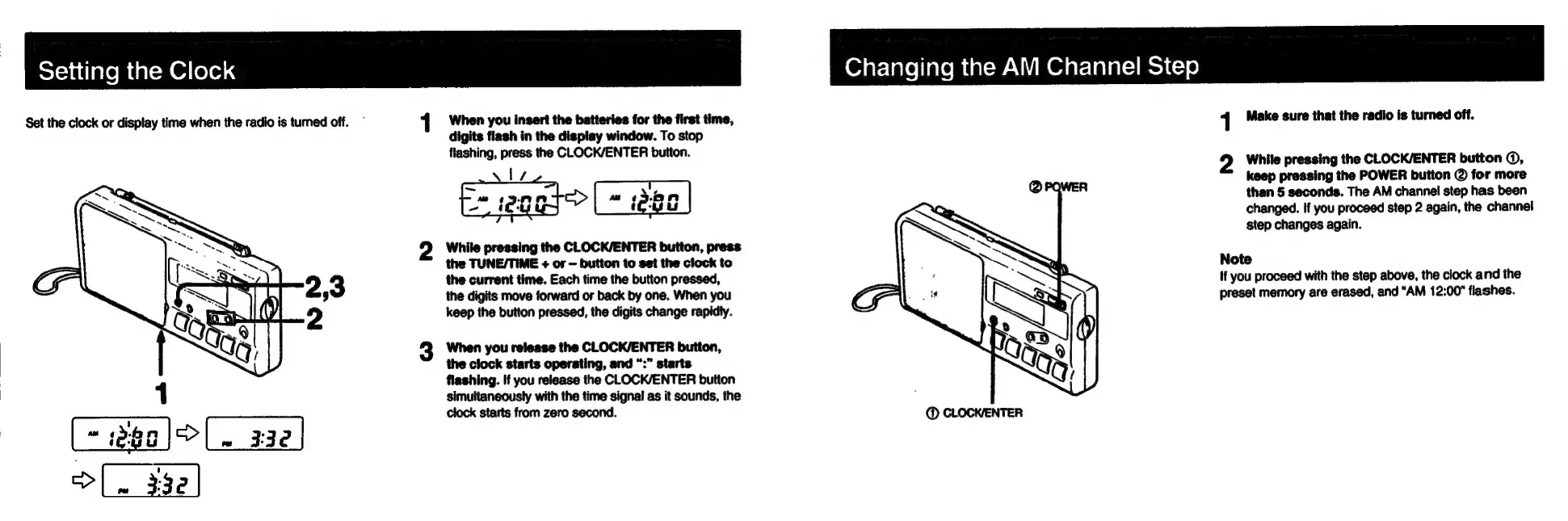
Set the
clock
or
display
time
when
the
radio
is
turned
off.
When
you
insert
the
batteries
for
the
first
time,
digits
flash
in
the
display
window.
To
stop
flashing,
press
the
CLOCK/ENTER
button.
=
eaa}>
(=
deal
While
pressing
the
CLOCK/ENTER
button,
press
the
TUNE/TIME
+
or
button
to
set
the
clock
to
the
current
time.
Each
time
the
button
pressed,
the
digits
move
forward
or
back
by
one.
When
you
keep
the
button
pressed,
the
digits
change
rapidly.
When
you
release
the
CLOCK/ENTER
button,
the
clock
starts
operating,
and
“:”
starts
flashing.
If
you
release
the
CLOCK/ENTER
button
simultaneously
with
the
time
signal
as
it
sounds,
the
clock
starts
from
zero
second.
Changing
the
AM
Channel
Step
1
Make
sure
that
the
radio
is
turned
off.
2
White
pressing
the
CLOCK/ENTER
button
©,
keep
pressing
the
POWER
button
@
for
more
than
5
seconds.
The
AM
channel
step
has
been
changed.
If
you
proceed
step
2
again,
the
channel
step
changes
again.
Note
If
you
proceed
with
the
step
above,
the
clock
and
the
preset
memory
are
erased,
and
“AM
12:00"
flashes.

Other manuals for Sony ICF-M350V

Related product manuals