EasyManua.ls Logo

Sony ICF-M350V - Preset Tuning; Using the Alarm Function

Sony ICF-M350V
9 pages
Print Icon
To Previous Page IconTo Previous Page
Loading...
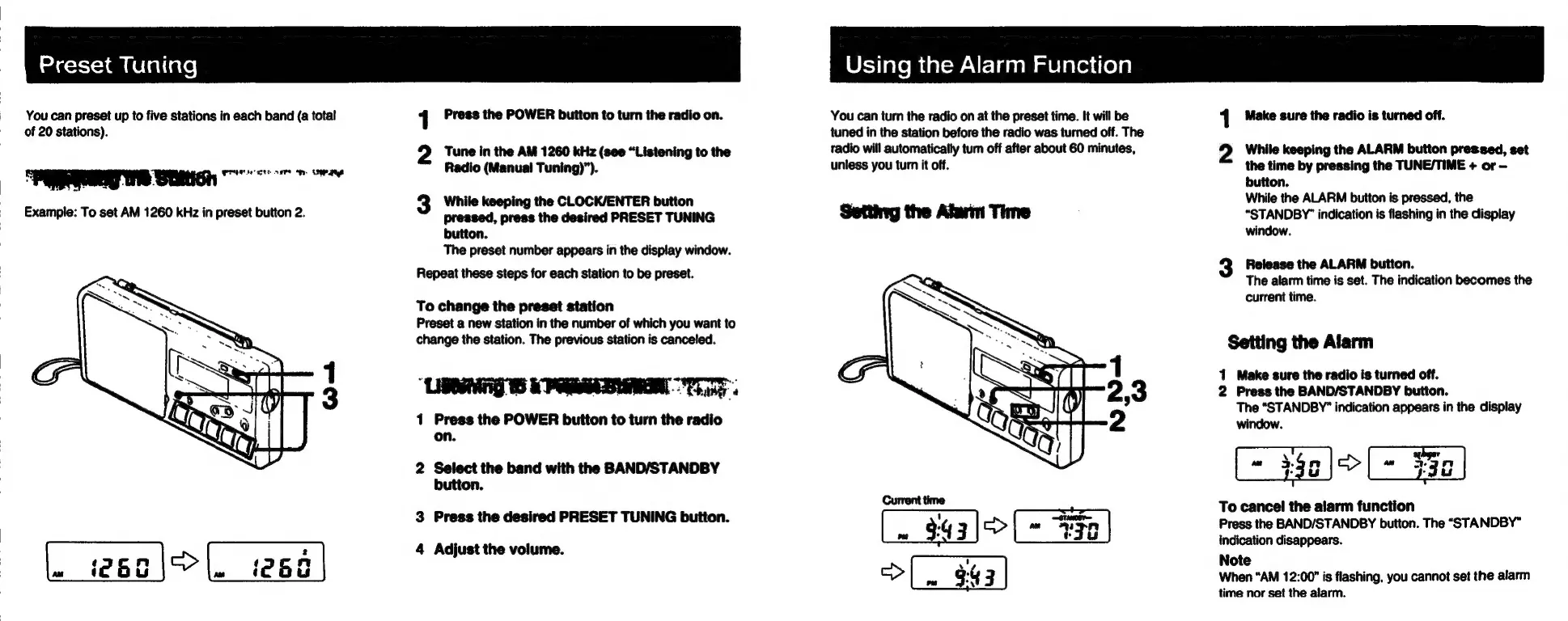
Preset
Tuning
You
can
preset
up
to
five
stations
in
each
band
(a
total
of
20
stations).
PEWS
Stitch
Example:
To
set
AM
1260
kHz
in
preset
button
2.
|.
teo\S
|.
i266
|
Press
the
POWER
button
to
turn
the
radio
on.
oth
2
Tune
in
the
AM
1260
kHz
(see
“Listening
to
the
Radio
(Manual
Tuning)”).
3
While
keeping
the
CLOCK/ENTER
button
pressed,
press
the
desired
PRESET
TUNING
button.
The
preset
number
appears
in
the
display
window.
Repeat
these
steps
for
each
station
to
be
preset.
To
change
the
preset
station
Preset
a
new
station
in
the
number
of
which
you
want
to
change
the
station.
The
previous
station
is
canceled.
1
Press
the
POWER
button
to
turn
the
radio
on.
2
Select
the
band
with
the
BAND/STANDBY
button.
3
Press
the
desired
PRESET
TUNING
button.
4
Adjust
the
volume.
Using
the
Alarm
Function
You
can
turn
the
radio
on
at
the
preset
time.
It
will
be
tuned
in
the
station
before
the
radio
was
turned
off.
The
tadio
will
automatically
tum
off
after
about
60
minutes,
unless
you
turn
it
off.
Setting
the
Alun
Time
Current
time
343)>|~
493
|
>|.
343
|
Make
sure
the
radio
is
turned
off.
scaly
2
While
keeping
the
ALARM
button
pressed,
set
the
time
by
pressing
the
TUNE/TIME
+
or
button.
While
the
ALARM
button
is
pressed,
the
“STANDBY’
indication
is
flashing
in
the
display
window.
3
Release
the
ALARM
button.
The
alarm
time
is
set.
The
indication
becomes
the
current
time.
Setting
the
Alarm
1
Make
sure
the
radio
is
turned
off.
2
Press
the
BAND/STANDBY
button.
The
“STANDBY”
indication
appears
in
the
display
window
=
Yel
=
Hal
To
cancel
the
alarm
function
Press
the
BAND/STANDBY
button.
The
“STANDBY”
indication
disappears.
Note
When
“AM
12:00"
is
flashing,
you
cannot
set
the
alarm
time
nor
set
the
alarm.

Other manuals for Sony ICF-M350V

Related product manuals