Help Guide
Interchangeable Lens Digital Camera
ILCE-7RM5 α7RV
Importing images to the computer
You can import images from the camera to a computer by connecting the camera to the computer with a USB cable, or
by inserting the memory card of the camera into the computer.
Open the folder in which the images you want to import are stored on the computer, and then copy the images to the
computer.
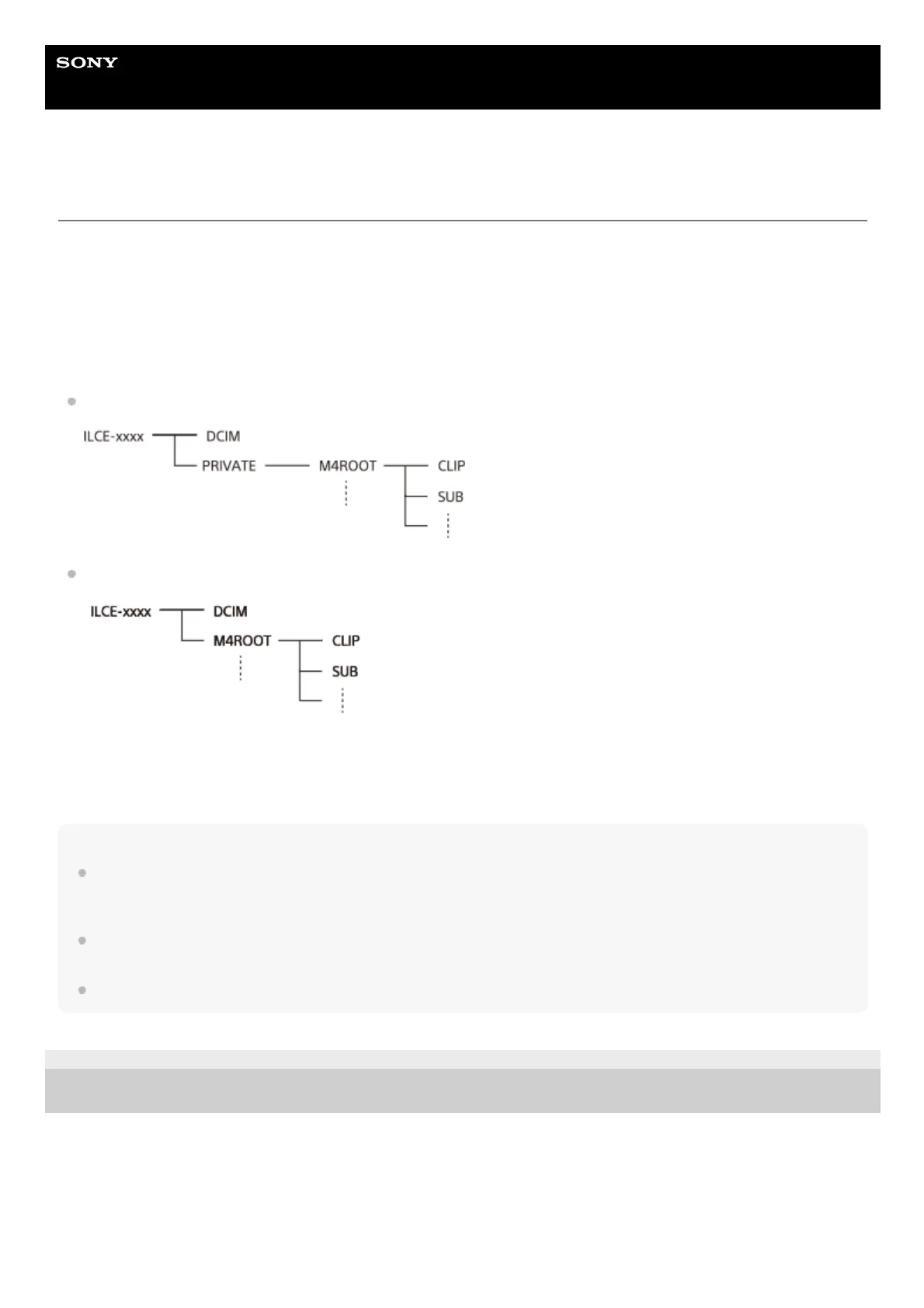
Example: Folder tree during USB Mass Storage connection
SD card
CFexpress Type A memory card
DCIM: still images
CLIP: movies
SUB: proxy movies
Note
Do not edit or otherwise process movie files/folders from the connected computer. Movie files may be damaged or become
unplayable. Do not delete movies on the memory card from the computer. Sony is not held liable for consequences resulting from
such operations via the computer.
If you delete images or perform other operations from the connected computer, the image database file may become
inconsistent. In this case, repair the image database file.
The folder tree is different during MTP connection.
5-044-866-11(1)
Copyright 2022 Sony Corporation



 To Next Page