Help Guide
Interchangeable Lens Digital Camera
ILCE-7RM5 α7RV
Using the Main menu (shooting setting list)
Select the
(Main) tab on the menu screen to display a list of shooting settings. You can confirm the settings before
shooting or for each scene, and also change the settings directly from this screen.
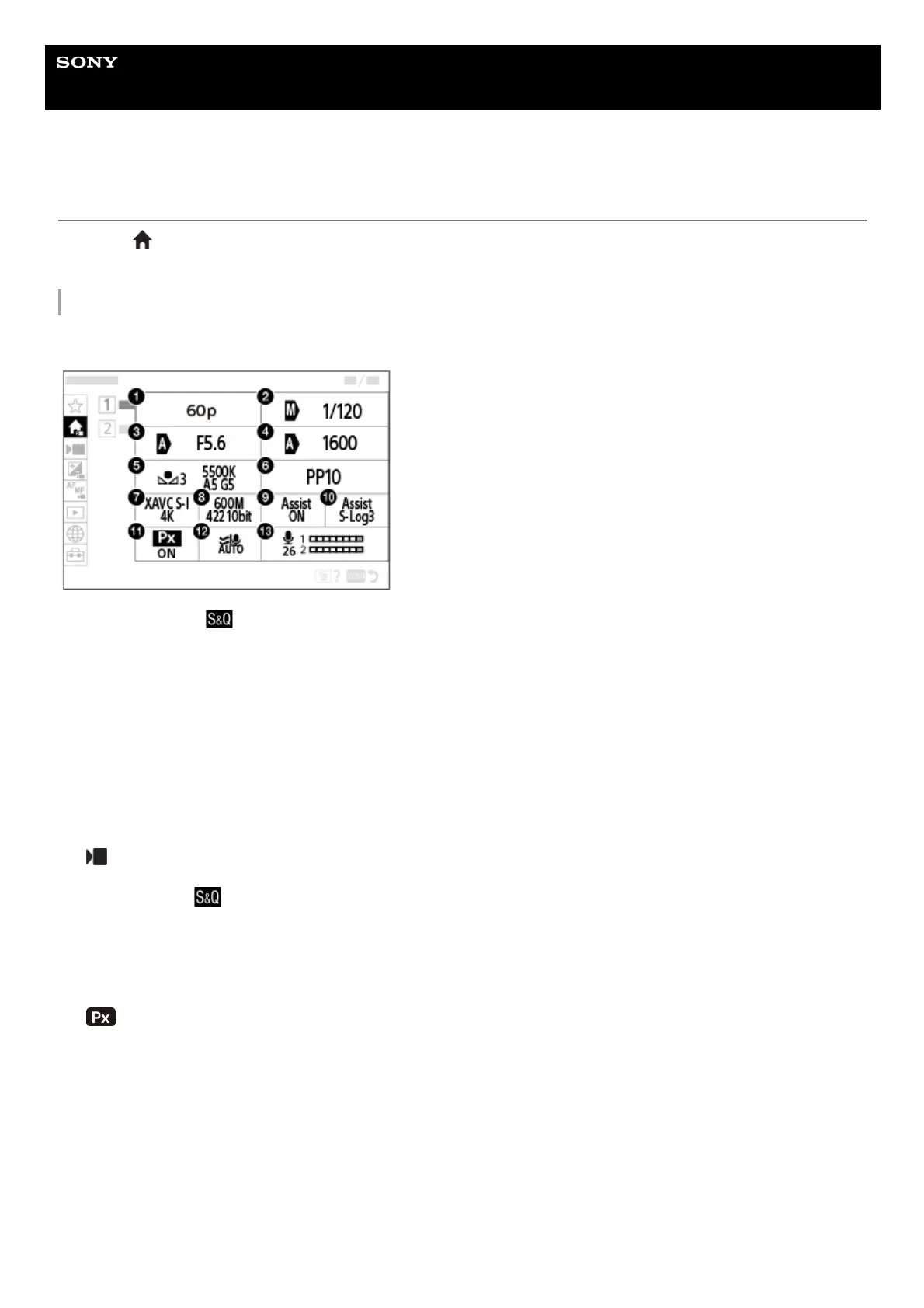
Main menu for shooting movies
Main1
Main2
Rec Frame Rate/
Rec Frame Rate (when shooting slow-motion/quick-motion movies)1.
Tv Auto/Manual Switch/Shutter Speed (when shooting movies in the flexible exposure mode)2.
Av Auto/Manual Switch/Aperture (when shooting movies in the flexible exposure mode)3.
ISO Auto/Manual Set/ISO (when shooting movies in the flexible exposure mode)4.
White Balance5.
Picture Profile6.
File Format7.
Record Setting/
S&Q Settings (when shooting slow-motion/quick-motion movies)8.
Gamma Display Assist9.
Gamma Disp. Assist Typ.10.
Proxy Recording11.
Wind Noise Reduct.12.
Audio Rec Level13.



 To Next Page