Functions that can be selected using the MENU button
Functions list
GB
45
(Setup)
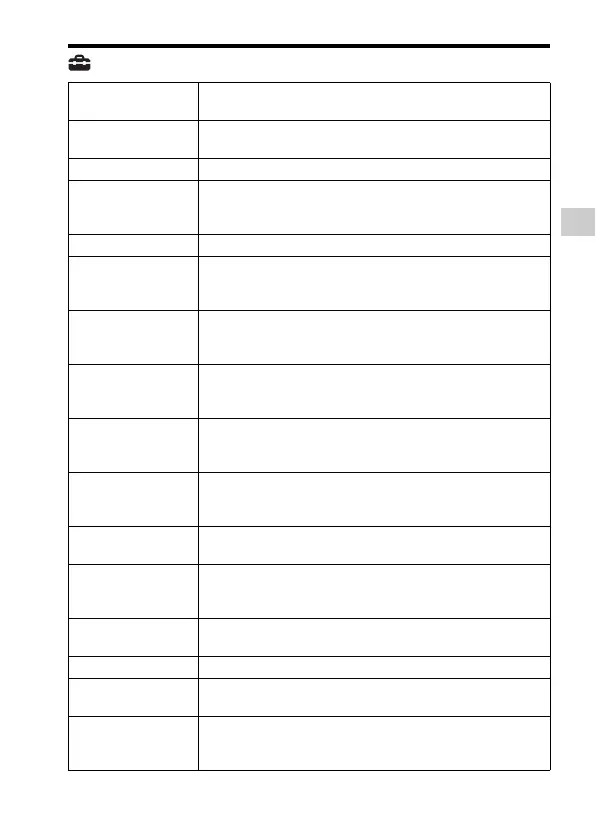
Monitor Brightness Sets the monitor brightness.
(Manual/Sunny Weather)
Viewfinder Bright. Sets the brightness of the electronic viewfinder.
(Auto/Manual)
Finder Color Temp. Sets the color temperature of the viewfinder.
Gamma Disp. Assist Converts an S-Log image to an ITU709-equivalent image and
displays it on the viewfinder or on the monitor.
(Off/Auto/S-Log2t709(800%)/S-Log3t709(800%))
Volume Settings Sets the volume for movie playback.
Audio signals Sets whether to sound a beep during auto focus or self-timer
operations.
(On/Off)
Upload Settings Sets the upload function of the camera when using an Eye-Fi
card.
(On/Off)
Tile Menu Sets whether to display the tile menu every time you press the
MENU button.
(On/Off)
Mode Dial Guide Turns the mode dial guide (the explanation of each shooting
mode) on or off.
(On/Off)
Delete confirm. Sets whether Delete or Cancel is preselected in the Delete
confirmation screen.
(“Delete” first /“Cancel” first)
Display Quality Sets the display quality.
(High/Standard)
Pwr Save Start Time Sets the time intervals to automatically switch to power save
mode.
(30 Min/5 Min/2 Min/1 Min/10 Sec)
NTSC/PAL Selector*
1
By changing the TV format of the device, shooting in a
different movie format is possible.
Cleaning Mode Starts the cleaning mode to clean the image sensor.
Demo Mode Sets demonstration playback of a movie to on or off.
(On/Off)
TC/UB Settings Sets the time code (TC) and user bit (UB).
(TC/UB Disp. Setting/TC Preset/UB Preset/TC Format/TC
Run/TC Make/UB Time Rec)


 To Next Page