About the instruction manual video
Watch the video for how to switch to the “Bluetooth mode” or “USB transceiver mode” by holding your fingers to the
touch sensors on both the left and right headset units.
https://rd1.sony.net/help/mdr/mov0067/h_zz/
Hint
The operation above is an example. For more details, refer to the operating instructions supplied with the Android smartphone.
Note
If the last connected Bluetooth device is placed near the headset, the headset may automatically connect to the device when you
turn on the headset and may not connect to another device.
If this occurs, cancel the connection on the last connected Bluetooth device or turn off the Bluetooth function on that device.
When the headset has automatically connected to the last connected device, you will hear a notification sound
indicating that the connection is established from both headset units at the same time. When you are wearing only
one headset unit, you will hear the notification sound from the headset unit you are wearing.
Check the connection status on the Android smartphone. If it is not connected, proceed to step
.
Display the devices paired with the Android smartphone.
4
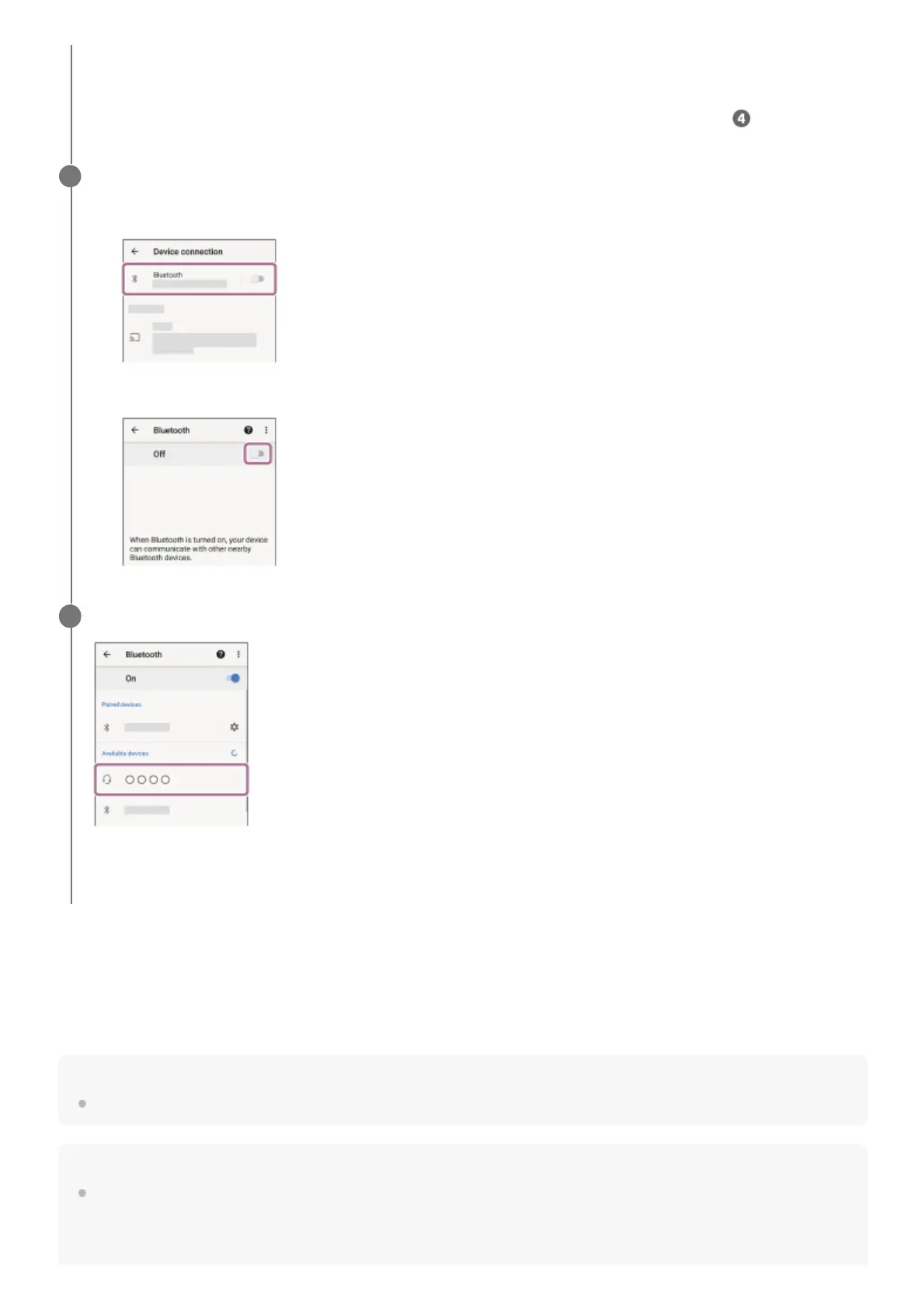
Select [Settings] - [Device connection] - [Bluetooth].
1.
Touch the switch to turn on the Bluetooth function.
2.
Touch [INZONE Buds].
You will hear a notification sound from both headset units (or from the headset unit you are wearing) at the same
time.
5












 To Next Page