The message [3D signal has been detected] automatically appears when 3D signal
is detected.
Deactivate the [3D Signal Notification] setting. Press HOME, then select
→ [Picture &
Display] → [3D Settings] → [3D Signal Notification] → [Off].
3D Glasses do not fit properly.
(The following adjustments apply only to TDG-BR100.)
Set both the switches on either side for a comfortable fit. Close the temple arms slightly
inwards to set the switch. (
)
Bend (adjust) the temple frames for a comfortable fit. (
)
Adjust the nose pad for your nose. (
)
LED indicator on the 3D Glasses flashes.
(The following illustration shows TDG-BR100.)
Flashes every few seconds: Indicates the glasses are powered on.
Flashes 3 times: Indicates the glasses have been powered off. The glasses turn off if you hold
the power button down for 2 seconds, or if no signal from the 3D Sync Transmitter is detected
for more than 5 minutes.
Flashes 3 times every 3 seconds: Indicates the battery capacity is almost running out. Replace
the battery, or charge the battery if the 3D Glasses have a rechargeable battery.
You cannot turn the 3D Glasses on.
Replace the battery. (Applies only to TDG-BR100/BR50. TDG-BR100 is used as an example in
the following instructions and illustrations.)
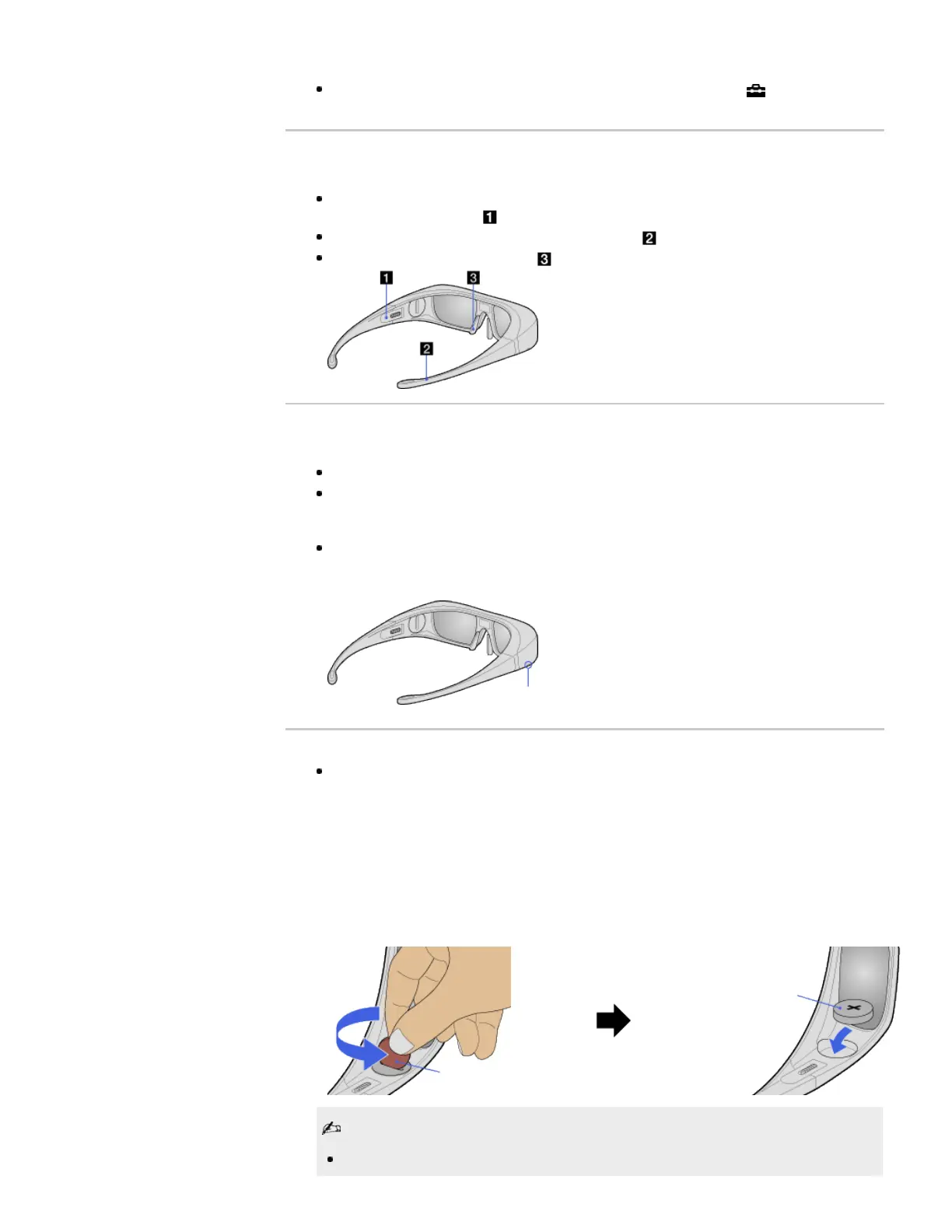
1. Open the battery cover using a coin, etc.
2. Push the edge of the battery and remove it at an angle.
3. Insert a battery (CR2032) with its positive (+) side facing up.
4. Close the battery cover using a coin, etc.
5. Make sure the cover is closed.
When opening or closing the battery cover, be sure to insert a coin, etc., into the slot.
LED Indicator
TDG-BR100 TDG-BR100
Coin, etc.
Battery (CR2032)













 To Next Page