Getting Started
5
-EN
When recording through the MONITOR OUT jacks
If you change the channel or video input while recording with a
VCR, the channel or video input you are recording also will be
changed.
Camcorder
to video and
audio outputs
When using the video input jacks
Do not connect video equipment to the VIDEO input jacks at the
front and the rear of your TV simultaneously; otherwise the
picture will not be displayed properly on the screen.
Connecting optional equipment
You can connect optional audio/video equipment to your TV such as a VCR, multi disc player, camcorder, or video
game.
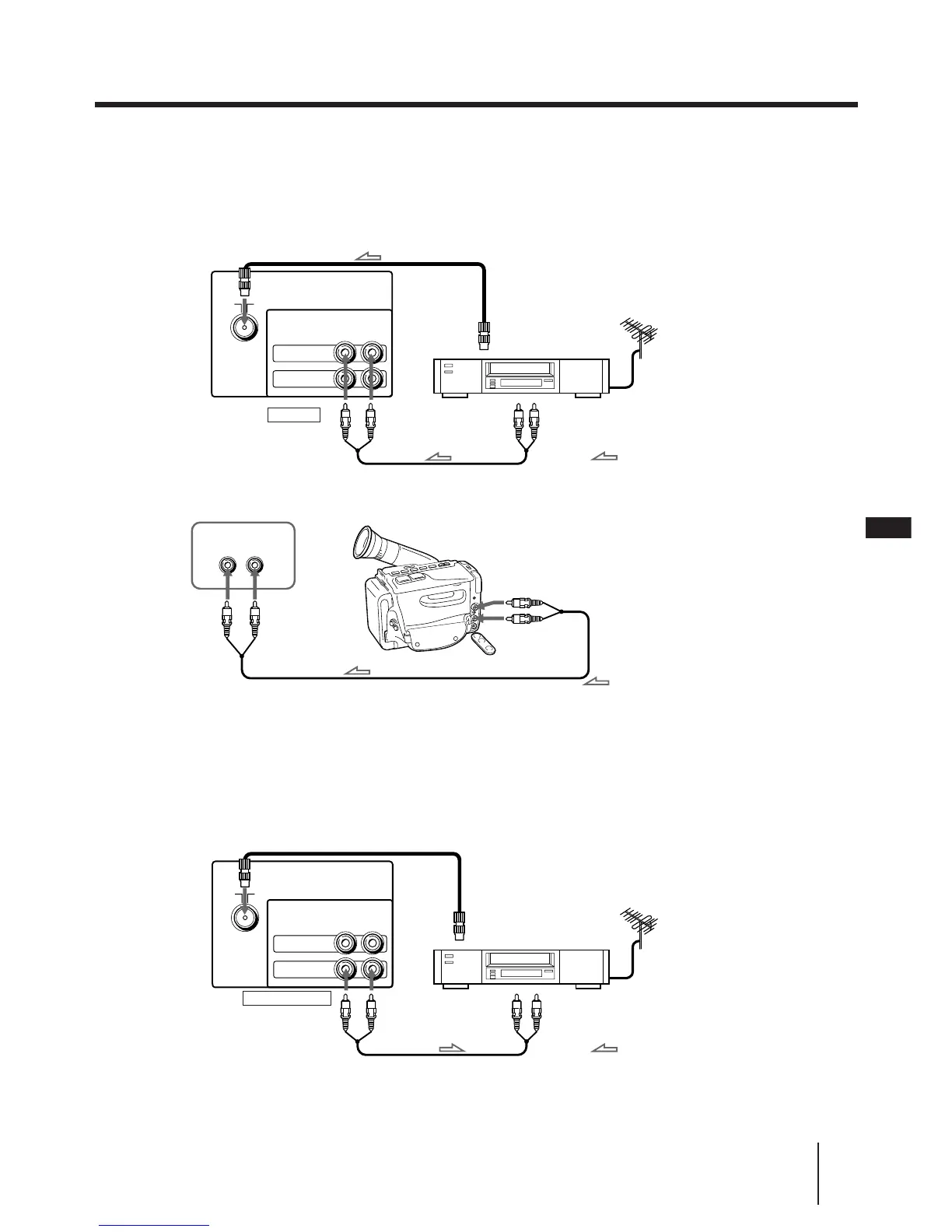
Connecting video equipment using VIDEO IN jacks
to antenna socket
to antenna
output
VIDEO IN
VCR
to video
and audio
outputs
: Signal flow
VIDEO
VIDEO INPUT
AUDIO
Front of TV
Rear of TV
to antenna socket
MONITOR OUT
to video
and audio
inputs
Rear of TV
to antenna
output
VCR
VIDEO
AUDIO
VIDEO
IN
MONITOR
OUT
: Signal flow
Connecting audio/video equipment using MONITOR OUT jacks
EN
: Signal flow
VIDEO
AUDIO
VIDEO
IN
MONITOR
OUT




 To Next Page