Operations
8
-EN
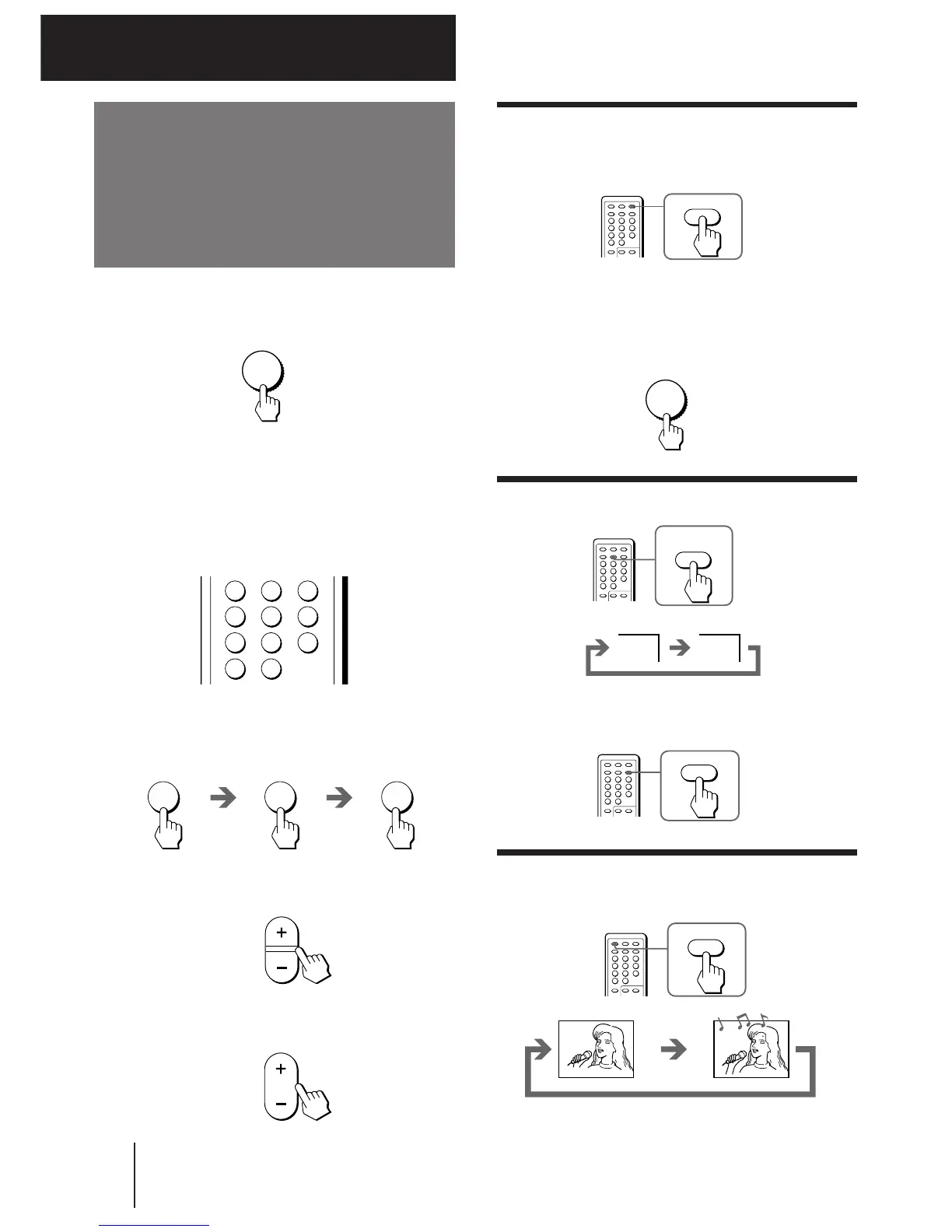
Watching the TV
Switching off the TV
To switch off the TV temporarily, press POWER on the
remote commander.
1 Press POWER to turn the TV on.
To scan through channels
Press PROGR +/– until the channel you want
appears.
3 Press VOL +/– to adjust the volume.
When the TV is in standby mode after pressing
POWER, press POWER on the remote commander.
2 Select the TV channel you want to watch.
To select a channel directly
Press a number button.
To switch off the TV completely, press POWER on the
TV.
If the power on the TV is turned off in standby mode,
the STANDBY indicator may remain alight for a while.
Watching the video input
Press VIDEO/HOLD.
Operations
To watch TV, press TV.
123
46
789
0
5
2 5
PROGR
VOL
MUTING
POWER
POWER
To select a two-digit channel, press “-/--” before
the number buttons.
For example: to select channel 25, press “-/--,” and
then “2” and “5.”





 To Next Page