Getting Started
6
-EN
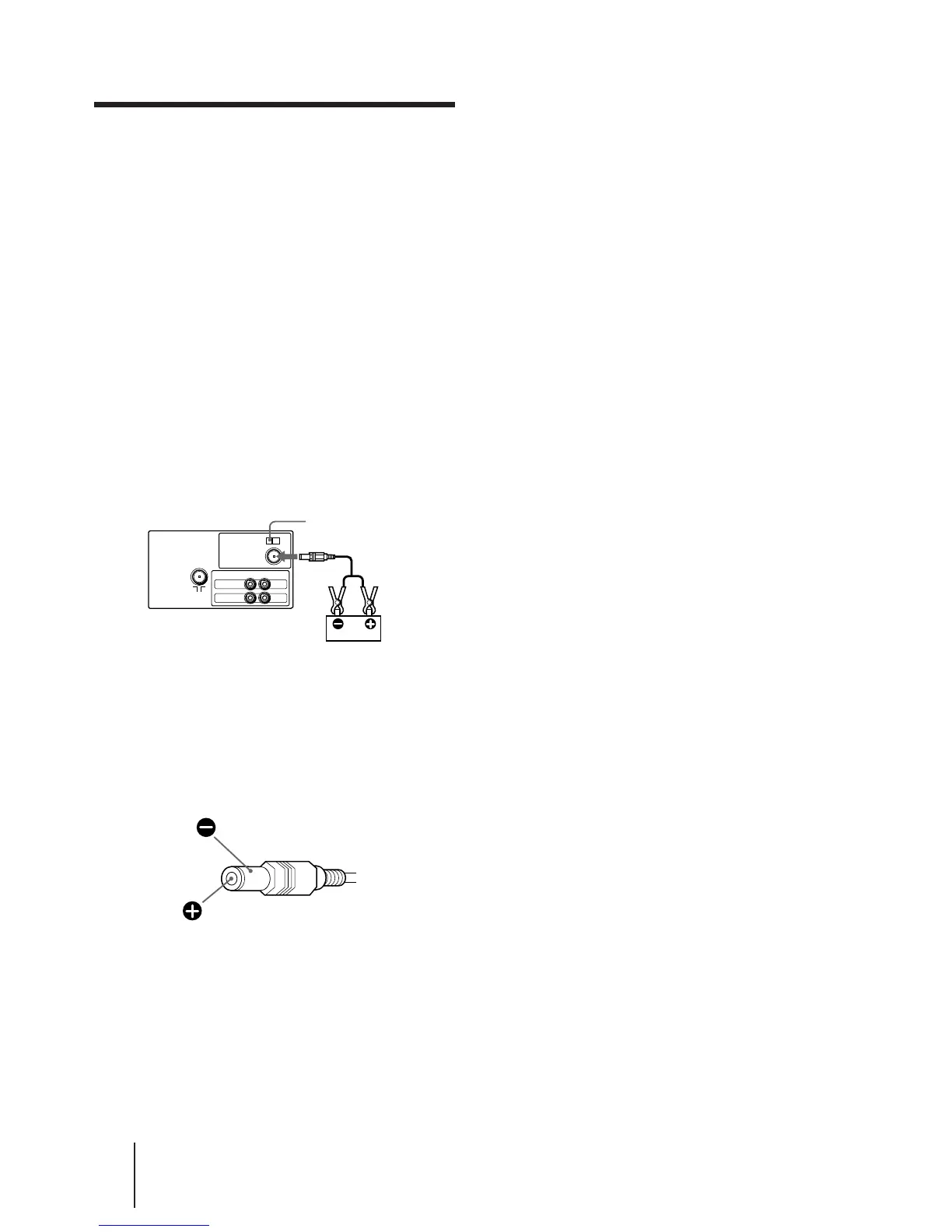
Connecting DC Power
p KV-G14MD1 only
You can also operate your TV on the DC power by
connecting the DC power cord (supplied) to a car
battery.
1 Connect the red cord to the ] red terminal
and the black cord to the }black terminal
of the car battery.
2 Connect the DC power cord to the DC INPUT
jack and press DC POWER (Ø ON) that both
are located on the rear of the TV.
3 Press POWER on the front of the TV to turn
off the AC power in order to operate on the
DC power.
Rear of TV
Notes
• When you are not using your TV, press DC POWER (ø OFF)
and remove the DC power cord from the battery.
• The DC power can be supplied only from a 12/24 V car battery
(negative grounded).
• Use only the supplied DC power cord. Using other cords with
different polarity may cause damage to your TV.
Black
Red
DC power cord
(supplied)
to DC INPUT
DC POWER switch
12/24 V car battery
VIDEO
IN
MONITOR
OUT
VIDEO
AUDIO
DC POWER
DC INPUT
Polarity of Sony plug




 To Next Page