filename[D:\MVC-CD1000 kaihan\3062473121\3062473121MVCCD1000UC\02GB-
MVCCD1000UC\04bas.fm]
masterpage:Left
16
model name1[MVC-CD1000]
[3-062-473-12(1)]
Basic operations
B Recording
Initializing a disc (INITIALIZE)
When you use a new disc, you have to initialize the disc. Slide the POWER switch
downward to turn on the power before initializing a disc.
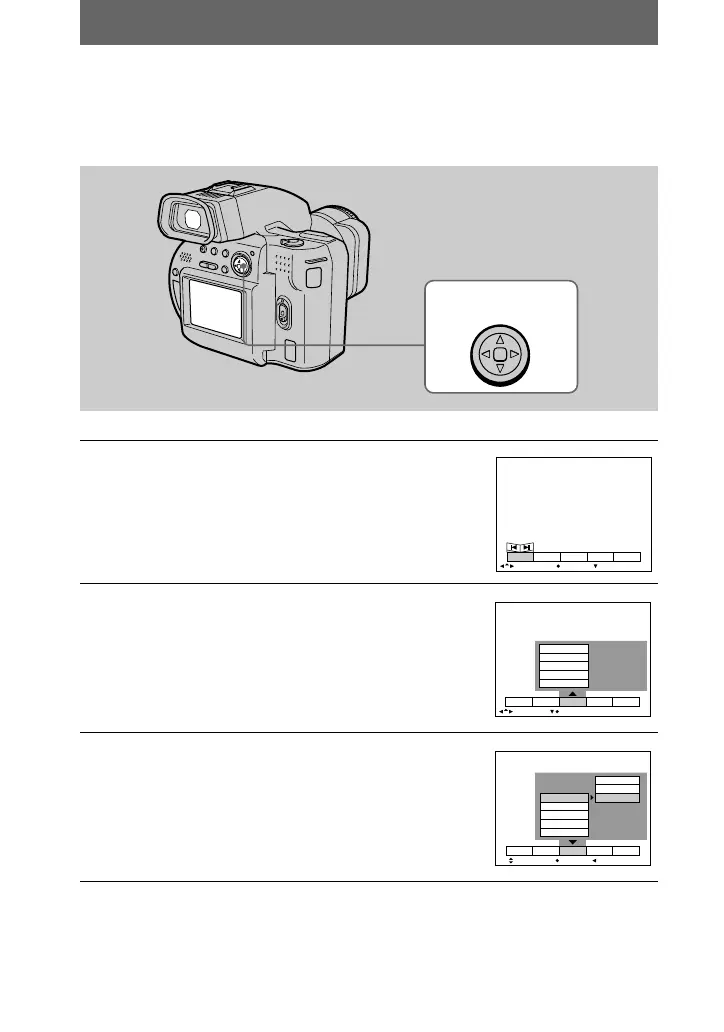
1
Press v on the control button.
The menu bar appears on the LCD screen or on the
viewfinder.
2
Select [FILE] with B on the control button,
then press the center x.
3
Select [DISC TOOL] with v on the control
button, then press the center x.
1
–
6
Control button
SELECT OK
MENU BAR OFF
DELETE
INDEX FILE SETUPTOOL
PROTECT
SLIDE SHOW
PRINT MARK
R OTAT E
DISC TOOL
SELECT CLOSE
DELETE
INDEX FILE SETUPTOOL
PROTECT
SLIDE SHOW
PRINT MARK
R OTAT E
DISC TOOL CANCEL
FINALIZE
INITIALIZE
DELETE
INDEX FILE SETUPTOOL
SELECT OK
CANCEL
01cov.book Page 16 Wednesday, July 19, 2000 10:33 AM



 To Next Page
 Loading...








