masterpage:Left
filename[D:\MVC-CD1000 kaihan\3062473121\3062473121MVCCD1000UC\02GB-
MVCCD1000UC\05bas.fm]
26
model name1[MVC-CD1000]
[3-062-473-12(1)]
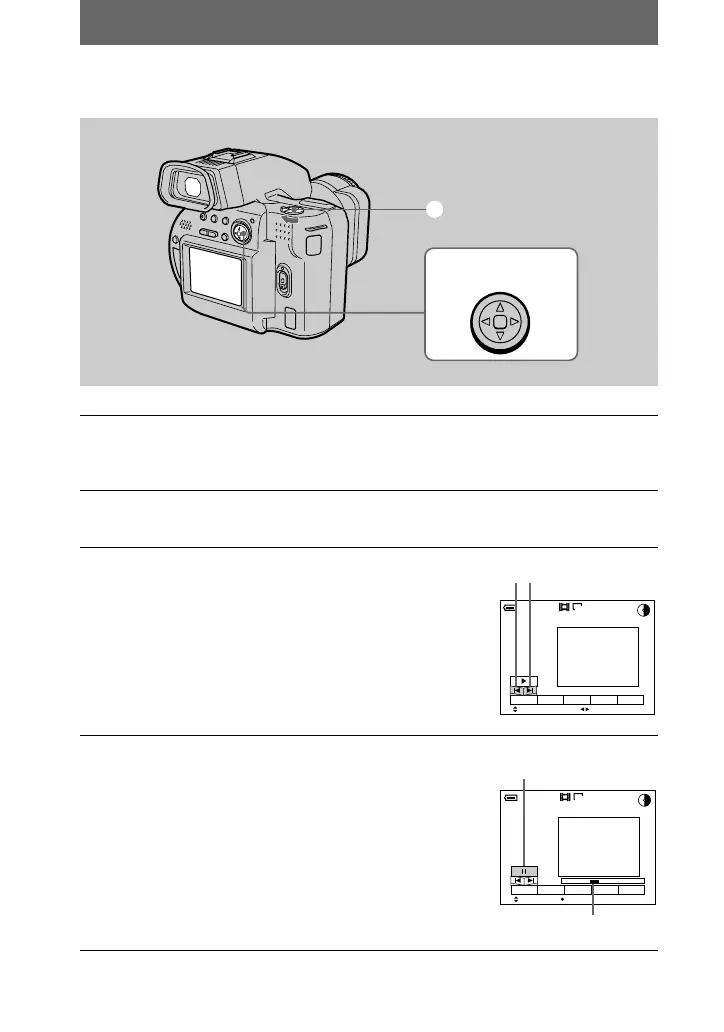
Playing back moving images
1
Set the PLAY/STILL/MOVIE selector to PLAY.
The last recorded image (still or moving) appears on the LCD screen or on the
viewfinder.
2
Press v on the control button to display the menu bar on the LCD
screen or on the viewfinder.
3
Select the desired moving image with the
control button.
Moving images are displayed one size smaller than
still images.
Press v/V/b/B on the control button to select \b/B\
on the LCD screen or on the viewfinder, then press
b/B.
\b: To display the preceding image.
B\: To display the next image.
4
Select the B (playback) button on the LCD
screen or on the viewfinder with v on the
control button, then press the center x.
The moving image and sound are played back.
During playback, B (playback) changes to X
(pause).
2
–
4
1
Control button
160
120min
6/8
SELECT
DELETE
INDEX FILE SETUPTOOL
FILE BACK/NEXT
\b/B\
160
120min
6/8
0:05
SELECT OK
DELETE
INDEX FILE SETUPTOOL
p
ay
ac
X (pause) button
Playback bar
01cov.book Page 26 Wednesday, July 19, 2000 10:33 AM



 To Next Page
 Loading...








