22-GB
k Recording and playing back images
During playback moving images (MOVIE)/Still images with
sounds (VOICE)
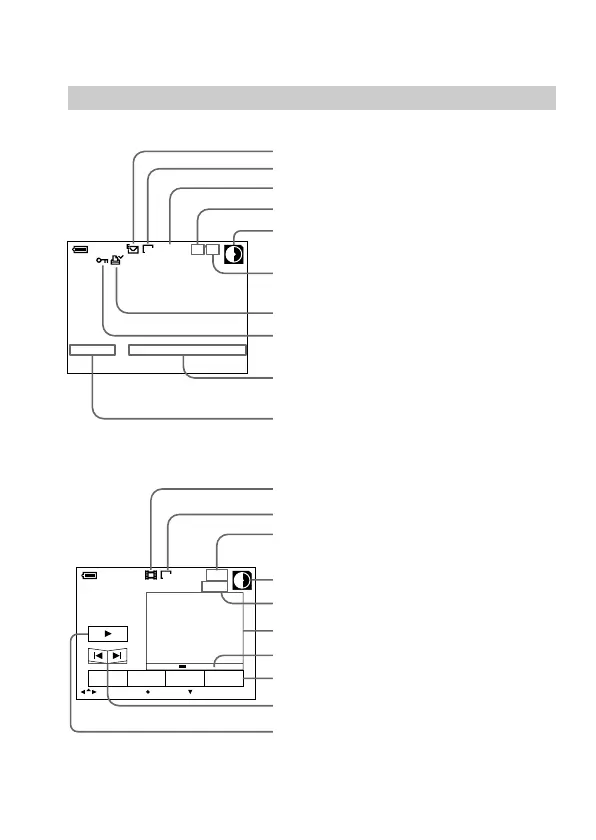
The indicators during playback
During playback still images (STILL)
MVC-011S
120
min
1280
11/12
12:00AM1999 7 4
FINE
Recording mode indicator
Image size indicator
Image number
Remaining disk capacity indicator
Number of stored images in a floppy
disk
Print mark indicator
Protect indicator
Recording date of the playback image/
Menu bar/Guide menu
File name
320
INDEX FILEDELETE SETUP
MENU BAR OFF
SELECT OK
120
min
6
/
8
0
:
10
Moving image file indicator
Image size indicator
Remaining disk capacity indicator
Image number/Number of stored
image in a floppy disk
Counter
Playback image*
Play bar
Menu bar and guide menu
Fast-forward/rewind buttons
Playback/playback pause button
B is displayed during stop, and X during
playback.
* When playing back a VOICE file, the playback image is full-screen.
Image quality



 To Next Page
 Loading...










