MEX-BT4100E/BT4100P/BT4100U/BT4150U
5
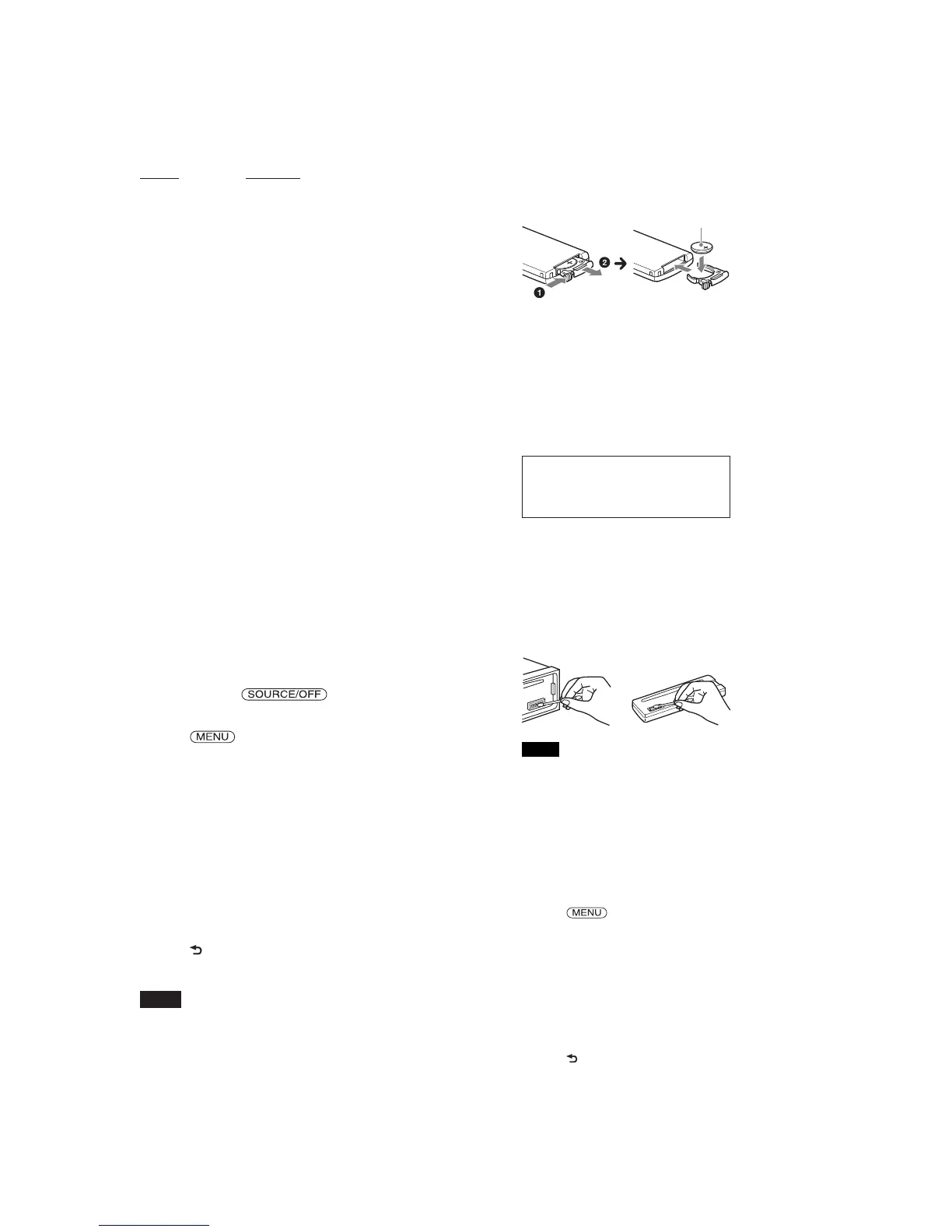
REPLACING THE LITHIUM BATTERY
OF THE REMOTE COMMANDER
When the battery becomes weak, the range
of the remote commander becomes shorter.
Replace the battery with a new CR2025
lithium battery. Use of any other battery
may present a risk of re or explosion.
Notes on the lithium battery
t Keep the lithium battery out of the reach of
children. Should the battery be swallowed,
immediately consult a doctor.
t Wipe the battery with a dry cloth to assure a
good contact.
t Be sure to observe the correct polarity when
installing the battery.
t Do not hold the battery with metallic tweezers,
otherwise a short-ci
rcuit may occur.
CLEANING THE CONNECTORS
e unit may not function properly if the
connectors between the unit and the front
panel are not clean. In order to prevent this,
detach the front panel and clean the
connectors with a cotton swab. Do not apply
too much force. Otherwise, the connectors
may be damaged.
+ side up
WARNING
Battery may explode if mistreated.
Do not recharge, disassemble, or dispose
of in re.
Notes
t For safety, turn o the ignition before cleaning
the connectors, and remove the key from the
ignition switch.
t Never touch the connectors directly with your
n
metal device.
CANCELLING THE DEMO MODE
You can cancel the demonstration display
which appears while this unit is turned off.
1 Press , rotate the control dial
until “DISPLAY” appears, then press
it.
2 Rotate the control dial until “DEMO”
appears, then press it.
3 Rotate the control dial to select
“DEMO-OFF,” then press it.
e setting is complete.
4 Press (BACK) to return to the
previous display.
e display returns to normal reception/
play mode.
TEST DISCS
Use following TEST DISC (for CD) when this set confi rms the
operation and checks it.
Part No. Description
3-702-101-01 DISC (YEDS-18), TEST
4-225-203-01 DISC (PATD-012), TEST
NOTE FOR REPLACEMENT OF THE BT BOARD
When repairing, the complete BT board should be replaced since
any parts in the BT board cannot be repaired.
NOTE FOR REPLACEMENT OF THE SERVO BOARD
When the complete SERVO board should be replaced since any
parts in the SERVO board cannot be repaired.
NOTE FOR REPLACEMENT OF THE SENSOR BOARD
When the SENSOR board is defective, exchange the MECHANI-
CAL BLOCK ASSY.
IMPORTANT NOTE OF “INITIALIZING”
The purpose of “Bluetooth Initialize” is to initialize the Bluetooth
connection history (HF/Audio Streaming). (To delete the device
information for the devices that you connected to when searching,
etc.)
When the complete BT board or complete MAIN board (including
BT board) are replaced, it is necessary to initialize this unit.
Refer to the following, initialize this unit.
Note: Phonebook data and dialed/received call history can be deleted by
executing “Reset.”
Initializing Bluetooth Settings
You can initialize all the Bluetooth related
settings (pairing information, preset
nu
mber, device informatio
n, etc.) from this
un
it.
1 Press and hold for 1
second to turn o the power.
2 Press , rotate the control dial
until "BT" appears, then press it.
e menu list appears.
3 Rotate the control dial to select “BT
INIT,” then press it.
e conrmation appears.
4 Rotate the control dial to select “INIT-
YES,” then press it.
“INITIAL” ashes while initializing the
Bluetooth settings; “COMPLETE”
appears when initializing has nished.
5 Press (BACK) to return to the
previous display.
Note
When disposing of this unit, preset numbers
should be deleted with “BT INIT.”


 To Next Page