EasyManua.ls Logo

Sony MHC-EX5 - Index to Parts and Controls

Sony MHC-EX5
29 pages
Print Icon
To Next Page IconTo Next Page
To Previous Page IconTo Previous Page
Loading...
28
>
continued
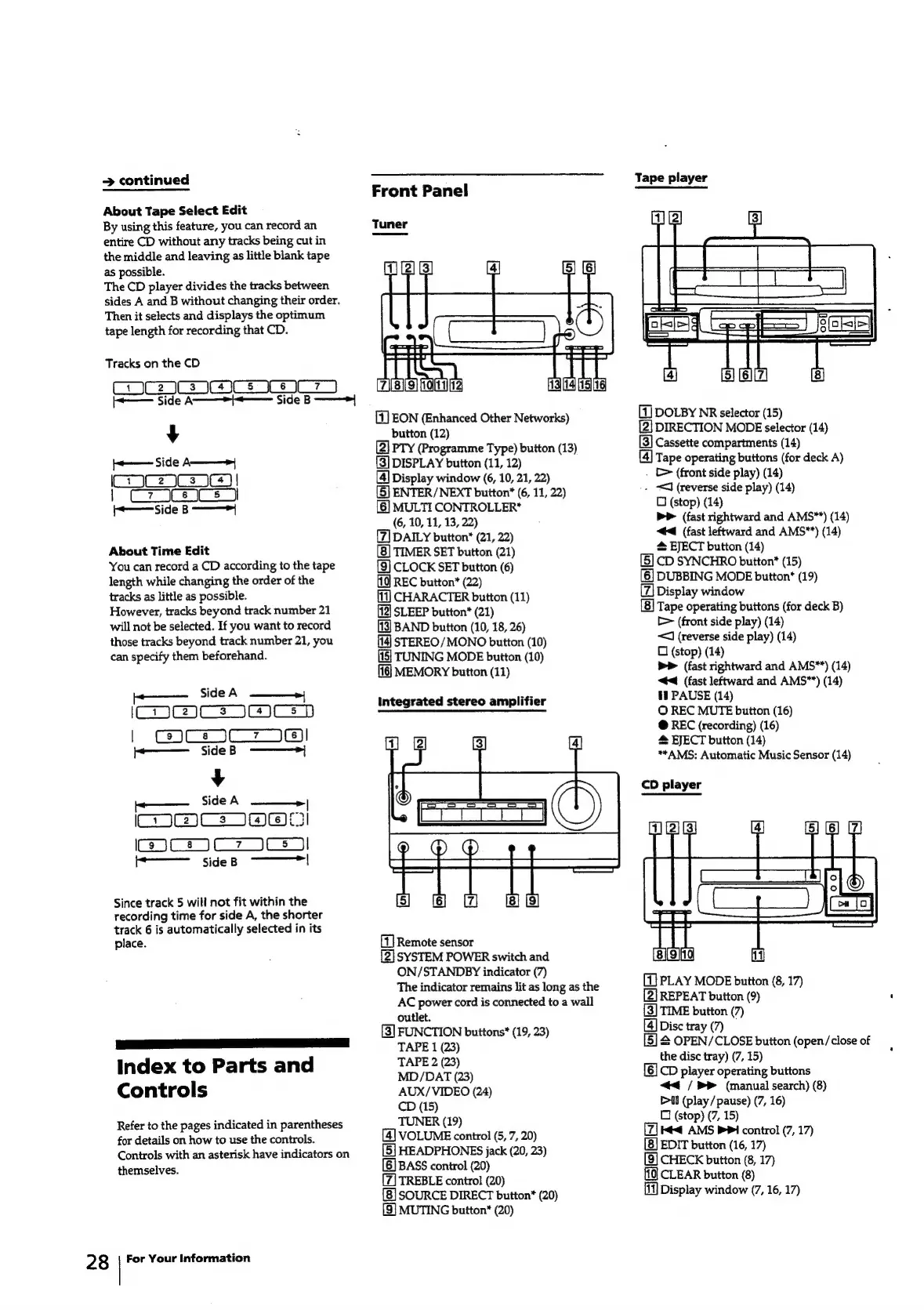
About
Tape
Select
Edit
By
using
this
feature,
you
can
record
an
entire
CD
without
any
tracks
being
cut
in
the
middle
and
leaving
as
little
blank
tape
as
possible.
The
CD
player
divides
the
tracks
between
sides
A
and
B
without
changing
their
order.
Then
it
selects
and
displays
the
optimum
tape
length
for
recording
that
CD.
Tracks
on
the
CD
cia
ees
se
-——
Side
A>
Side
B
———>
y
}+———
Side
A—___—>}
C37
|
|
C7
3CeaCs
Side
B
-———™|
About
Time
Edit
You
can
record
a
CD
according
to
the
tape
length
while
changing
the
order
of
the
tracks
as
little
as
possible.
However,
tracks
beyond
track
number
21
will
not
be
selected.
If
you
want
to
record
those
tracks
beyond
track
number
21,
you
can
specify
them
beforehand.
Side
A
ICDBCs
ICED
|
CMCsjCT
Ie!
+——
SideB
——>}
¥
——
Side
A
_|
COCs
NOW
CoC
jCz7
Cs
————
sideB
|
Since
track
5
will
not
fit
within
the
recording
time
for
side
A,
the
shorter
track
6
is
automatically
selected
in
its
place.
SSE
SSE
ee
a
Index
to
Parts
and
Controls
Refer
to
the
pages
indicated
in
parentheses
for
details
on
how
to
use
the
controls.
Controls
with
an
asterisk
have
indicators
on
themselves.
For
Your
Information
Front
Panel
[1
EON
(Enhanced
Other
Networks)
button
(12)
(2]
PTY
(Programme
Type)
button
(13)
(3]
DISPLAY
button
(11,
12)
[4]
Display
window
(6,
10,
21,
22)
(5)
ENTER/NEXT
button*
(6,
11,
22)
[6]
MULTI
CONTROLLER*
(6,
10,
11, 13,
22)
[7]
DAILY
button*
(21,
22)
[8]
TIMER
SET
button
(21)
[9]
CLOCK
SET
button
(6)
(10
REC
button*
(22)
CHARACTER
button
(11)
[12]
SLEEP
button*
(21)
[13]
BAND
button
(10,
18,
26)
STEREO/MONO
button
(10)
[15]
TUNING
MODE
button
(10)
MEMORY
button
(11)
Integrated
stereo
amplifier
Remote
sensor
[2]
SYSTEM
POWER
switch
and
ON/STANDBY
indicator
(7)
The
indicator
remains
lit
as
long
as
the
AC
power
cord
is
connected
to
a
wall
outlet.
[3]
FUNCTION
buttons*
(19,
23)
TAPE
1
(23)
TAPE
2
(23)
MD/DAT
(23)
AUX/VIDEO
(24)
CD
(15)
TUNER
(19)
[4]
VOLUME
control
(5,
7,
20)
[5]
HEADPHONES
jack
(20,
23)
[6]
BASS
control
(20)
TREBLE
control
(20)
SOURCE
DIRECT
button*
(20)
[9]
MUTING
button"
(20)
Tape
player
DOLBY
NR
selector
(15)
[2]
DIRECTION
MODE
selector
(14)
[3]
Cassette
compartments
(14)
[4]
Tape
operating
buttons
(for
deck
A)
.
[>
(front
side
play)
(14)
.
J
(reverse
side
play)
(14)
0
(stop)
(14)
bP
(fast
rightward
and
AMS**)
(14)
“44
(fast
leftward
and
AMS*)
(14)
@
EJECT
button
(14)
[5]
CD
SYNCHRO
button*
(15)
[6]
DUBBING
MODE
button*
(19)
Display
window
Tape
operating
buttons
(for
deck
B)
[>
(front
side
play)
(14)
<<
(reverse
side
play)
(14)
C
(stop)
(14)
PP
(fast
rightward
and
AMS**)
(14)
<4
(fast
leftward
and
AMS*")
(14)
il
PAUSE
(14)
©
REC
MUTE
button
(16)
@
REC
(recording)
(16)
#
EJECT
button
(14)
“AMS:
Automatic
Music
Sensor
(14)
CD
player
[1]
PLAY
MODE
button
(8,
17)
[2]
REPEAT
button
(9)
[3]
TIME
button
(7)
[4]
Disc
tray
(7)
[5]
S
OPEN/CLOSE
button
(open/close
of
the
disc
tray)
(7,
15)
[6]
CD
player
operating
buttons
<<
/
>>
(manual
search)
(8)
Pll
(play
/
pause)
(7,
16)
C
(stop)
(7,
15)
Kt
AMS
PPI
control
(7,
17)
EDIT
button
(16,
17)
[9]
CHECK
button
(8,
17)
CLEAR
button
(8)
Display
window
(7,
16,
17)