EasyManua.ls Logo

Sony MHC-EX5 - Chapter 2: the CD Player; Basic CD Playback

Sony MHC-EX5
29 pages
Print Icon
To Next Page IconTo Next Page
To Previous Page IconTo Previous Page
Loading...
Chapter
2:
the
CD
Player
Playing
a
CD
(normal
play)
Playing
Tracks
in
Random
Order
(shuffle
play)
Playing
Tracks
in
the
Desired
Order
(programme
play)
Playing
Tracks
Repeatedly
(repeat
play)
Se
ee
Playing
a
CD
(normal
play)
You
can
play
a
CD
in
four
modes:
normal,
shuffle,
programme
and
repeat.
The
mode
decides
which
tracks
(songs)
you
will
listen
to,
in
which
order
and
whether
or
not
they
will
repeat.
Before
you
play
the
CD,
decrease
the
sound
level
by
turning
the
VOLUME
control
counterclockwise,
to
avoid
damaging
the
speakers.
You
can
also
use
the
remote
to
do
this
operation.
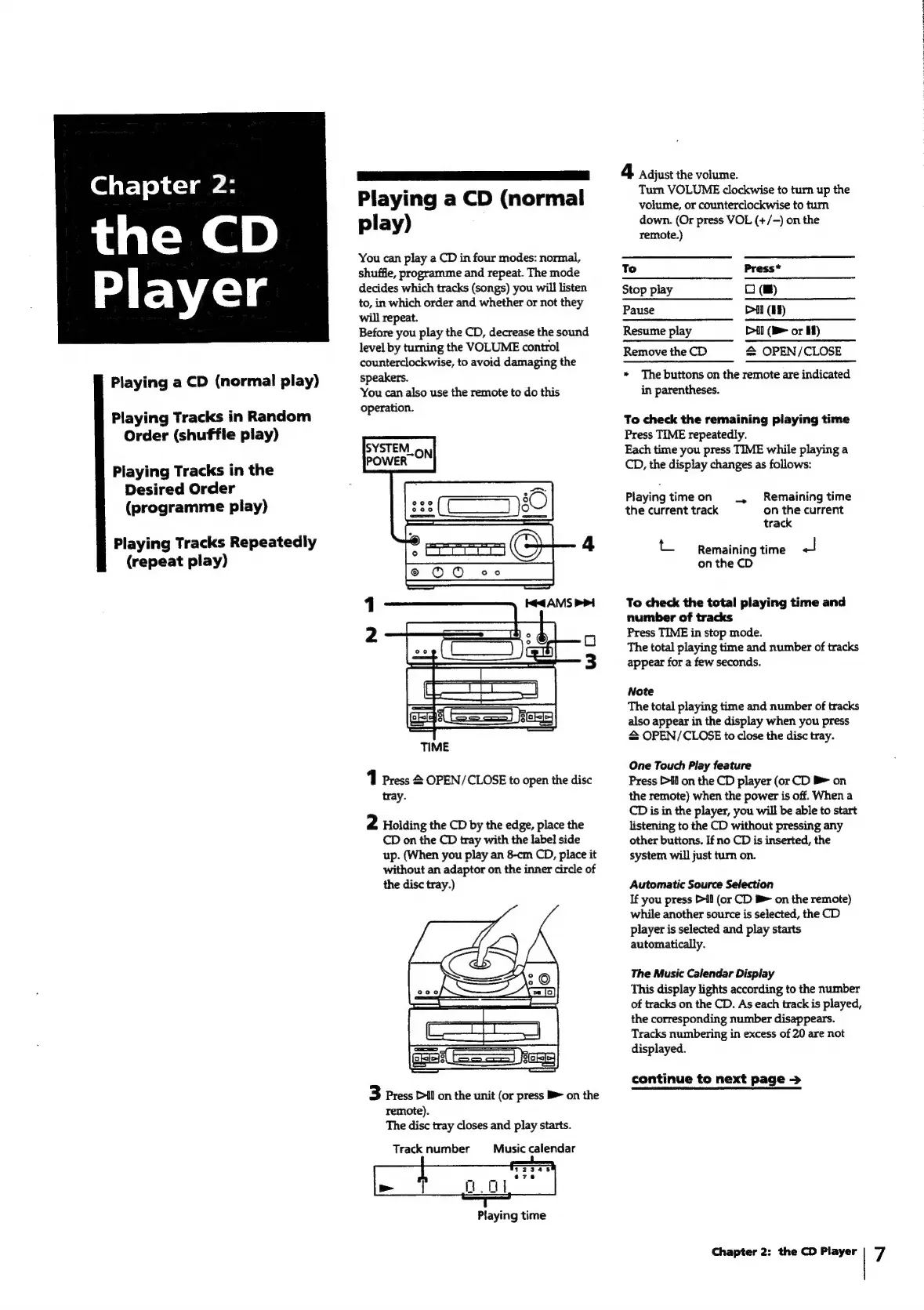
1
Press
2
OPEN/CLOSE
to
open
the
disc
tray.
2
Holding
the
CD
by
the
edge,
place
the
CD
on
the
CD
tray
with
the
label
side
up.
(When
you
play
an
8-cm
CD,
place
it
without
an
adaptor
on
the
inner
circle
of
the
disc
tray.)
3
Press
Dil
on
the
unit
(or
press
B
on
the
remote).
The
disc
tray
closes
and
play
starts.
Track
number
Music
calendar
Playing
time
4
Adjust
the
volume.
Turn
VOLUME
clockwise
to
turn
up
the
volume,
or
counterclockwise
to
turn
down.
(Or
press
VOL
(+/-)
on
the
remote.)
To
Press*
Stop
play
O
(m)
Pause
Dil
(Hu)
Resume
play
Dil
(B=
or
Hf)
Remove
the
CD
&
OPEN/CLOSE
*
The
buttons
on
the
remote
are
indicated
in
parentheses.
To
check
the
remaining
playing
time
Press
TIME
repeatedly.
Each
time
you
press
TIME
while
playing
a
CD,
the
display
changes
as
follows:
Playing
time
on
_
Remaining
time
the
current
track
on
the
current
track
=
Remaining
time
a
on
the
CD
To
check
the
total
playing
time
and
number
of
tracks
Press
TIME
in
stop
mode.
The
total
playing
time
and
number
of
tracks
appear
for
a
few
seconds.
Note
The
total
playing
time
and
number
of
tracks
also
appear
in
the
display
when
you
press
=
OPEN/CLOSE
to
close
the
disc
tray.
One
Touch
Play
feature
Press
Dil
on
the
CD
player
(or
CD
>
on
the
remote)
when
the
power
is
off.
When
a
CD
is
in
the
player,
you
will
be
able
to
start
listening
to
the
CD
without
pressing
any
other
buttons.
If
no
CD
is
inserted,
the
system
will
just
turn
on.
Automatic
Source
Selection
If
you
press
il
(or
CD
B>
on
the
remote)
while
another
source
is
selected,
the
CD
player
is
selected
and
play
starts
automatically.
The
Music
Calendar
Display
This
display
lights
according
to
the
number
of
tracks
on
the
CD.
As
each
track
is
played,
the
corresponding
number
disappears.
Tracks
numbering
in
excess
of
20
are
not
displayed.
continue
to
next
page
>
Chapter
2:
the
CD
Player
7

Related product manuals