EasyManua.ls Logo

Sony MHC-EX5 - Playing Tracks Repeatedly (Repeat Play)

Sony MHC-EX5
29 pages
Print Icon
To Next Page IconTo Next Page
To Previous Page IconTo Previous Page
Loading...
To
programme
tracks
directly
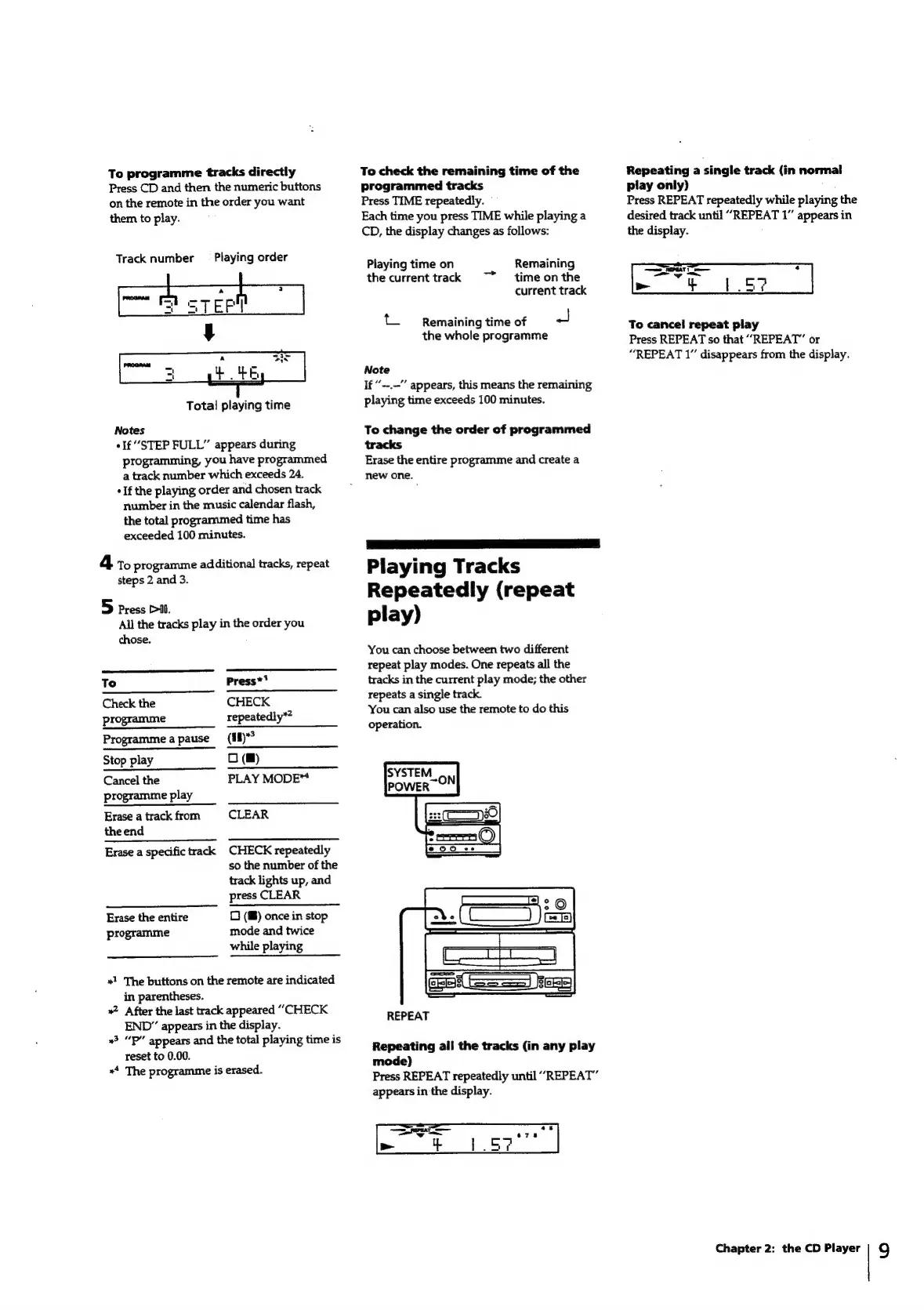
Press
CD
and
then
the
numeric
buttons
on
the
remote
in
the
order
you
want
them
to
play.
Track
number
_—
Playing
order
)
STEP!
Total
playing
time
Notes
If
“STEP
FULL”
appears
during
programming,
you
have
programmed
a
track
number
which
exceeds
24.
+
If
the
playing
order
and
chosen
track
number
in
the
music
calendar
flash,
the
total
programmed
time
has
exceeded
100
minutes.
4
t
programme
additional
tracks,
repeat
steps
2
and
3.
5
Press
Pil.
All
the
tracks
play
in
the
order
you
chose.
To
check
the
remaining
time
of
the
programmed
tracks
Press
TIME
repeatedly.
Each
time
you
press
TIME
while
playing
a
CD,
the
display
changes
as
follows:
Playing
time
on
Remaining
the
currenttrack
~~
timeonthe
current
track
t_
Remaining
time
of
a
the
whole
programme
Note
If
“--.-”
appears,
this
means
the
remaining
playing
time
exceeds
100
minutes.
To
change
the
order
of
programmed
tracks
Erase
the
entire
programme
and
create
a
new
one.
Playing
Tracks
Repeatedly
(repeat
play)
You
can
choose
between
two
different
repeat
play
modes.
One
repeats
all
the
tracks
in
the
current
play
mode;
the
other
Repeating
a
single
track
(in
normal
play
only)
Press
REPEAT
repeatedly
while
playing
the
desired
track
until
“REPEAT
1”
appears
in
the
display.
To
cancel
repeat
play
Press
REPEAT
so
that
“REPEAT”
or
“REPEAT
1”
disappears
from
the
display.
To
Press*'
Check
the
CHECK
programme
repeatedly”?
Programme
apause
(#fl)*?
Stop
play
0
(@)
Cancel
the
PLAY
MODE“
programme
play
Erase
a
track
from
CLEAR
the
end
Erase
a
specific
track
CHECK
repeatedly
so
the
number
of
the
track
lights
up,
and
press
CLEAR
Erase
the
entire
programme
0
(®)
once
in
stop
mode
and
twice
while
playing
«1
The
buttons
on
the
remote
are
indicated
in
parentheses.
»
After
the
last
track
appeared
“CHECK
END”
appears
in
the
display.
»?
“P”
appears
and
the
total
playing
time
is
reset
to
0.00.
«4
The
programme
is
erased.
repeats
a
single
track.
You
can
also
use
the
remote
to
do
this
operation.
REPEAT
Repeating
all
the
tracks
(in
any
play
mode)
Press
REPEAT
repeatedly
until
“REPEAT”
appears
in
the
display.
—_
pee
a6
an
e78
>
eee
bea
Chapter
2:
the
CD
Player
9

Related product manuals