32
Programming the CD
tracks
–– Program Play
You can make a program of up to 32 tracks
from all the CDs in the order you want them
to be played.
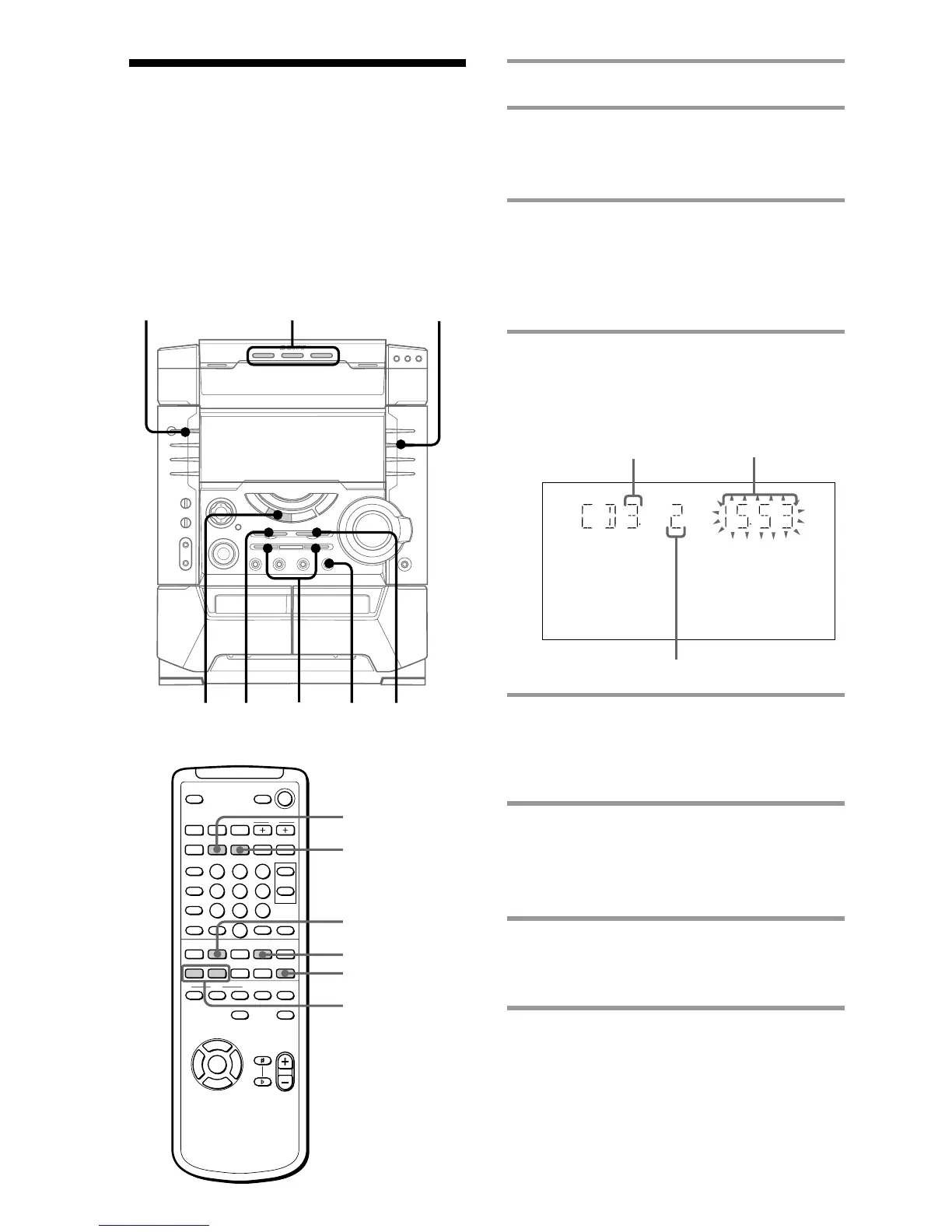
1 Press CD, then place a CD.
2 Press PLAY MODE repeatedly until
“PROGRAM” scrolls and “PGM”
appears in the display.
3 Press one of the DISC 1~3 buttons to
select a CD.
To program all the tracks on a CD at
once, proceed to step 5 while “AL”
appears on the display.
4 Press . or > repeatedly until
the track you want appears in the
display.
5 Press ENTER.
The track(s) is (are) programmed. The
program step number appears, followed
by the total playing time.
6 To program additional tracks,
repeat steps 3 to 5.
Skip step 3 to select tracks from the
same disc.
7 Press nN.
All the tracks play in the order you
selected.
?/1
(Power)
Disc tray
number
Track number
Total playing time
(including selected track)
2
3
4
157
x
NX x
x
Mm>.
nN
O
v
V
bB
X
nN
x
. >
CD
CHECK
CLEAR
PGM



 To Next Page