GB
61
Importing images to the computer
For details on “Image Data Converter SR” and “Image Data Lightbox SR,”
refer to Help.
To start Help, click [Start] t [All Programs] t [Sony Image Data Suite] t
[Help] t [Image Data Converter SR Ver.3] or [Image Data Lightbox SR].
The support information for the “Sony Image Data Suite” (English only):
http://www.sony.co.jp/ids-se/
Creating a movie disc (NEX-5/5C)
You can create a disc from AVCHD format movies recorded on the camera.
Select the method that best suits your disc player. Use “PMB” to import
AVCHD format movies to a computer. See “PMB Help” for details on
creating a disc using “PMB.”
• If you use a Sony DVDirect (DVD Writer), you can transfer data by inserting a
memory card into the memory card slot of the DVD writer, or connecting your
camera to the DVD writer with a USB cable.
• When you use Sony DVDirect (DVD writer), make sure that the version of DVD
writer’s firmware is the latest.
For details, refer to the following URL:
http://sony.storagesupport.com/
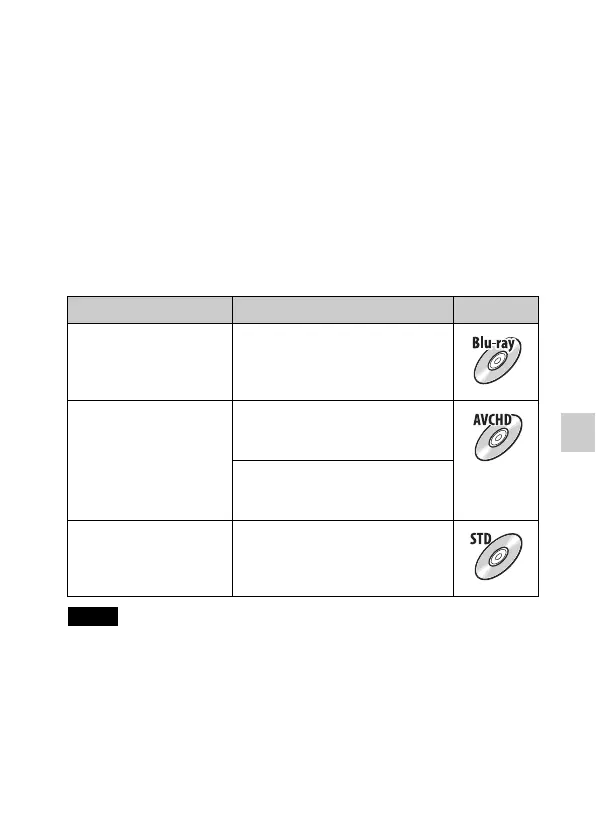
Player Method Disc type
Blu-ray disc playback
devices
(Blu-ray disc player,
PlayStation®3, etc.)
Create a Blu-ray disc of movies and
photos imported to a computer using
“PMB.”
AVCHD format playback
devices
(Sony Blu-ray disc player,
PlayStation®3, etc.)
Create an AVCHD format disc of
movies and photos imported to a
computer using “PMB.”
Creating an AVCHD format disc with
a DVD writer/recorder other than
DVDirect Express.
Ordinary DVD playback
devices
(DVD player, DVD
playable computer, etc.)
Create a standard definition image
quality (STD) disc of movies and
photos imported to a computer using
“PMB.”
Notes


 To Next Page