43
Using as a DVD player
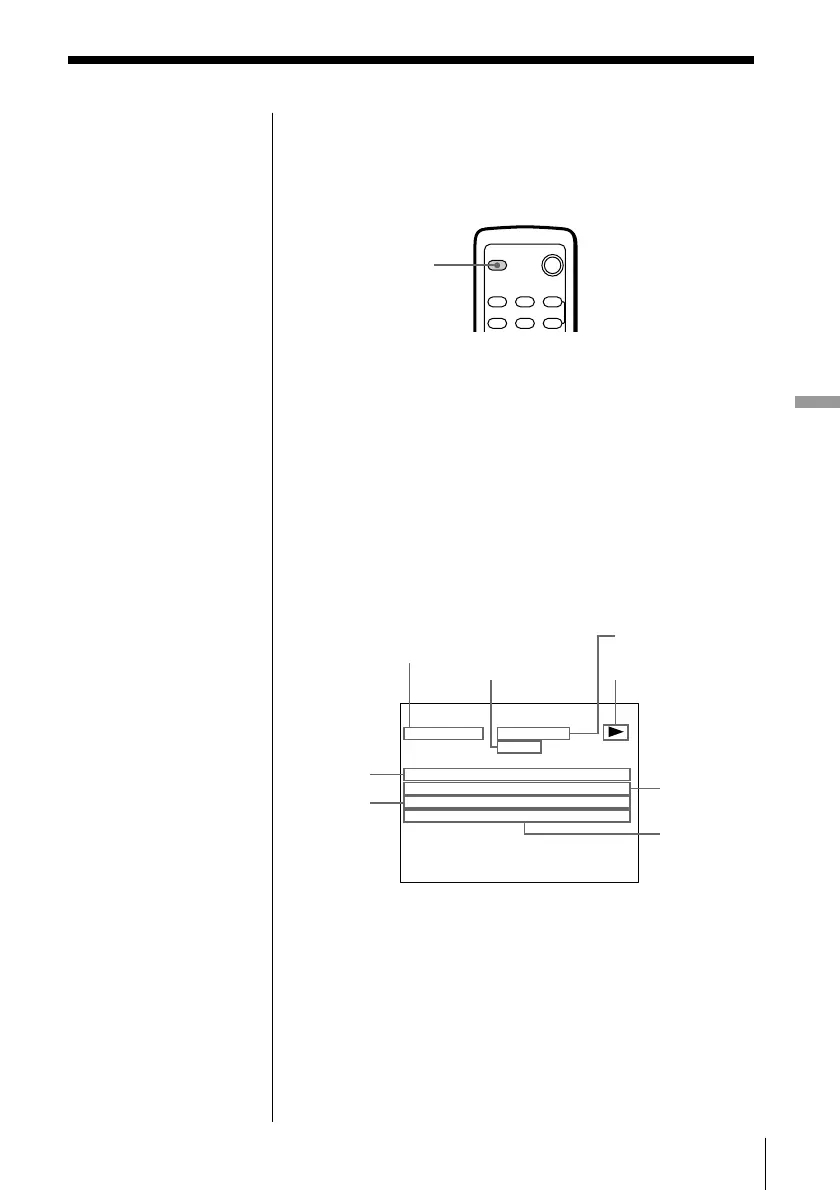
Using the on-screen display
You can check the operating status of the unit and the
information about the disc using the on-screen display
on the TV screen.
Press DISPLAY.
Each time you press the button, the on-screen display
changes as follows:
On-screen display on , On-screen display off
p Display information of the on-screen display
on mode
• During Continuous Play mode
During Shuffle Play or Programme Play, the remaining
time of the disc is not displayed.
Current
track
number/
total
number
of tracks
Playing status
Playing
time of the
current
track
Remaining
time of the
current disc
Current play mode
Remaining
time of the
current track
IVDEOCD PBCOFF
PLAY
RT ACK / TOTAL : 2 / 2
RTACKPLAY: 0:01:26
RT ACK REMA I N : - 0 : 47 : 15
:-0:47:15
IDSCREMAIN
PBC status
(VIDEO CD only)
Disc type
DISPLAY



 To Next Page