60
Additional operations
You can make all the necessary settings for setup and
connections for this unit using the INITIAL SETUP
menu.
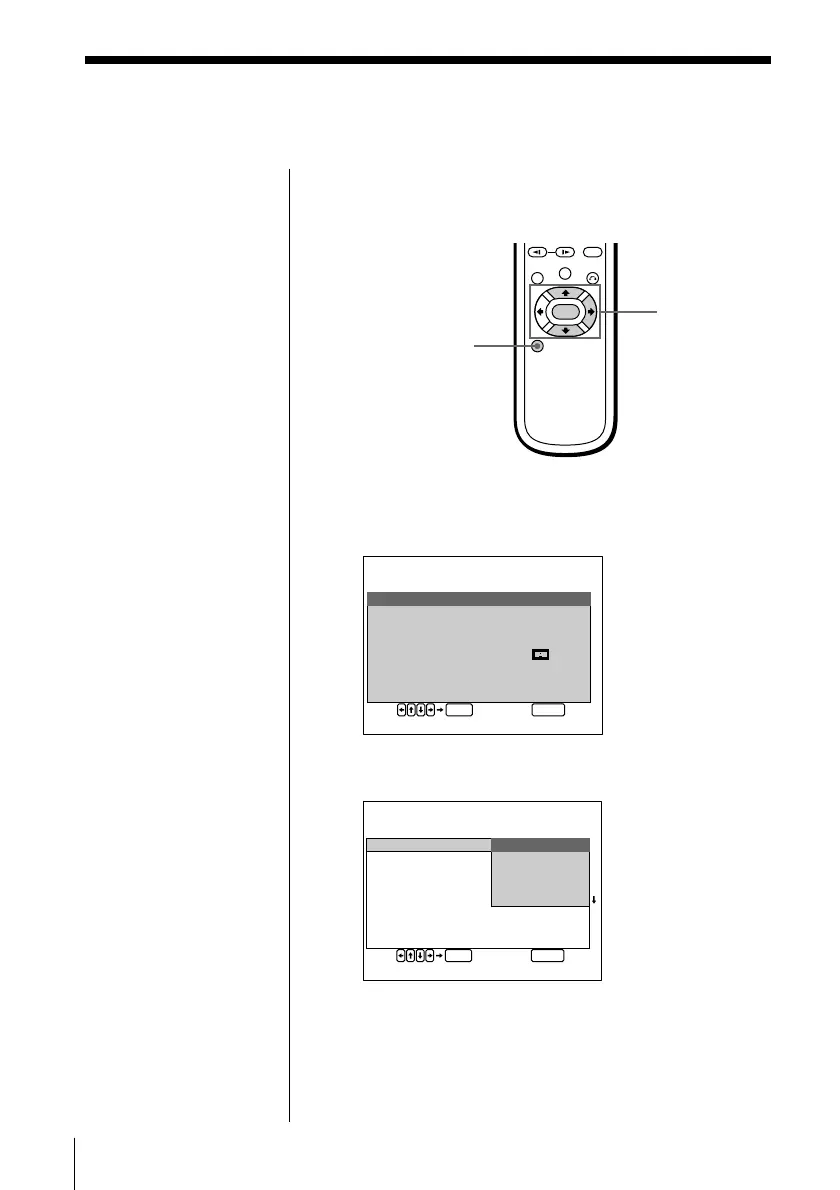
1 Press SETUP during stop playback.
The INITIAL SETUP menu appears on the TV
screen.
2 Select the item using >/., then press / or
ENTER.
3 Select the setting using >/., then press ENTER.
4 Press SETUP.
To cancel the Initial Setup midway
Press SETUP.
Basic settings (INITIAL
SETUP) Z
Note
Some items on “INITIAL
SETUP” require
operations other than
selecting the setting. For
details on these items, see
the relevant pages.
SETUP
>/.///ENTER
ENTER
SETUP
NIITIALSETUP
VDDMENU: ENGLISH
UADIO: ORIGINAL
USBTITLE: AU.FOLLOW
VTTYPE: 4:3
IDGITALOUT: D
-
PCM
APRENTAL: OFF
EST QUIT
ENTER
SETUP
NIITIALSETUP
VDDMENU: ENGL I SH
UADIO: DEUTSCH
USBTITLE: FRANÇAIS
ITALIANO
VT TYPE : NEDERLANDS
IDGITALOUT: D
-
PCM
APRENTAL: OFF
EST QUIT



 To Next Page