91
Additional Information
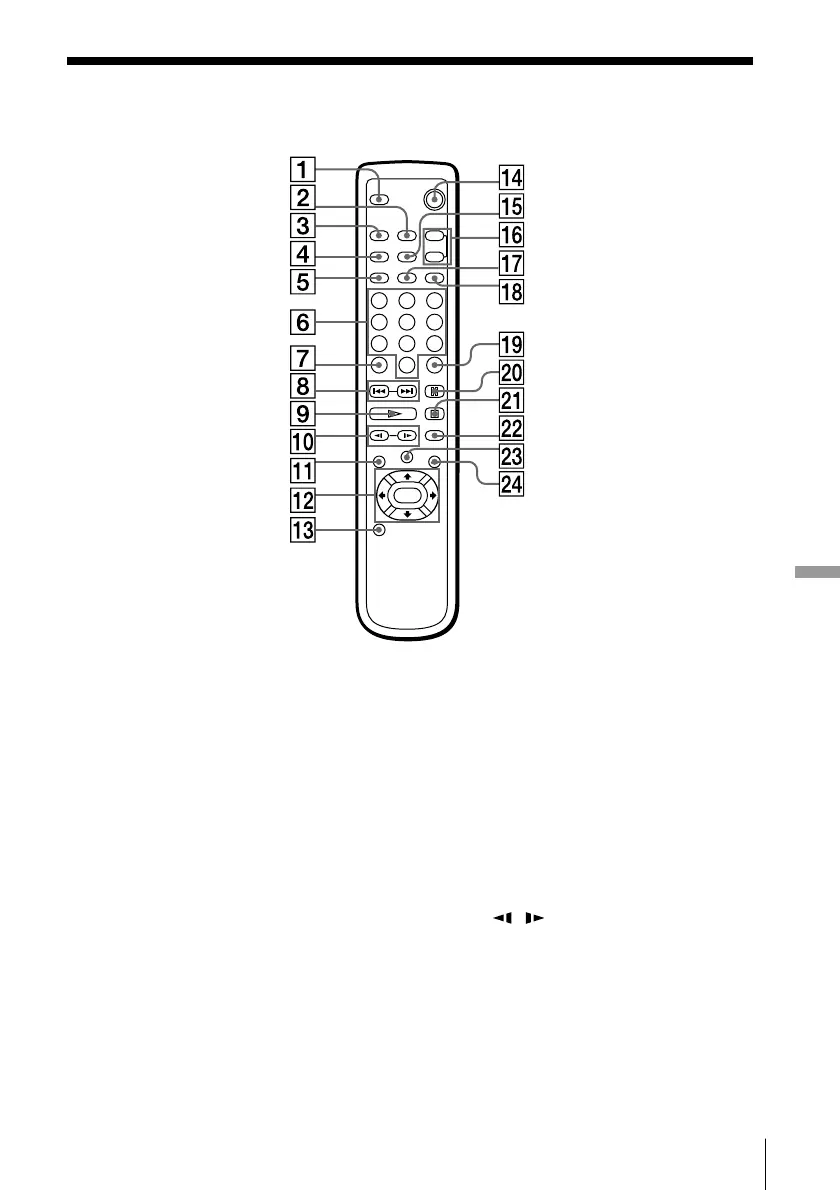
7 CLEAR button
Cancels the selected item.
8 = PREV/+ NEXT buttons
(31, 39)
Go back/forward to the
previous/next chapter or track,
or to search.
9 · PLAY button (30, 38)
Plays back a disc.
!º
/ SLOW buttons (31, 39)
Play a disc in slow motion.
!¡ DVD MENU button (34)
Displays the DVD menu on the
TV screen to set or adjust the
menu items.
Remote
312
645
978
0
1 DISPLAY button (35, 43)
Displays the current playing
status on the TV screen.
2 AUDIO button (55)
Changes the sound while
playing a DVD VIDEO, VIDEO
CD, or an audio CD.
3 ANGLE button (58)
Changes the angles when
playing a DVD VIDEO.
4 REPEAT button (45, 46, 47)
Repeats playback.
5 A–B button (48)
Repeats a specific portion.
6 Number buttons
Select the items or settings.
(continued)



 To Next Page