Help Guide
Linear PCM Recorder
PCM-A10
Starting recording slightly in advance (PRE REC)
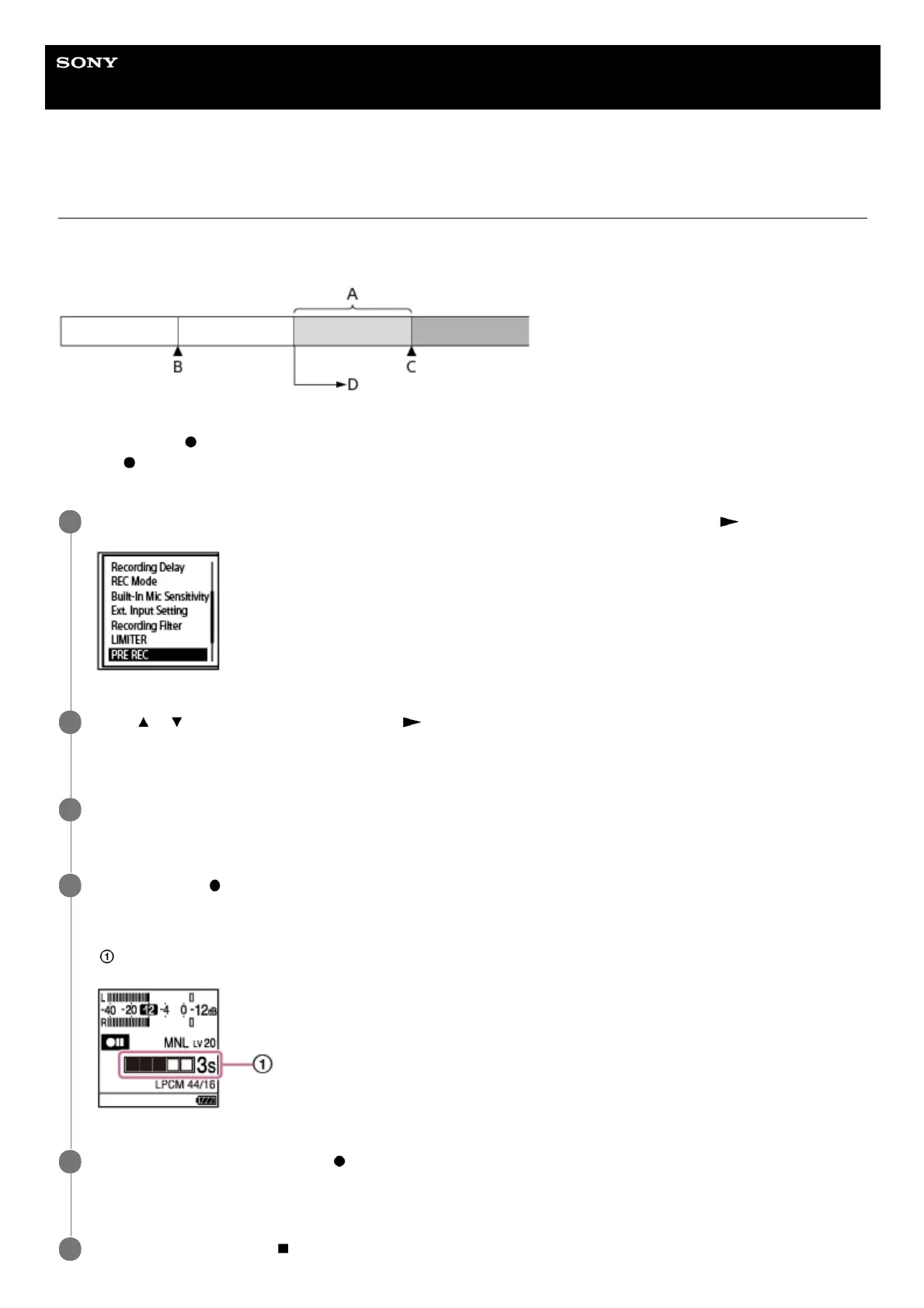
The Pre-recording function starts recording up to 5 seconds before you start recording. This function comes in handy
when you do not want to miss the beginning of a sudden recording event, such as an interview or an outdoor recording.
A: About 5 seconds of the ongoing audio stream is buffered.
B: Press and hold
REC/PAUSE to make the recorder pause for recording.
C: Press
REC/PAUSE.
D: Recording start.
While recording is on standby, select [PRE REC] on the OPTION menu, and then press
.
1
Press
or to select [ON], and then press .
[PRE REC] is set to [OFF] by default.
2
Select the memory storage (the built-in memory or the SD card) and the storage folder where you want to
store recorded files.
3
Press and hold
REC/PAUSE.
Your linear PCM recorder pauses for recording and up to 5 seconds of the ongoing audio stream is buffered in the
recorder's memory.
(
indicates the buffered time length.)
4
To start regular recording, press
REC/PAUSE.
Regular recording starts with the audio stream buffered in step 4 prefixed.
5
To stop recording, press
STOP.
6



 To Next Page