16
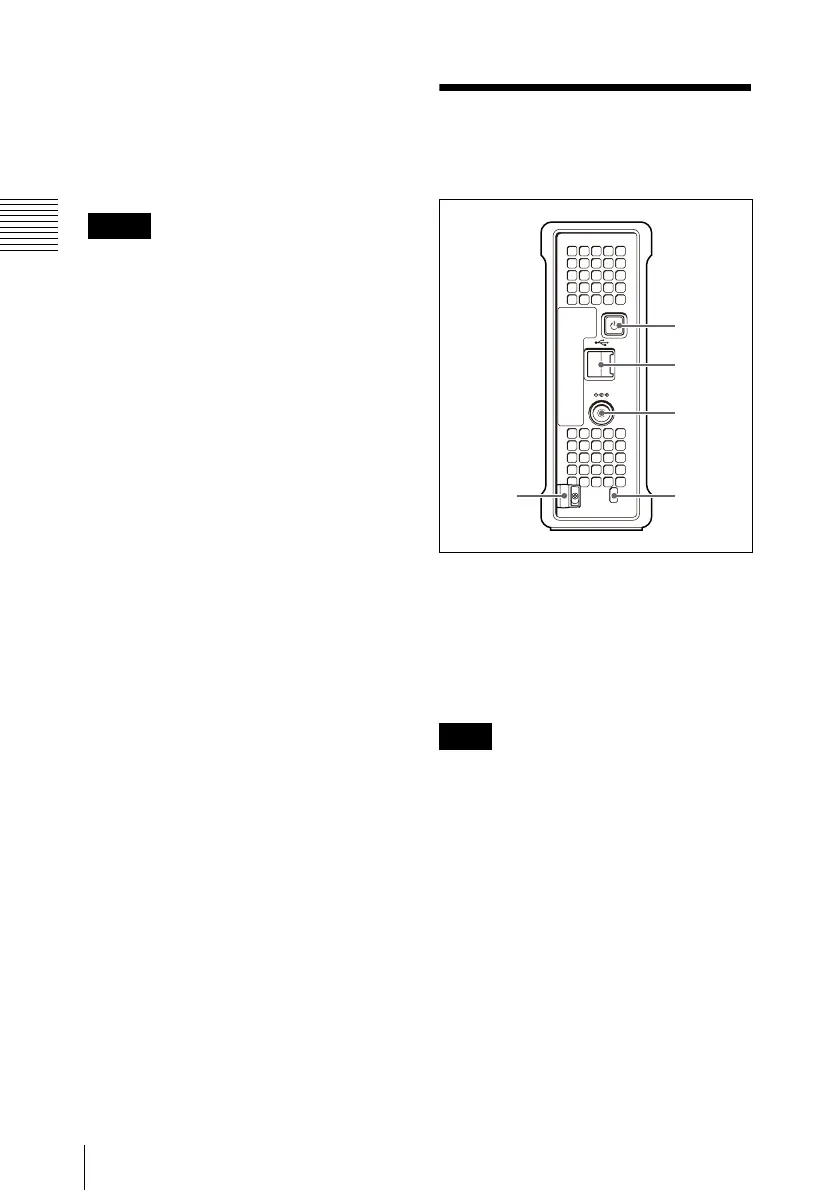
2-2 Rear Panel
Chapter 2 Names and Functions of Parts
For details, see 3-4-5 “To Eject Discs With the Unit
Powered Off” (page 21).
f EJECT button
Ejects a disc (see page 21).
• This button is disabled while the disc is
being accessed. Either stop accessing the
disc before ejecting, or eject by an
operation from the computer.
• When this unit is connected to a
Macintosh computer, this button is
disabled.
g Disc slot
With the label surface on the right, insert
the disc (see page 21).
2-2 Rear Panel
a 1 (power) button
This switches the power on and off.
b USB connector (Hi-speed USB)
Use the supplied USB cable to connect to
the computer.
If the video and audio are not output on a
computer connected using the USB
connector, try disconnecting the USB cable,
and reconnect making sure it is correctly
inserted.
c DC power inlet connector
Connect to the AC power using the supplied
AC adaptor and a power cord (not
supplied).
d Security slot
You can fit a commercially available
security cable into this slot.
Notes
Note
DC IN 12V
1
2
3
45


 To Next Page