21
3-4 Handling Discs
Chapter 3 Preparations
Storage
• Do not store discs where they may be
subjected to direct sunlight, or in other
places where the temperature or humidity
is high.
• Do not leave cartridges where dust may
be able to gain ingress.
• Store cartridges in their cases.
Care of the discs
• Remove dust and dirt on the outside of a
cartridge using a soft dry cloth.
• If condensation forms, allow ample time
to dry before use.
3-4-3 Write-Protecting
Discs
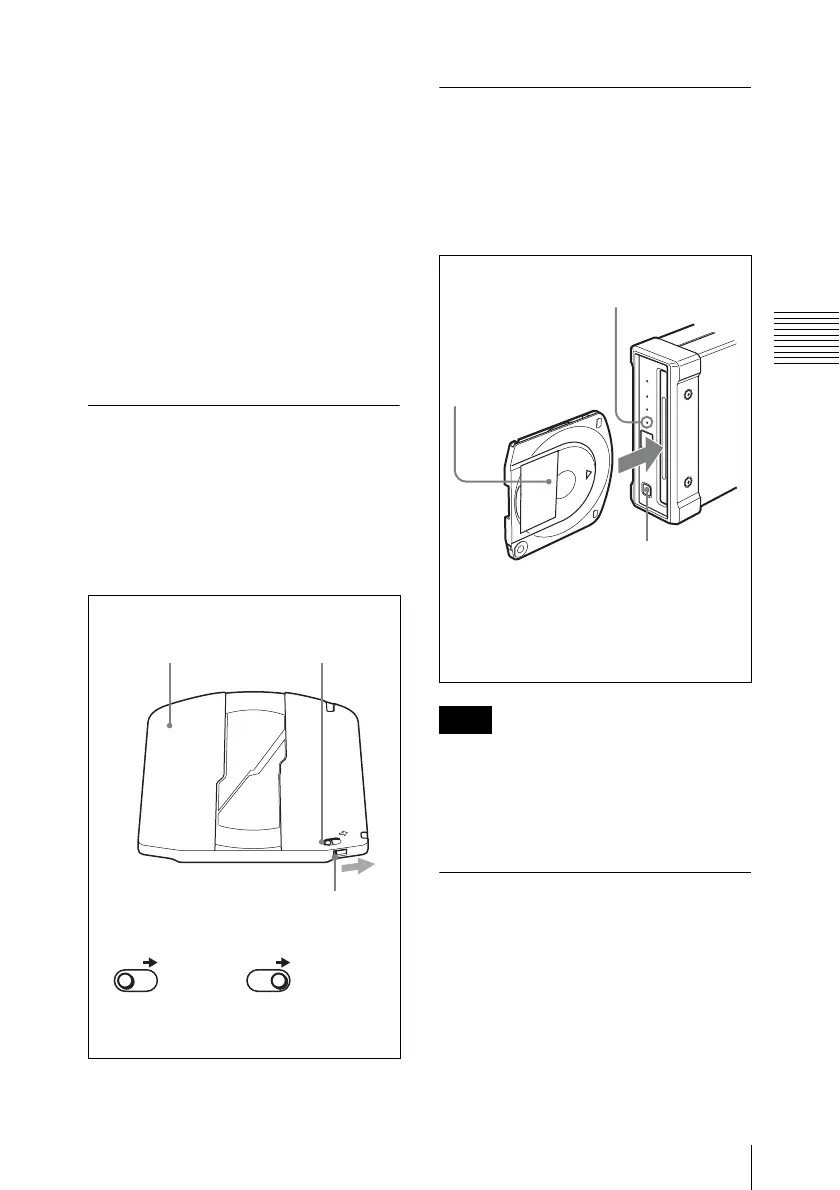
To protect the content recorded on the disc
from accidental erasure, move the write-
protect tab on the lower surface of the disc
in the direction of the arrow, as shown in the
following figure.
3-4-4 Loading and
Unloading a Disc
To load and unload a disc, press 1 (power)
button to turn the unit on and light the
indicator, and follow the procedures
indicated in the next illustration.
If an unformatted disc is loaded to the unit
when the unit is connected to a Macintosh
computer, select U1 Utility > Eject from the
menu of the utility software to unload the
disc.
3-4-5 To Eject Discs With
the Unit Powered Off
When the power is not supplied, it may not
be possible to eject discs by pressing the
EJECT button. In these situations, you can
use the following as an emergency
procedure to eject a disc manually.
1 Power the unit off.
SAVE
SAVE SAVE
Lower surface
of the disc
Write Inhibit tab
Slide in the direction
of the arrow
Write Inhibit
tab settings
Recording
enabled
Recording
disabled
Note
DISC IN indicator
To unload
Press the
EJECT button.
To load
With the label
surface on the right,
insert the disc.
The disc is drawn in.
When a disc is loaded, the DISC IN
indicator lights.


 To Next Page