Getting Started
12
US
1
2
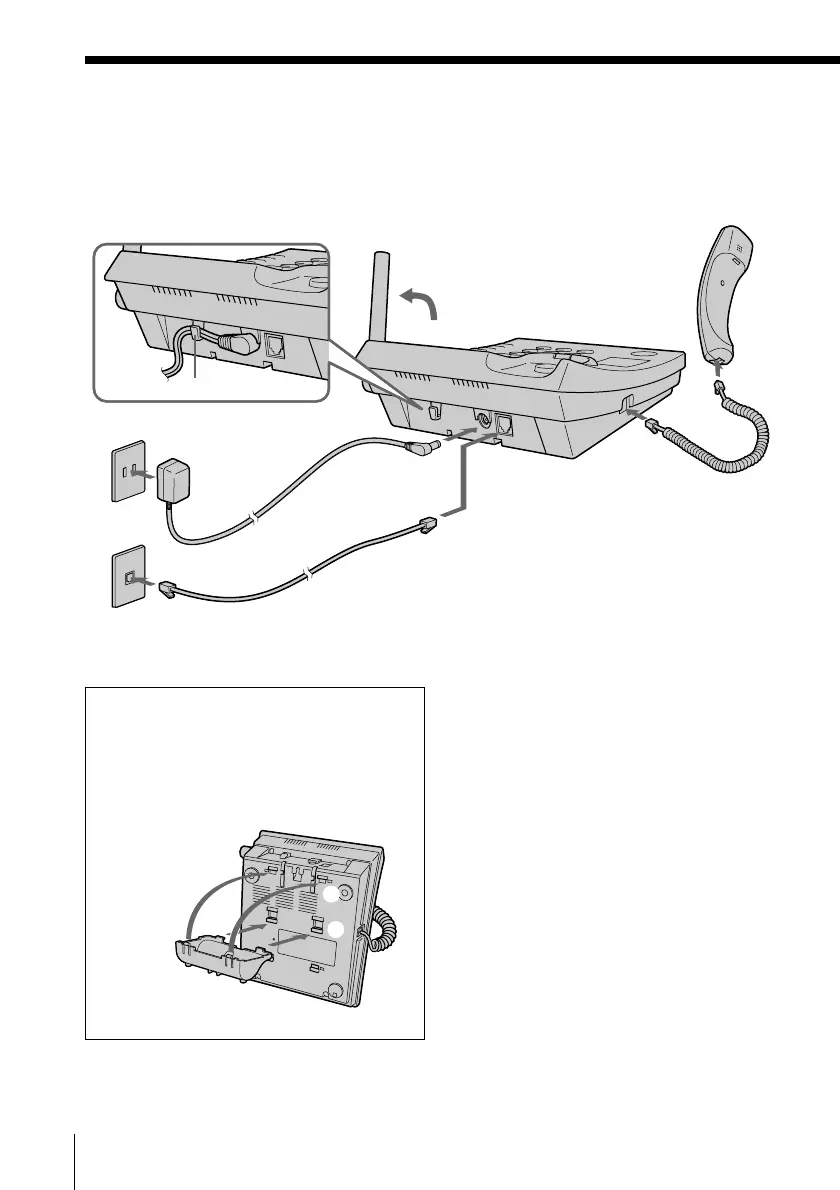
1 Connect the handset cord to the
HANDSET jack and to the
handset.
2 Connect the telephone line cord
to the LINE jack and to a
telephone outlet.
3 Connect the AC power adaptor
to the DC IN 9V jack and to an
AC outlet.
4 Raise the antenna. Make sure it
points towards the ceiling.
Connect the base phone
If you want to hang the base phone on the wall, see page 86.
Hook the cord.
To DC IN 9V
To LINE
AC power adaptor
(supplied
AC-T46)
Telephone line cord
(supplied)
4
To an AC outlet
3
To a telephone
outlet
2
To
HANDSET
1
To tilt the phone
If you want to tilt the phone, attach the
supplied wall bracket on the bottom of
the base phone.
Align the
f marks.
Step 2: Setting up the base phone (continued)



 To Next Page