EasyManua.ls Logo

Sony PS-1350 - Section 1: Disassembly and Replacement; Bottom Plate, Case, and Motor Board Removal; Cartridge Replacement Procedure

Sony PS-1350
8 pages
Print Icon
To Next Page IconTo Next Page
To Previous Page IconTo Previous Page
Loading...
PS-1350/PS-2350
SECTION
1
DISASSEMBLY
AND
REPLACEMENT
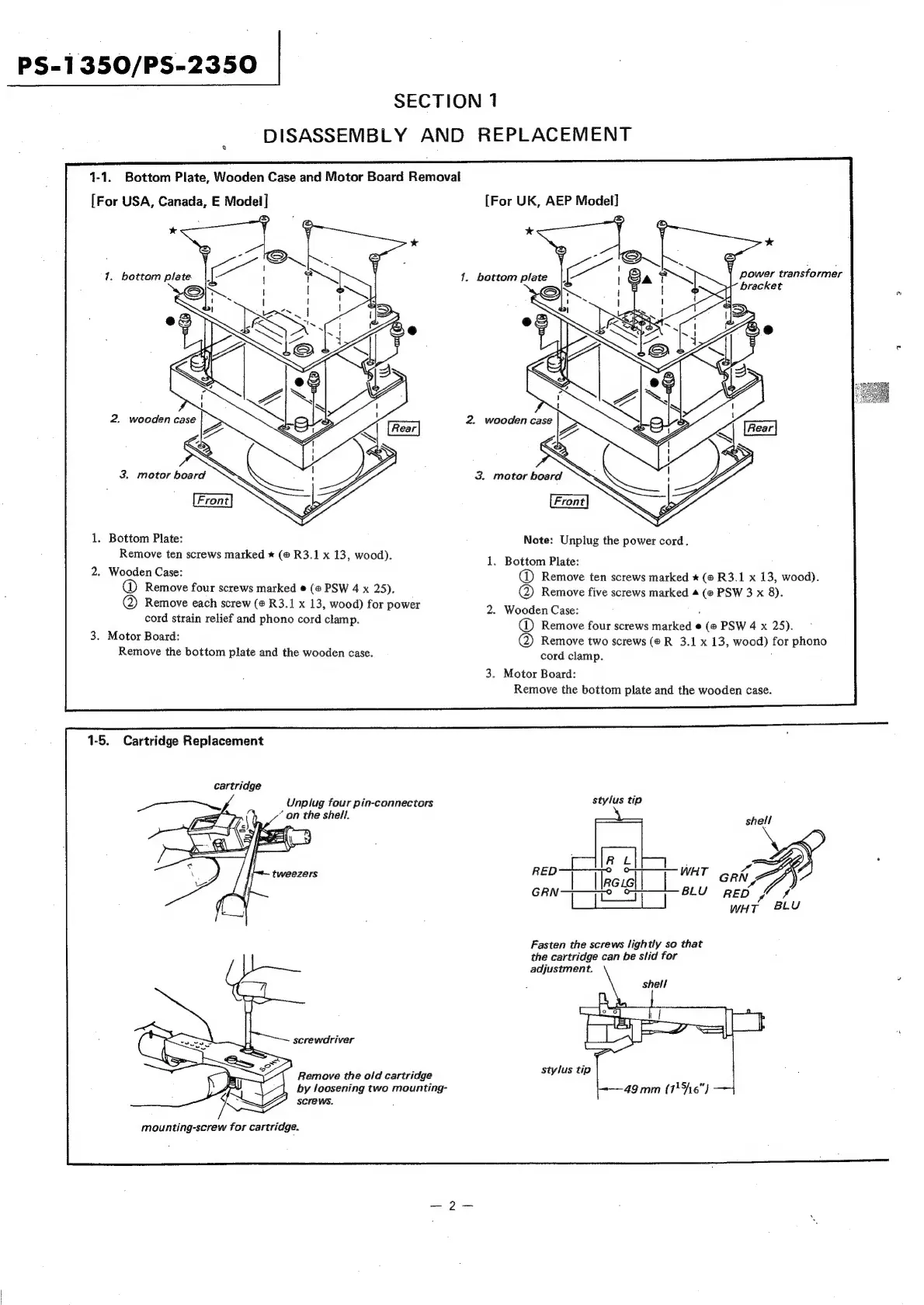
1-1.
Bottom
Plate,
Wooden
Case
and
Motor
Board
Removal
[For
USA,
Canada,
E
Model]
[For
UK,
AEP
Model]
3.
motor
board
1.
Bottom
Plate:
Note:
Unpiug
the
power
cord.
Remove
ten
screws
marked
*
(@
R3.1
x
13,
wood).
1.
Bottom
Plate:
2.
Wooden
Case:
Remove
ten
screws
marked
*
(@
R3.1
x
13,
wood).
@
Remove
four
screws
marked
@
(@
PSW
4
x
25).
@
Remove
five
screws
marked
4
(@
PSW
3
x
8).
@
Remove
each
screw
(#
R3.1
x
13,
wood)
for
power
2.
Wooden
Case:
cord
strain
relief
and
phono
cord
clamp.
@
Remove
four
screws
marked
@
(@
PSW
4
x
25).
3.
Motor
Board:
Remove
two
screws
(®R
3.1
x
13,
wood)
for
phono
Remove
the
bottom
plate
and
the
wooden
case.
cord
clamp.
3.
Motor
Board:
Remove
the
bottom
plate
and
the
wooden
case.
1-5.
Cartridge
Replacement
cartridge
ae,
Unplug
four
pin-connectors
stylus
tip
z
“on
the
shell.
shell
tweezers
WHT
GRIN,
BLU
RED
~/
#
wHT
8LU
Fasten
the
screws
lightly
so
that
the
cartridge
can
be
slid
for
adjustment.
screwdriver
Remove
the
old
cartridge
stylus
tip
by
loosening
two
mounting-
screws.
49mm
(1
\6"}
mounting-screw
for
cartridge.

Related product manuals