EasyManua.ls Logo

Sony PS-LX430 - Tone Arm Balance and Stylus Force

Sony PS-LX430
26 pages
Print Icon
To Next Page IconTo Next Page
To Previous Page IconTo Previous Page
Loading...
PS-LX430/430C€/431/431N/433
SECTION
3
3-1.
MECHANICAL
ADJUSTMENTS
ADJUSTMENTS
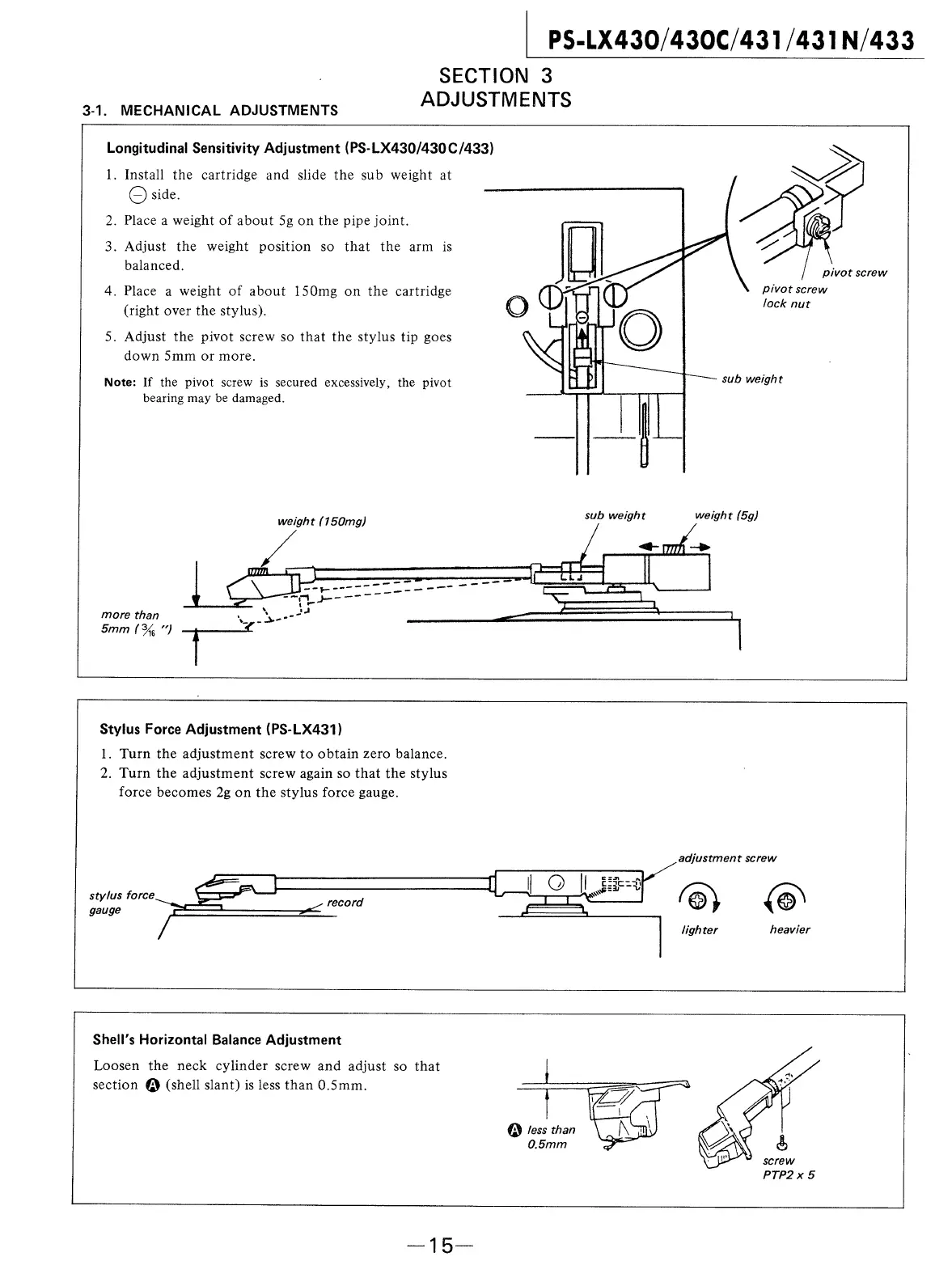
Longitudinal
Sensitivity
Adjustment
(PS-LX430/430C/433)
1.
Install
the
cartridge
and
slide
the
sub
weight
at
sy
CO
side.
.
Place
a
weight
of
about
5g
on
the
pipe
joint.
.
Adjust
the
weight
position
so
that
the
arm
is
a
balanced.
pivot
screw
Pivot
screw
.
Place
a
weight
of
about
150mg
on
the
cartridge
lock
nut
(right
over
the
stylus).
.
Adjust
the
pivot
screw
so
that
the
stylus
tip
goes
down
5mm
or
more.
Note:
If
the
pivot
screw
is
secured
excessively,
the
pivot
sub
weight
bearing
may
be
damaged.
weight
(150mg)
sub
weight
weight
(5g)
More
than
5
5mm
(%
“)
tT
Stylus
Force
Adjustment
(PS-LX431)
1.
Turn
the
adjustment
screw
to
obtain
zero
balance.
2.
Turn
the
adjustment
screw
again
so
that
the
stylus
force
becomes
2g
on
the
stylus
force
gauge.
adjustment
screw
‘ey
lighter
heavier
Shell’s
Horizontal
Balance
Adjustment
Loosen
the
neck
cylinder
screw
and
adjust
so
that
section
@)
(shell
slant)
is
less
than
0.5mm.
@)
Jess
than
0.5mm
screw
PTP2x5

Related product manuals