EasyManua.ls Logo

Sony PS-LX430 - Mechanical Adjustments; Stylus Height Adjustment

Sony PS-LX430
26 pages
Print Icon
To Next Page IconTo Next Page
To Previous Page IconTo Previous Page
Loading...
PS-LX430/430€/431/431N/433
Stylus
Height
Adjustment
Note:
Perform
both
adjustment
for
manual
and
automatic
operations.
1.
Automatic
1)
Put
a
test
record
on
the
mat.
2)
Depress
the
lifter
lever
to
make
a
lifterdown
mode.
3)
Move
the
tonearm
to
out
of
groove
at
record
by
hand.
4)
Rotate
the
turntable
by
hand
and
at
make
tonearm
lead-in.
5)
Move
the
tonearm
to
out
of
groove
of
record
by
hand
again.
6)
Rotate
the
turntable
by
hand
and
make
the
tonearm.
7)
Then,
loosen
the
adjustment
screw
(A)
and
adjust
the
height
of
the
tonearm
lifter
so
that
the
stylus
height
becomes
in
4
8mm.
8)
Rotate
the
turntable
by
hand
slowly
and
move
the
tonearm
to
the
most
outer
groove
of
record.
9)
Confirm
that
stylus
height
becomes
in
4—8mm.
2.
Manual
1)
Put
a
test
record
on
the
mat.
2)
Move
the
tonearm
to
out
of
groove
of
record
by
hand.
3)
Rotate
the
turntable
by
hand
and
make
the
tonearm
lead-in.
4)
Raise
the
lifter
lever
to
make
a
lifter-up
mode.
5)
Move
the
tonearm
until
most
outer
groove
of
record
by
hand.
6)
Adjust
the
adjustment
screw
(B)
so
that
the
stylus
height
becomes
in
4—8mm.
7)
Move
the
tonearm
to
the
out
of
groove
of
record
by
hand.
Confirm
that
stylus
height
becomes
in
4—8mm.
8)
Rotate
the
turntable
by
hand
and
return
the
tonearm
to
arm
rest.
9)
After
the
adjustment,
lock
the
portion
@
with
suitable
locking
compound.
Note:
@
Stylus
height
difference
should
be
within
2mm,
between
automatic
and
manual
operation.
When
the
arm
returns.
®
The
tonearm
should
be
not
contact
with
the
top
part
of
the
rest
when
the
tonearm
returns.
—17-
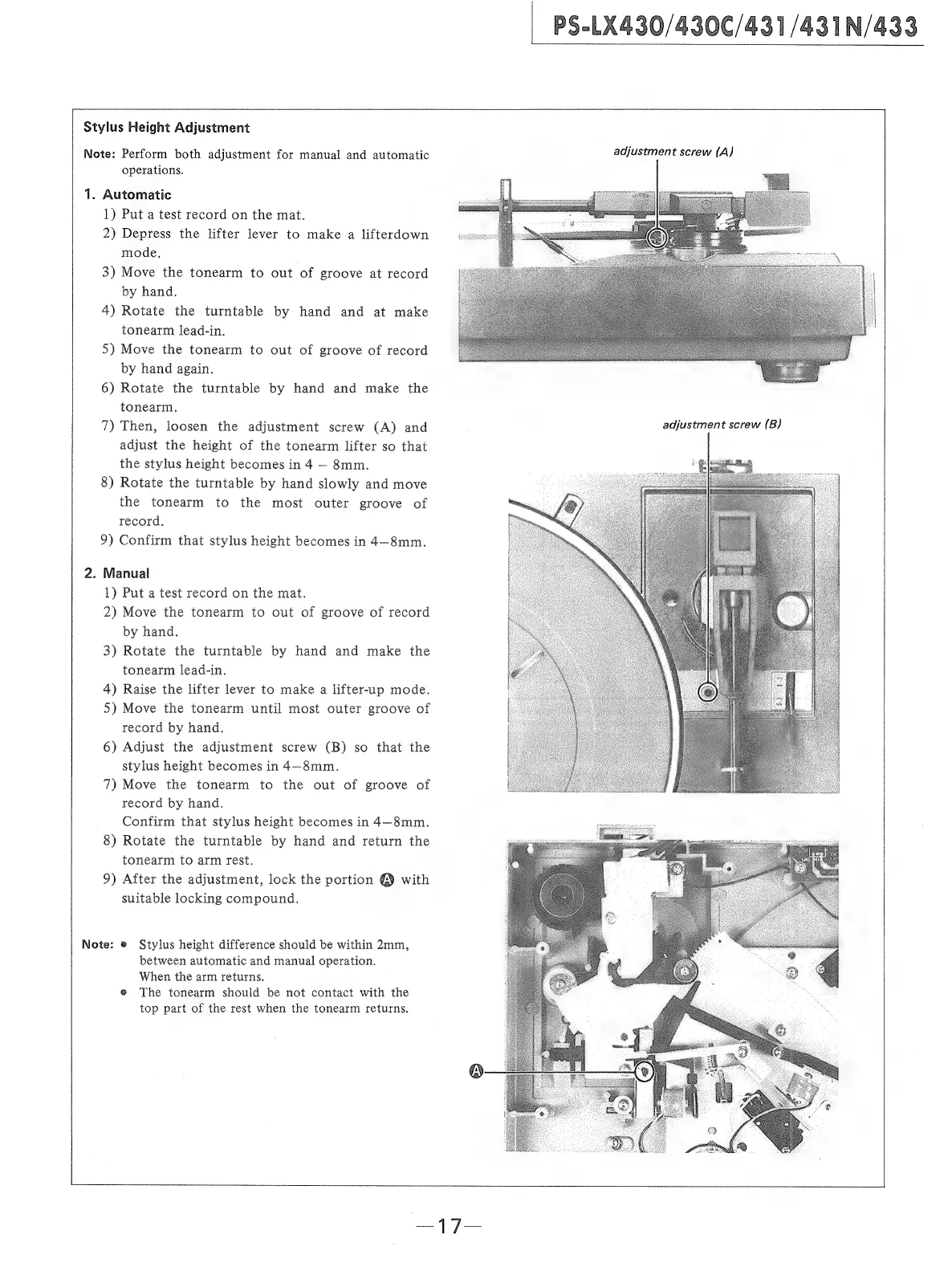
adjustment
screw
(A)
adjustment
screw
(B)

Related product manuals