EasyManua.ls Logo

Sony PS-Q7 - MANUAL PLAY; REPLACING THE STYLUS

Sony PS-Q7
10 pages
Print Icon
To Next Page IconTo Next Page
To Previous Page IconTo Previous Page
Loading...
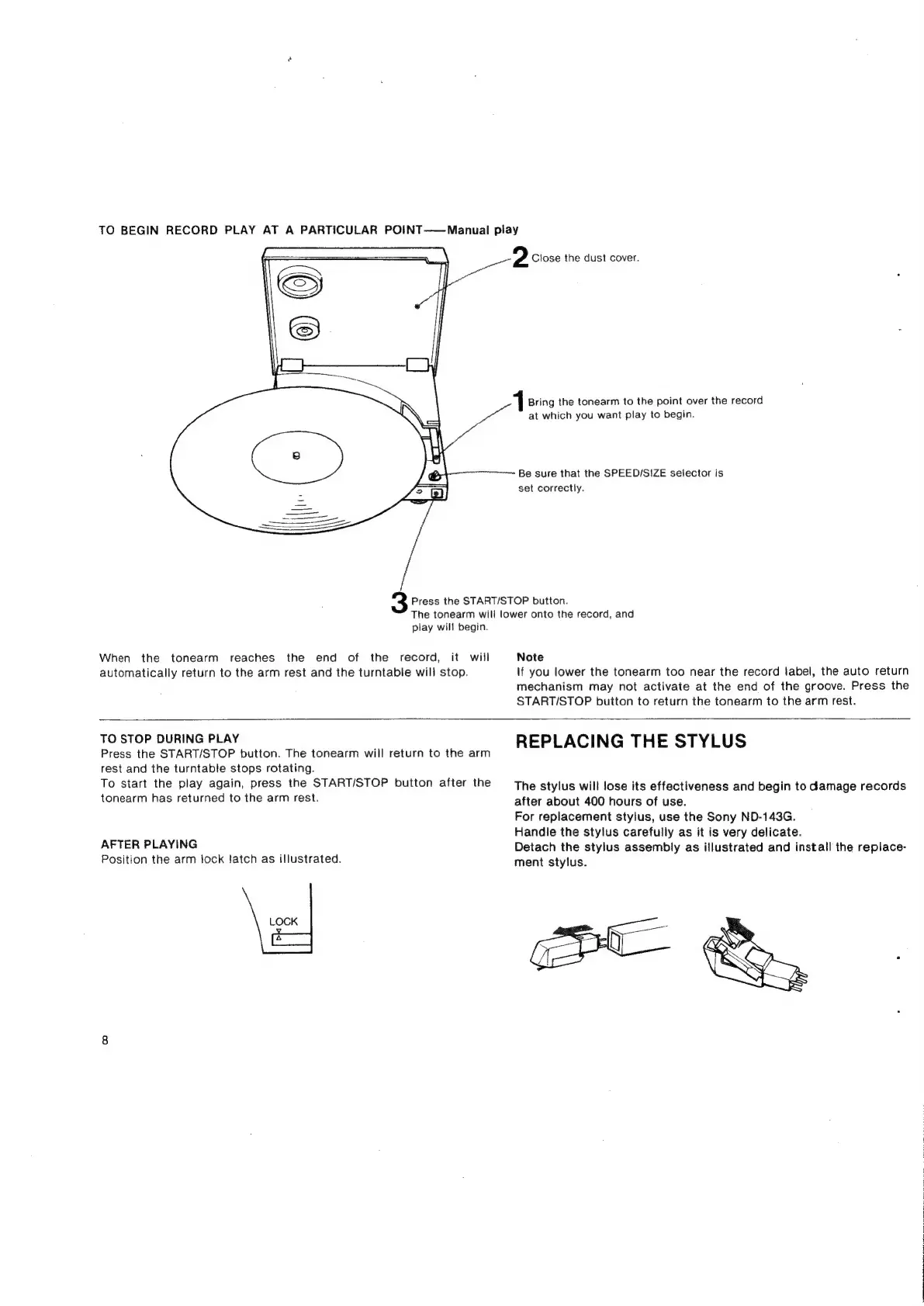
TO
BEGIN
RECORD
PLAY
AT
A
PARTICULAR
POINT——
Manual
play
2
Close
the
dust
cover.
Bring
the
tonearm
to
the
point
over
the
record
at
which
you
want
play
to
begin.
Be
sure
that
the
SPEED/SIZE
selector
is
set
correctly.
Press
the
START/STOP
button.
The
tonearm
will
lower
onto
the
record,
and
play
will
begin.
When
the
tonearm
reaches
the
end
of
the
record,
it
will
Note
automatically
return
to
the
arm
rest
and
the
turntable
will
stop.
lf
you
lower
the
tonearm
too
near
the
record
label,
the
auto
return
mechanism
may
not
activate
at
the
end
of
the
groove.
Press
the
START/STOP
button
to
return
the
tonearm
to
the
arm
rest.
10
SFOP
BERING
PEAY
REPLACING
THE
STYLUS
Press
the
START/STOP
button.
The
tonearm
will
return
to
the
arm
rest
and
the
turntable
stops
rotating.
To
start
the
play
again,
press
the
START/STOP
button
after
the
The
stylus
will
lose
its
effectiveness
and
begin
to
damage
records
tonearm
has
returned
to
the
arm
rest.
after
about
400
hours
of
use.
For
replacement
stylus,
use
the
Sony
ND-143G.
Handle
the
stylus
carefully
as
it
is
very
delicate.
AFTER
PLAYING
Detach
the
stylus
assembly
as
illustrated
and
install
the
replace-
Position
the
arm
lock
fatch
as
illustrated.
ment
stylus.
LOCK

Related product manuals