000
1. Overview: Location and Function of Parts
5
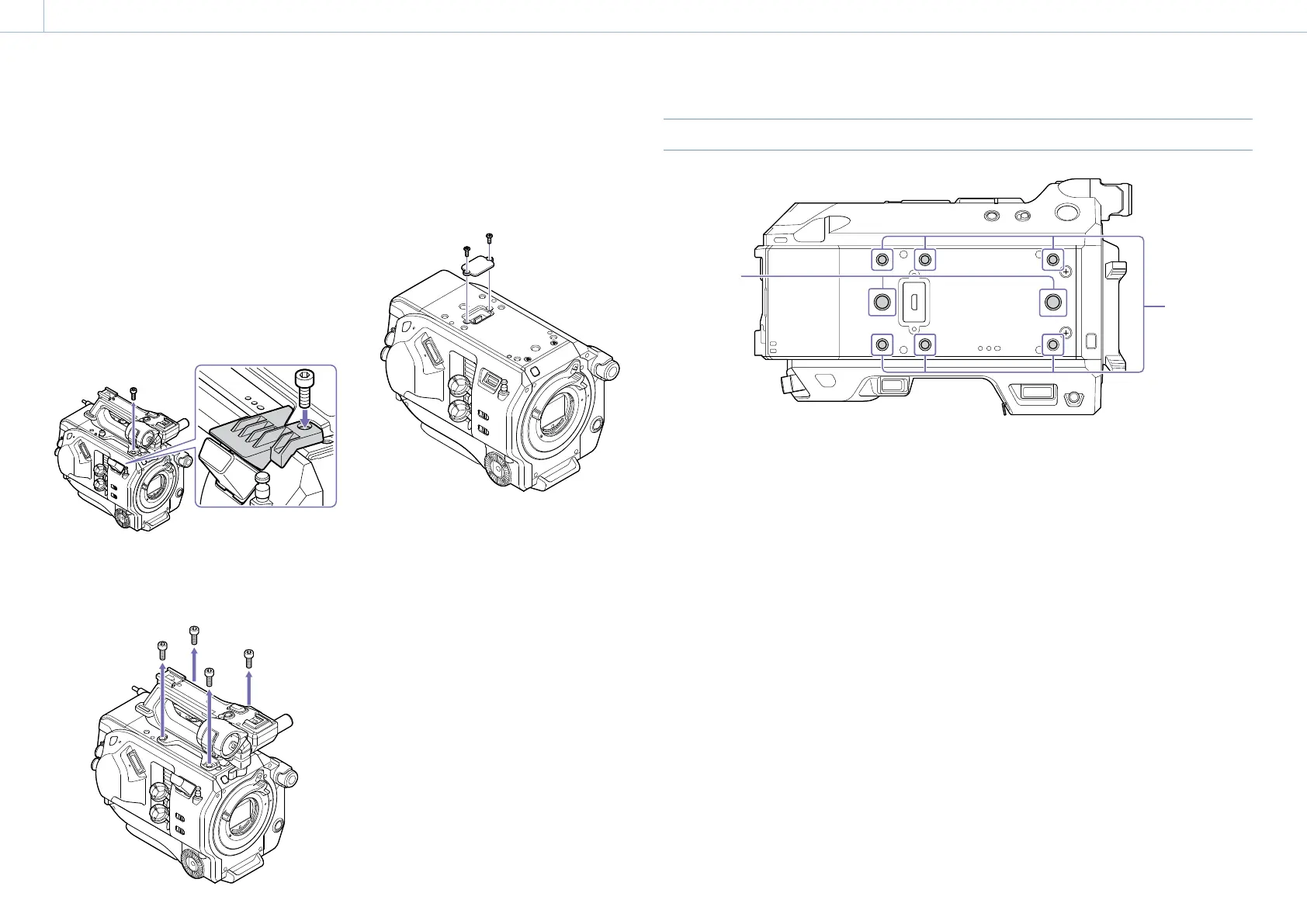
Removing the accessory shoe
Remove the show spring as described in step 1 in
“Attaching the accessory shoe” (page 4) unscrew
the four screws, and remove the accessory shoe.
Attaching the USB wireless LAN module guard
plate
1 Remove the handle attachment screw.
2 Attach the guard plate, and tighten the screw.
1
2
Removing the handle
Remove the four handle attachment screws, and
remove the handle from the camcorder.
Attaching the handle connector protective cap
(supplied)
When using the camcorder with the handle
removed, protect the connector using the
supplied protective cap.
Protecting the connector terminals
Attach the cover to unused connectors to protect
the connector terminals.
Top Side
1
2
1. Extension screw holes (3/8 inch)
Compatible with 3/8-16 UNC screws (length of
10.0 mm or less).
2. Extension screw holes (1/4 inch)
Compatible with 1/4-20 UNC screws (length of 7.0
mm or less).


 To Next Page