000
5. Menu Display and Settings: Setup Menu List
63
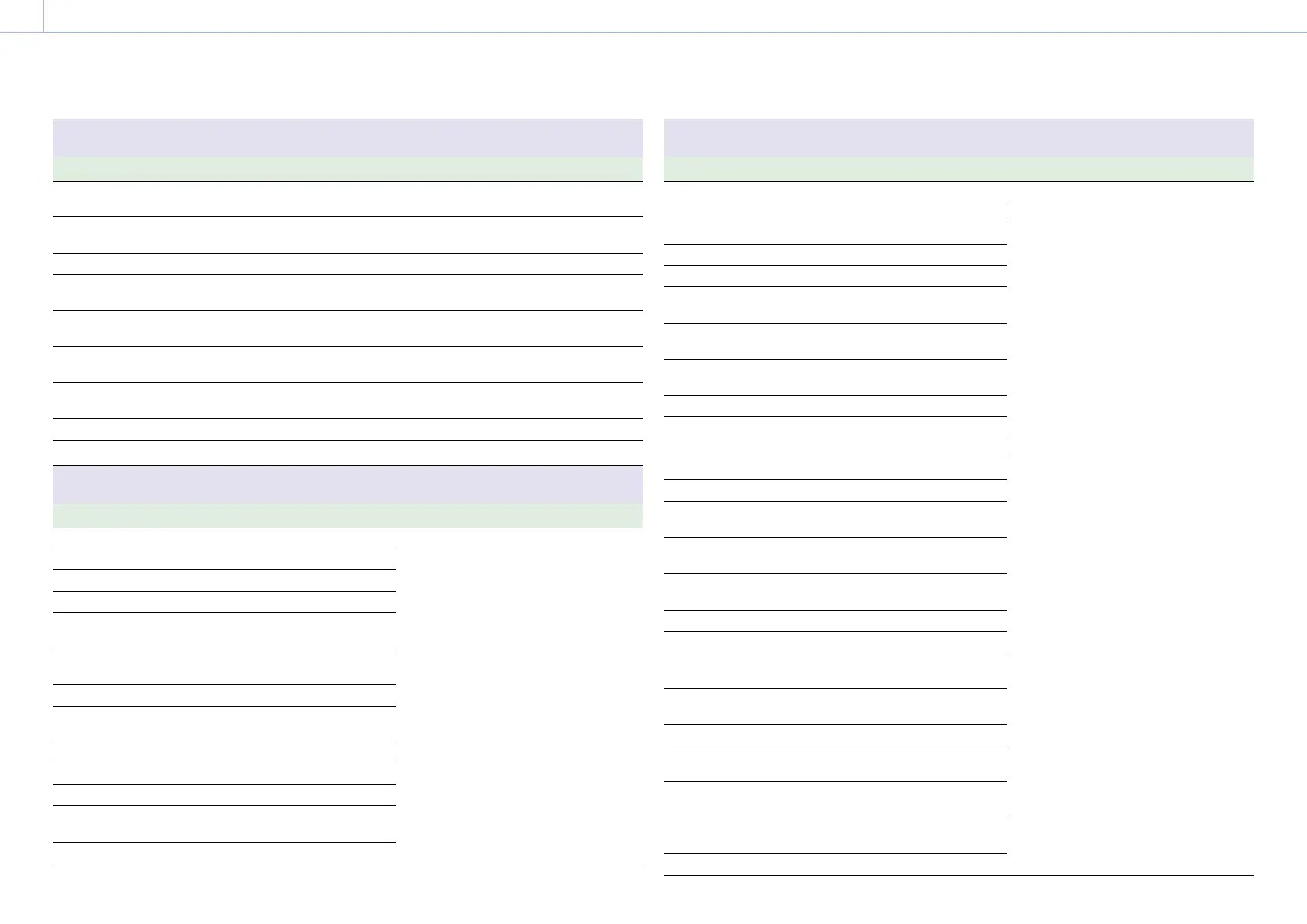
VF >Marker
Sets marker display settings.
Item Sub-item setting Description
Aspect Safety
Area
80% / 90% / 92.5% / 95% Selects the size of the aspect safety zone
marker (as a percentage of total screen size).
Aspect Select 4:3 / 1.66:1 / 1.85:1 / 2.35:1 / 2.4:1 Sets the mode when displaying the aspect
marker.
User Box On / Off Turns the box cursor display on/off.
User Box
Width
3 to 479 (240) Sets the box cursor width (distance from the
center to the left and right edges).
User Box
Height
3 to 269 (135) Sets the box cursor height (distance from the
center to the top and bottom edges).
User Box H
Position
–476 to +476 (0) Sets the horizontal position of the box cursor
center.
User Box V
Position
–266 to +266 (0) Sets the vertical position of the box cursor
center.
100% Marker On / Off Turns the 100% marker on/off.
Guide Frame On / Off Turns the guide frame display on/off.
VF >Display On/Off
Sets display item settings.
Item Sub-item setting Description
Setting On / Off Selects the items to display in the viewfinder.
Shutter Setting On / Off
ND Filter Value On / Off
Gain Setting On / Off
Rec/Play
Status
On / Off
HXR-IFR5 Rec
Control
On / Off
Color Temp. On / Off
Frame Rate /
Interval
On / Off
Battery Remain On / Off
Timecode On / Off
Audio Manual On / Off
Audio Level
Meter
On / Off
Media Status On / Off
VF >Display On/Off
Sets display item settings.
Item Sub-item setting Description
Focus Position Meter / Feet / Off Selects the items to display in the viewfinder.
Iris Position On / Off
Zoom Position Number / Bar / Off
SteadyShot On / Off
Focus Mode On / Off
Focus Area
Indicator
On / Off
Focus Area
Ind. (Push AF)
On / Off
Focus
Indicator
On / Off
Auto Shutter On / Off
AGC On / Off
Auto ND Filter On / Off
Auto Iris On / Off
AE Mode On / Off
Auto Exposure
Level
On / Off
White Balance
Mode
On / Off
SDI/HDMI Rec
Control
On / Off
Rec Format On / Off
Gamma On / Off
Timecode
Lock
On / Off
Wi-Fi
Condition
On / Off
Clip Name On / Off
Focus Assist
Indicator
On / Off
Focus Area
Marker
On / Off
Video Level
Warning
On / Off
Clip Number On / Off



 To Next Page