116
US
Guide to Parts and Controls
For more information, see the pages in parentheses.
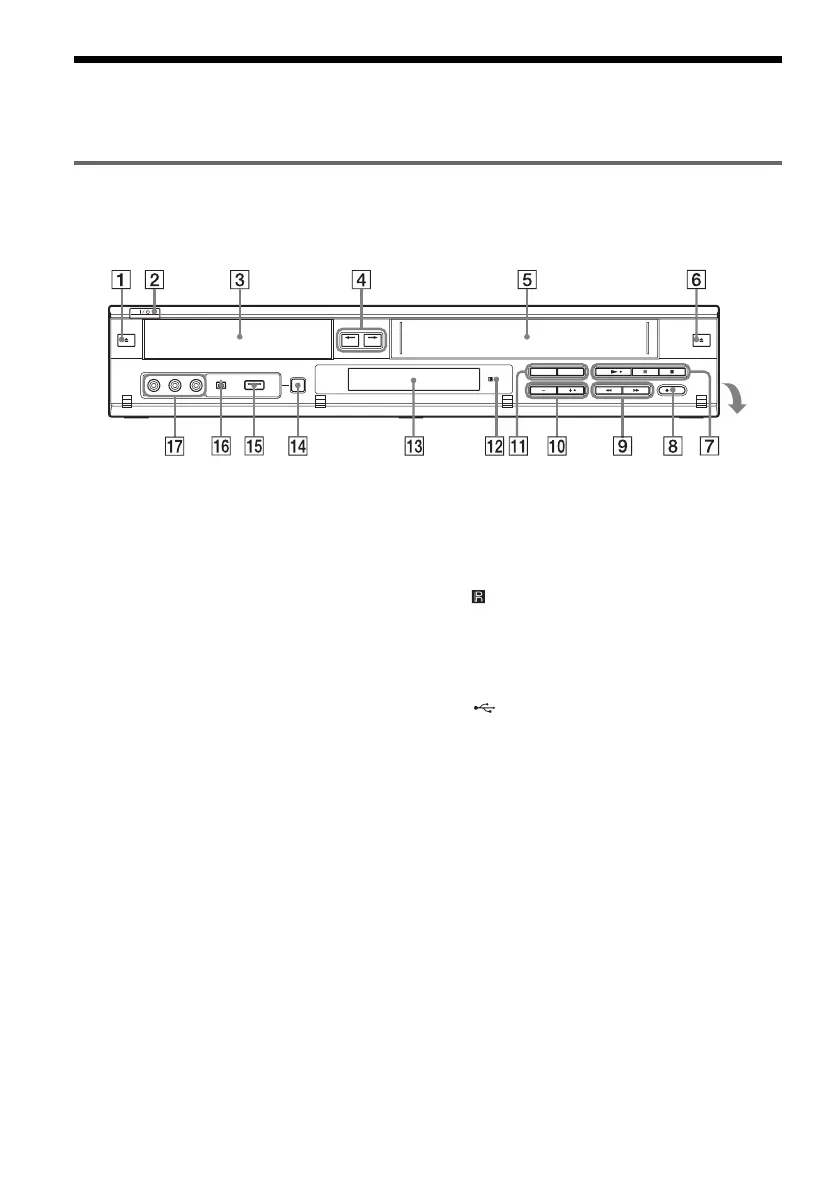
Front panel
Buttons on the recorder have the same function as the buttons on the remote if they have the same or
similar names.
A Z (open/close) button (34, 49)
B "/1 (on/standby) switch (23)
C Disc tray (34, 49)
D ONE-TOUCH DUBBING
(DVD) T VIDEO button (83)
DVD t (VIDEO) button (84)
E Tape compartment (68, 75)
F Z (eject) button (68)
G N (play) button (34, 68)
X (pause) button (35, 49, 70, 75)
x (stop) button (34, 49, 68, 75)
H z REC (record) button (49, 75)
I m/M (fast-reverse/fast-forward)
buttons (36)
J CHANNEL/TRACKING +/– buttons*
1
*
2
(49, 69, 75)
K SELECT DVD/VIDEO buttons (34, 49, 68,
75)
L (remote sensor) (21)
M Front panel display (41, 72)
N ONE-TOUCH DUBBING button (87, 90,
91, 93)
O (USB) jack (89)
P DV IN jack (86)
Q LINE 2 IN (VIDEO/AUDIO L (MONO)/
R) jacks (27)
*1
The CHANNEL/TRACKING + button has a tactile
dot. Use the tactile dot as a reference.
*2
The CHANNEL +/– buttons are used for channel
selection when the set top box control is turned on
(page 12).
Open the
cover













 To Next Page