VCR Recording
77
US
VCR Timer Recording From
Connected Equipment
You can set the timer for a total of 12 programs
together with DVD and VCR timer recording, up
to one month in advance.
If you record from connected equipment that has a
timer function, you can use the Synchro Rec
function (page 80).
Note
Do not operate your cable box or satellite receiver just
before or during a timer recording. This may prevent the
accurate recording of a program.
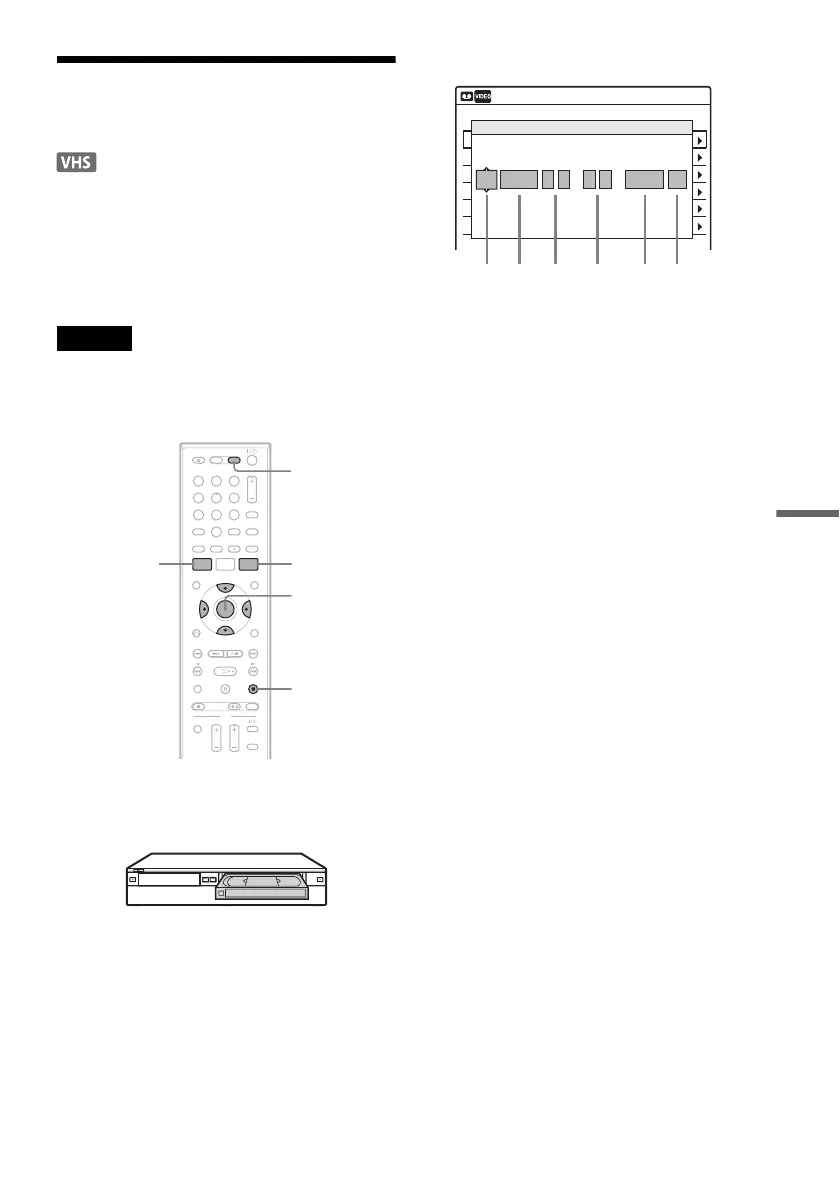
1 Press VIDEO to operate the VCR.
2 Insert a tape with its safety tab in place.
3 Press TIMER.
4 Select an item using </, and adjust
using M/m.
A “Media”: Select “VCR.”
B “Date”: Sets the date using M.
To record the same program every day or
the same day every week, press m.
The item changes as follows:
Today y Sun-Sat (Sunday to Saturday)
y Mon-Sat (Monday to Saturday) y
Mon-Fri (Monday to Friday) y Sun
(every Sunday) y Mon (every Monday)
y … y Sat (every Saturday) y
1 month later y … y Today
C “Start”: Sets the start time.
D “End”: Sets the stop time.
E “Ch”: Selects the channel or input
source.
• When using the cable box/satellite
receiver control, select the channel.
• When not using the cable box/satellite
receiver control, select the input, LINE1
or LINE2. Select the channel on the
connected cable box/satellite receiver’s
side before the timer recording starts.
F “Mode”: Selects the recording mode;
“SP” or “EP.” To use the Rec Mode
Adjust function (page 78), select
“AUTO.”
If you make a mistake, select the item and
change the setting.
5 Press ENTER.
The Timer List menu (page 79) appears. The
c indicator lights up in the front panel
display, and the recorder is ready to start
recording.
11 22 33
44 55 66
77 88
00
99
M/m/</,,
ENTER
SYSTEM
MENU
TIMER
x STOP
VIDEO
01 VHS 4/15 09:00PM 10:00PM CH8
--- --/-- --:-- --:-- ---- ---04
--- --/-- --:-- --:-- ---- ---05
--- --/-- --:-- --:-- ---- ---06
03 --- --/-- --:-- --:-- ---- ---
02 VHS 4/30 09:15PM 09:45PM CH11
10:10 AM
No Rec To Date Start End Source Mode Edit
No.01
: PM
VCR
PM
:
Today 09 00 10 00 Line1 SP
Timer – Standard
Media Date Start End Ch Mode
,continued













 To Next Page