16
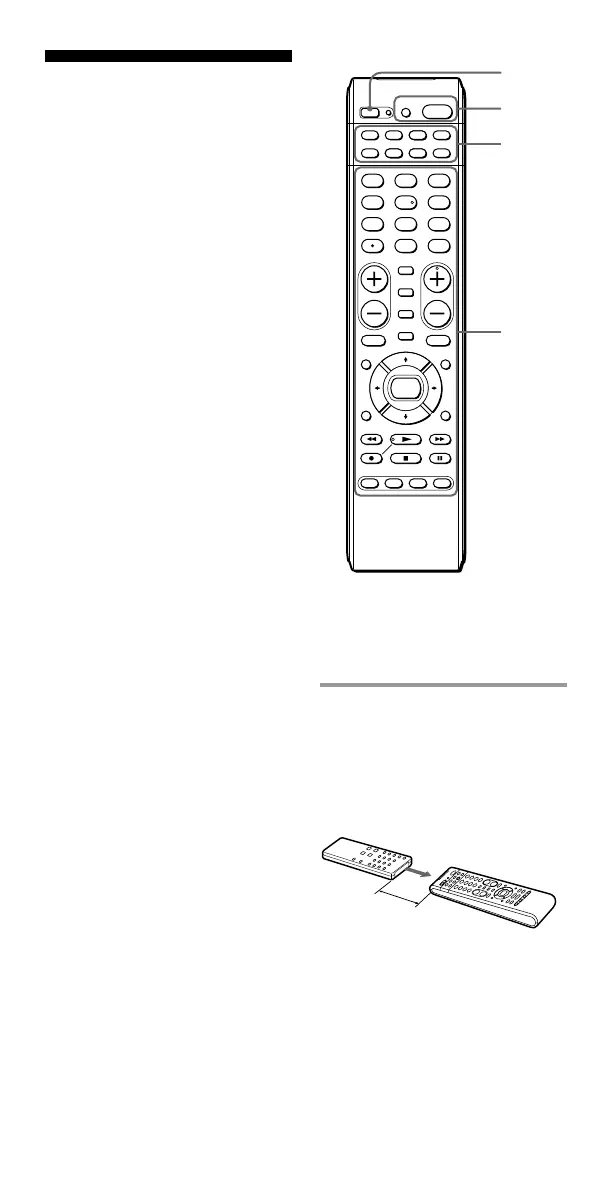
Example: To program the N
(Play) signal of your video
cassette recorder to the VCR N
(Play) button of the Commander
1 Place the RM-VL600 head
to head with your
component’s remote
control.
SET
POWER
SATDVDTV CBL
TAPE
CDVCR
1
VIDEO1
2
VIDEO2
3
AUX
4
TUNER
5
CD
6
TAPE
7
MD
8
TV
9
PHONO
VOL CH
0
DVD
DIGITAL
/ANALOG
TWIN VIEW
SLEEP
INFO
GUIDE MENU
EXIT
TOOLS
SYSTEM CONTROL
RECALL
MUTING
AMP
ENT
OK
ABCD
TV/VIDEO
2,7
3
4
4
about 2 – 4 inches
(5 – 10 cm) away
Remote control for
your component
RM-VL600
Programming Signals
of Another Remote
Control — Learning
Function
To operate components or
functions which do not work even
if you set a component code
number, use the following
Learning procedure to “teach” any
of the programmable buttons of
the Commander to operate the
functions of another remote
control. You can also use the
Learning function to change the
signals of individual buttons after
setting the component code
number (page 10). It is
recommended that you make a
note of the “learned” key
functions. (It is possible to make a
note on the back of the supplied
“Component code numbers.”)
Notes
• Some specific remote control signals
may not be “learned.”
• You can also use a display monitor
for computer display (including a
built-in tuner type), if the
Commander is “learned.”



 To Next Page