32
Programming a
Series of Commands
on the Component
Select Buttons
As with the SYSTEM CONTROL
buttons, you can also program a
series of operating commands for
the Component Select buttons (up
to 16 steps).
To execute the commands
programmed on a Component
Select button by the System
Control function, press the button
for more than 2 seconds.
Notes
• When you press the button for less
than 2 seconds, it works as a normal
Component Select button, and the
programmed function does not work.
•
See also “Tips for programming the
System Control functions” on page 31.
Example: To program the
procedure on page 29 for the
VCR Component Select button
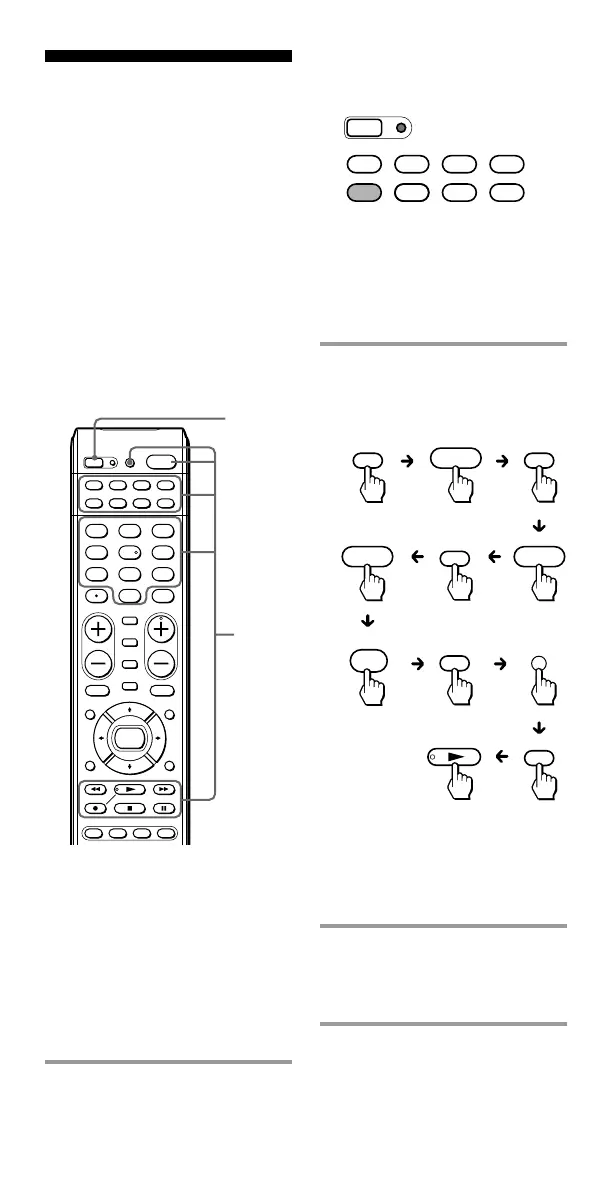
1 Press and while holding
SET, press the VCR
Component Select button.
SET
POWER
SATDVDTV CBL
TAPE
CDVCR
1
VIDEO1
2
VIDEO2
3
AUX
4
TUNER
5
CD
6
TAPE
7
MD
8
TV
9
PHONO
VOL CH
0
DVD
DIGITAL
/ANALOG
TWIN VIEW
SLEEP
INFO
GUIDE MENU
EXIT
TOOLS
SYSTEM CONTROL
RECALL
MUTING
AMP
ENT
OK
ABCD
TV/VIDEO
1,3
2
The SET indicator and the VCR
Component Select button lights
turn on.
If a Control Program function
(Component Macro) has
already been set on the button,
the button flashes twice. The
setting procedure is
automatically canceled.
2 Set the Control Program
function.
With this example, press the
buttons in sequence as below:
You can program up to 16
consecutive steps on each of
the Component Select buttons,
including the first step of
pressing to select a Component
Select button.
3 Press SET to complete the
programming.
The VCR Component Select
button light turns off.
SET
SATDVDTV CBL
TAPE
CDVCR AMP
POWER
TV
1
VCR
POWERPOWER
VCR
AMP
VIDEO1
TV
TV/VIDEO



 To Next Page