35
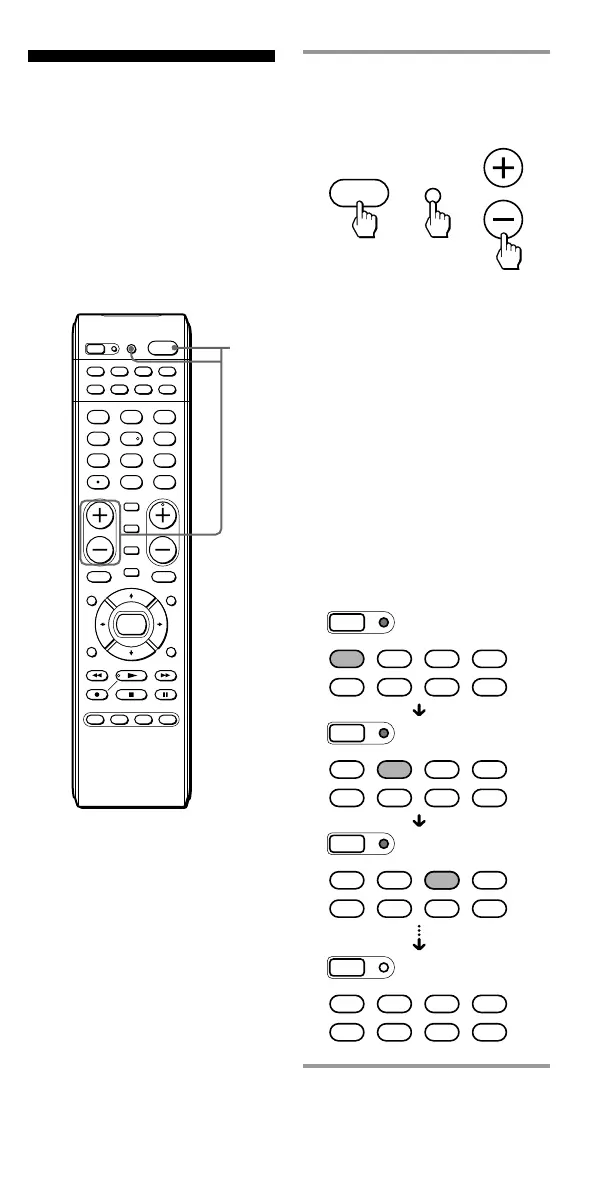
1 While holding POWER
pressed, press TV/VIDEO
and VOL –.
When pressing the POWER
button and the TV/VIDEO
button, all the Component
Select buttons go off. When
pressing the VOL – button
while holding down the
POWER button and the TV/
VIDEO button, the SET
indicator lights up and the
Component Select buttons light
up one by one. When the SET
indicator turns off at last, all
settings are cleared, and the
Commander returns to its
original state.
Erasing All Settings
— To reset the
Commander to its
factory settings
You can erase all remote control
signals programmed by the
“learned“ function to reset the
Commander to its factory settings.
SET
POWER
SATDVDTV CBL
TAPE
CDVCR
1
VIDEO1
2
VIDEO2
3
AUX
4
TUNER
5
CD
6
TAPE
7
MD
8
TV
9
PHONO
VOL CH
0
DVD
DIGITAL
/ANALOG
TWIN VIEW
SLEEP
INFO
GUIDE MENU
EXIT
TOOLS
SYSTEM CONTROL
RECALL
MUTING
AMP
ENT
OK
ABCD
TV/VIDEO
1
SET
SATDVDTV CBL
TAPE
CDVCR AMP
SET
SATDVDTV CBL
TAPE
CDVCR AMP
SET
SATDVDTV CBL
TAPE
CDVCR AMP
SET
SATDVDTV CBL
TAPE
CDVCR AMP
TV/VIDEO
POWER
VOL
+
+



 To Next Page