EasyManua.ls Logo

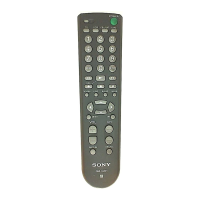
Sony RM RM-VL600 - Digital TV TUNER

Sony RM RM-VL600
52 pages
Print Icon
To Next Page IconTo Next Page
To Previous Page IconTo Previous Page
Loading...
47
KEY DISPLAY
9POWER
1qaw;
1 – 9, 0, ENT,
DOT
4INFO
(DISPLAY)
qfSLEEP
(FAVORITE)
qhMENU
qjf
qjF
qjG
qjg
qjOK
qdCH +/–
qgRECALL
6GUIDE
(EPG)
Digital TV TUNER
FUNCTION
To turn on and off.
To change the channel.
For example, to change
to channel 5, press 0 and
5 (or, press 5 and ENT).
To display the current
channel.
To use the “FAVORITE”
function.
To call up the MENU
display.
To move the cursor
upward.
To move the cursor
downward.
To move the cursor to
the right.
To move the cursor to
the left.
To enter the selection of
the MENU display.
Channel up: +
Channel down: –
To operate JUMP,
FLASHBACK or
CHANNEL RETURN
function on the TV
depending on the setting
of the TV’s
manufacturer.
To use the program
guide.

Table of Contents

Related product manuals