34
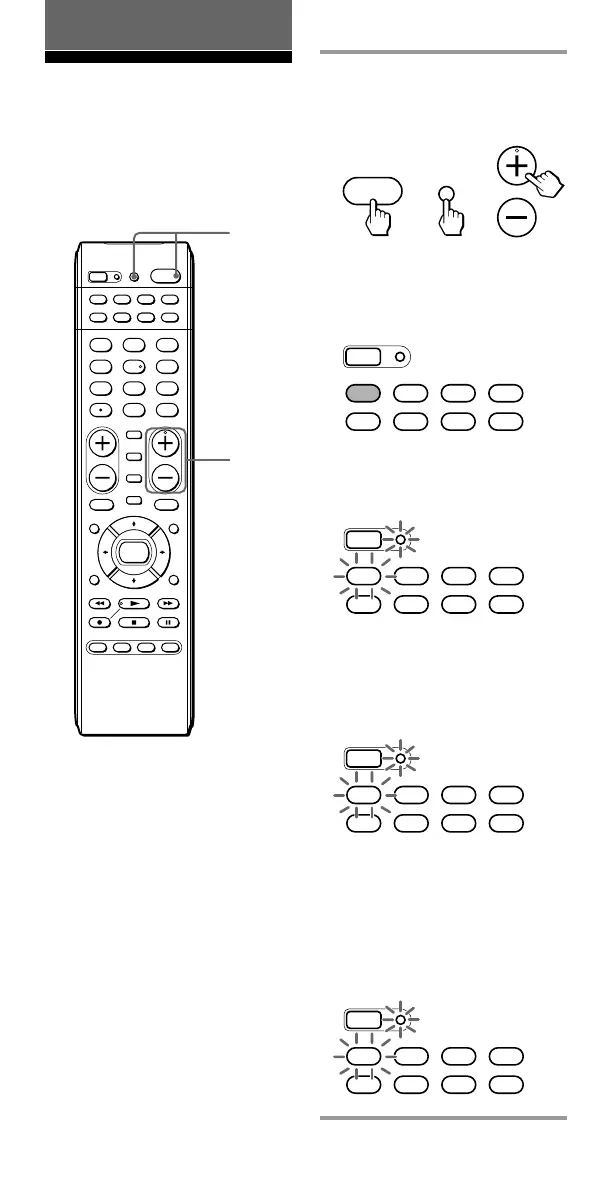
1 Press and while holding
POWER, press TV/VIDEO
and CH +.
The SET button and the
Component Select button
currently selected flash once,
and the Hold function is set.
While the Hold function is on,
no function can be operated.
(The SET button and the
Component Select button
currently selected flash twice.)
To unlock the control
Press and while holding POWER,
press TV/VIDEO and CH –.
The SET button and the
Component Select button
currently selected flash once, and
the Hold function is released.
TV/VIDEO
POWER
CH
+
+
SET
SATDVDTV CBL
TAPE
CDVCR AMP
SET
SATDVDTV CBL
TAPE
CDVCR AMP
(twice)
SET
SATDVDTV CBL
TAPE
CDVCR AMP
(once)
SET
SATDVDTV CBL
TAPE
CDVCR AMP
x
All the buttons are locked.
(once)
SET
POWER
SATDVDTV CBL
TAPE
CDVCR
1
VIDEO1
2
VIDEO2
3
AUX
4
TUNER
5
CD
6
TA PE
7
MD
8
TV
9
PHONO
VOL CH
0
DVD
DIGITAL
/ANALOG
TWIN VIEW
SLEEP
INFO
GUIDE MENU
EXIT
TOOLS
SYSTEM CONTROL
RECALL
MUTING
AMP
ENT
OK
ABCD
TV/VIDEO
1
1
Using Other Functions
Locking the Controls
— Hold Function
To prevent accidental operation,
you can lock all the buttons with
the Hold function.
x



 To Next Page