KF-42E200A/42E201A/50E200A/50E201A
KF-42E200A/42E201A/50E200A/50E201A
12
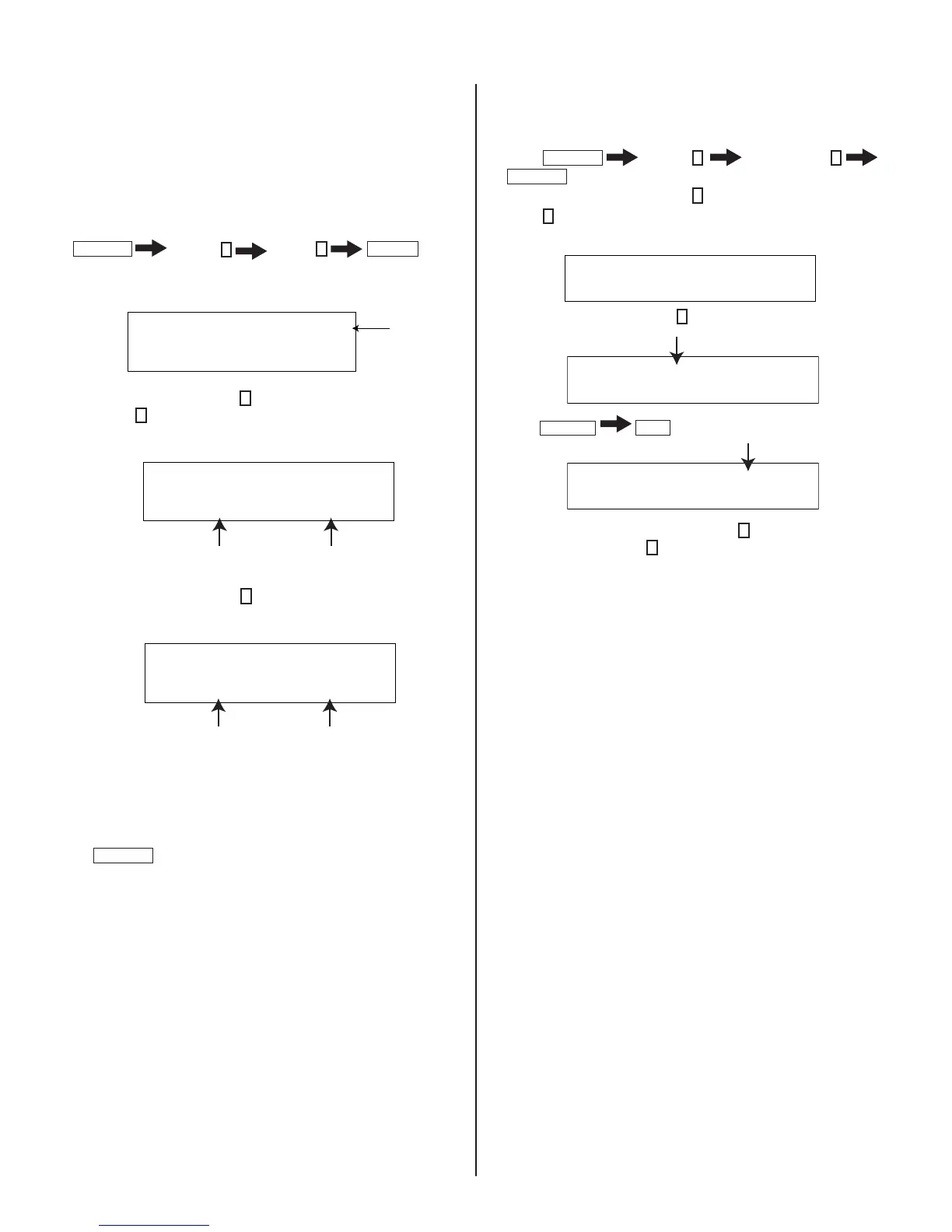
READING LAMP AND PANEL TIME
The TV_Micro menu of the Service Menu displays the current lamp and
panel time of a set. The Lamp Hours and Panel Hours are shown in
hexadecimal format.
1. TV must be in standby mode. (Power off).
2. Press the following buttons on the Remote Commander within a
second of each other:
DISPLAY
Channel
5
Volume
+
POWER
.
(For more information regarding the Service Menus, see
2-2. Accessing Service Adjustment Mode.)
VERSION 00 SERVICE
VERS Wide Zoom Video 1
WSL: 480I
3. To read the Lamp time, press
5
to display the TIME category and
then press
1
to display the LMPH item.
The screen displays:
Wide Zoom TV
TIME 0 0 SERVICE
LMPH
LMPH: 01H LMPL: A0H
Total LAMP TIME is 416 hours
Total hours 256 Total hours 160
4. To read the Panel time, press
1
to display the PNLH item.
Wide Zoom TV
TIME 0 0 SERVICE
PNLH
PNLH: 01H PNLL: A0H
The screen displays:
Total PANEL TIME is 416 hours
Total hours 256 Total hours 160
5. Do one of the following:
a. If you have replaced the lamp, proceed to step 4 of “Resetting the
Lamp Time”.
b. If you have not replaced the lamp, turn off the set by pressing
POWER
RESETTING THE LAMP TIME
When replacing the lamp, use the following to reset the lamp time.
1. If the Self-Diagnostic screen is already displayed, proceed to step 4.
If not, Power off (Set to Standby mode).
2. Press
DISPLAY
Channel
5
Sound Volume
-
POWER
3. To access the Lamp reset, press
5
until the TIME category displays.
4. Press
1
until the RSET item displays.
Wide Zoom TV
TIME 0 0 SERVICE
RSET
5. To reset the Lamp time, press
3
to change the data value to 1.
Wide Zoom TV
TIME 0 1 SERVICE
RSET
6. Press
MUTING
ENT
to write the change into memory.
Wide Zoom TV
TIME 0 1 WRITE
RSET
6. To verify the Lamp has been reset, press
5
until the TIME category
displays, and then press
1
until the LMPH item displays.
NOTE: You cannot reset the Panel time with the Service menu.
EXITING SERVICE MODE
After completing the changes, exit service mode by turning off the set
using the Remote Commander or the power switch.
NOTE: After exiting service mode wait 2 minutes before restarting
the set to allow the fans to shut down properly.





 To Next Page